 Set Trusted or Prohibited Party for Restricted Party Screening
This feature allows you to designate a party in your party master as either prohibited or trusted by assigning a new status. This status provides greater control over how parties are handled during screening.
Prohibited Party
If a party has previously been screened and assigned a status such as RPLS_FAILED, you may want to prevent it from reverting to RPLS_REQUIRES_REVIEW in future screenings.
For example, if a company was previously marked as a verified match, it should not automatically return to REQUIRES_REVIEW if screening is run again and another potential match is found.
Trusted Party
If a party has already been screened and assigned a status of RPLS_PASSED, you may choose to exclude it from future screenings.
For example, internal employees who have already been cleared may not need to be screened again.
A new status type, RPLS_OVERRIDE, has been introduced for parties. This works alongside the existing RPLS status and allows users to override it when needed.
The possible values are:
- RPLS_OVERRIDE_PROHIBITED_PARTY
- RPLS_OVERRIDE_REQUIRES_SCREENING (default value)
- RPLS_OVERRIDE_TRUSTED_PARTY
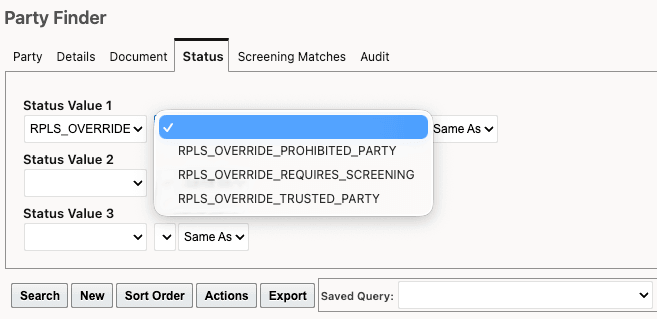
Party Status Type of RPLS_OVERRIDE
A new UI and agent action called Change Restricted Party Override Status is now available. When this action is triggered to update the RPLS_OVERRIDE status for a party, GTM performs the following:
- When set to RPLS_OVERRIDE_PROHIBITED_PARTY, GTM automatically updates the RPLS status to RPLS_FAILED.
- When set to RPLS_OVERRIDE_REQUIRES_REVIEW, GTM does not modify the existing RPLS status.
- When set to RPLS_OVERRIDE_TRUSTED_PARTY, GTM automatically updates the RPLS status to RPLS_PASSED which marks all previously matched denied parties as "Not a Match".
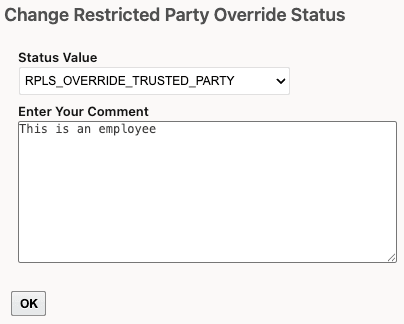
Change Restricted Party Override Status Action
Business Benefit: This feature improves screening efficiency and accuracy by giving users greater control over how parties are handled. By allowing parties to be designated as prohibited or trusted, organizations can prevent unnecessary re-screening, reduce false positives, and maintain consistent decision-making. It streamlines workflows, saves time for compliance teams, and ensures that previously reviewed high-risk or low-risk parties are treated appropriately in future screenings.
Steps to enable and configure
You don't need to do anything to enable this feature.
Tips and considerations
- Existing parties are assigned a default RPLS_OVERRIDE_REQUIRES_REVIEW status value.
- The Restricted Party Screening Workbench now includes new buttons that allow users to update the RPLS_OVERRIDE status. For more information on these enhancements, refer to the Enhancements to the Restricted Party Screening Workbench topic in this document.