 Petal Breakup with Capacity Limits
A new approach has been taken to account for Capacity Limits when the Multi-Segment; Multi-Stop (MSMS) Shipment is broken into petal shipments. If Capacity has been used to create the MSMS, then the split up would require additional capacity. However, this is not desired. The resolution is that the split shipments are governed under one usage by awarding the first sequence of the tour as the shipment with the capacity.
Capacity is defined by service provider and equipment for a specific period. The MSMS shipment needs that to determine how many assets to require. When the asset problem has been resolved, and the shipments stretch over two or more drivers, capacity cannot be used again. Resource Schedules can be used. But the equipment shipments will multiply, and planning logic will determine that many will fail. The logic change is the only the first shipment in the tour will be associated with the Capacity Limits Usage. The other shipments will ignore it.
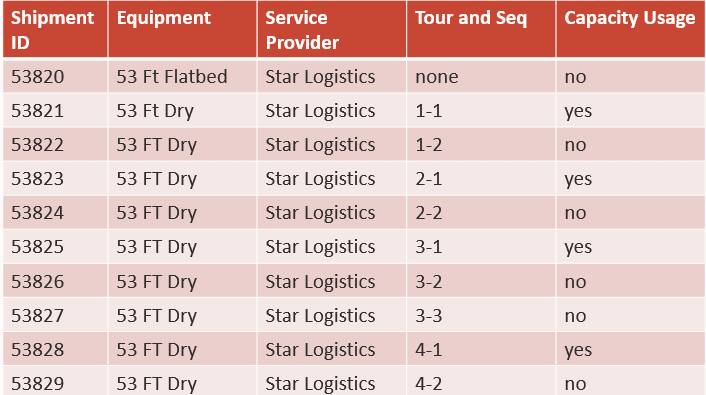
Capacity Limits Chart
Business Benefit: This enhancement has resolved a long-standing dilemma. It addresses the most basic scenario where the capacity represents the trucks, and the resources represent the drivers.
Steps to enable and configure
Standard Capacity Logic setup is required.
Tips and considerations
It is important to distinguish between equipment capacity and driver capacity. Capacity Limits cannot do both at the same time. The general use case is that capacity pertains to trucks as it has the equipment attribute. Not included in this enhancement is a consideration that work assignment may pay attention to shipment times and attributes and NOT to order times and attributes. Work assignments will change the shipment start times but that is not desired. The concept is that the truck is the primary resource. It gets loaded and makes deliveries and returns to the DC for another load. That load cannot leave until the truck has returned and is loaded again. This implies the start time for the driver.