 Multi-Stop Petal Breakup to Retain Times, Equipment, and Service Provider
The enhancement provides the capability to create petal shipments from the Multi-segment, multi-stop shipments and retain the start times of each segment. A petal shipment is defined when the equipment is empty at any stop. Additionally, the equipment group and service provider is retained on each petal shipment. Previously, the breakup could have changed those attributes. This behavior can be controlled used new MS parameter – RETAIN PETAL TIMES. Default is false. The enhancement works in conjunction with CONVERT MULTI SEGMENT TO MULTI SHIPMENT or CONVERT MULTI SEGMENT TO PETALS.
The upper Gantt Chart shows the MSMS shipments as they represent the work that each asset is planned to do for the duration of a day. The lower Gantt Chart shows the shipments that have been split apart of broken up. It is not organized by Tour and Segment yet as that is planned work. The gaps between the segments represent the time between the segments. A future enhancement will add NFR stops for the continuity. The labels on the right are not part of the UI but are there to show the Tour and Sequence.
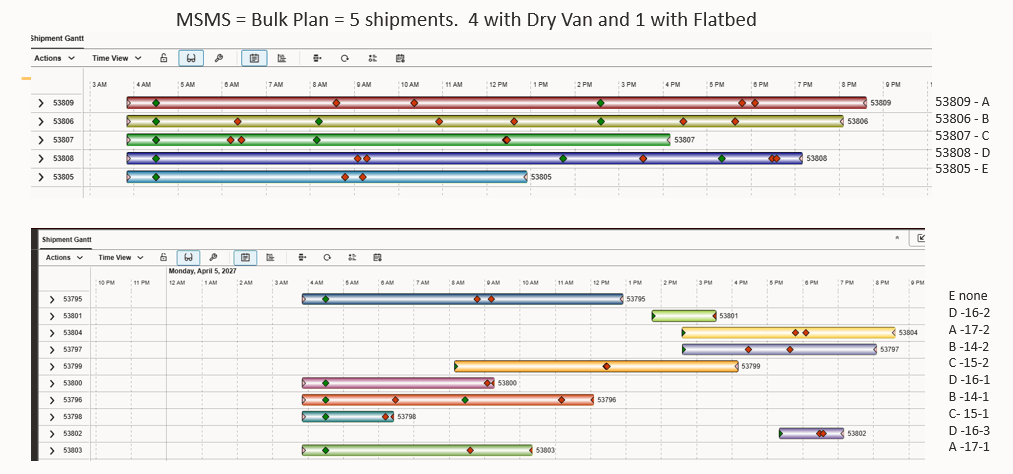
Petal Breakup Gantt
Business Benefit: The Multi-Segment, Multi-Stop (MSMS)shipment is designed to string together order movements into a practical sequence that is limited by constraints like the Hours or Service. An asset can be sequentially filled and emptied multiple times during this trip, which is called a Tour. External systems, like SAP, cannot handle the execution of orders as anything but simply shipments so that the MSMS is operationally a great solution for planning, but unacceptable to the upstream ERP system. The enhancement to break up the MSMS into Petals provided a way to create the shipments for settlement and upstream visibility, but at the cost of the loss of operational efficiency. This enhancement restores that benefit since the shipments that are created retain the planned start and end times, the equipment that was used and the service provider that was used. These may then be used to create a Work Assignment or just executed as desired.
Steps to enable and configure
The Multi-stop Configuration must be configured to use the enhancement. It is recommended that the ENFORCE CLEAN HANDOFF CHECK IN SEQUENCING is also TRUE.
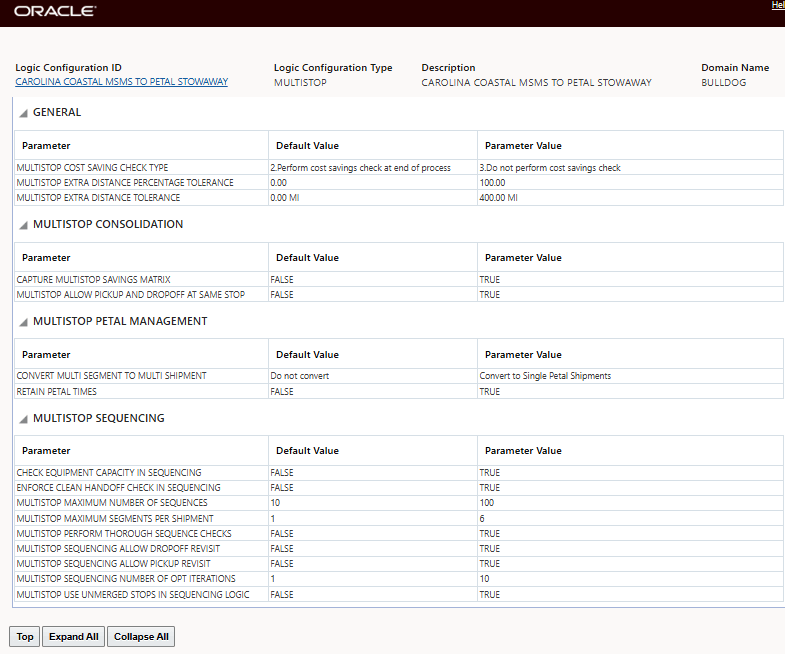
Multi-stop Logic Configuration
Tips and considerations
The Hours of Service rules are key to defining the ending boundary condition.
The Capacity Usage Enhancement must also be used if there are Capacity Limits Defined.