Capture number of pallets to be counted
Reserve LPN number count – create detailed counting task
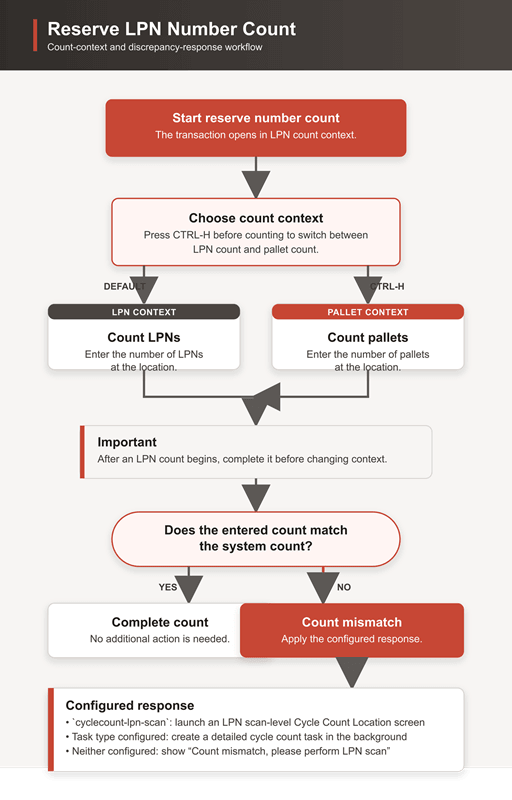
The Reserve LPN Number Count (Resv-LPN Nbr Cnt) Redwood mobile transaction now supports counting either LPNs or pallets. Users begin in LPN-count context and can press CTRL-H to switch to pallet-count context; pressing CTRL-H again switches back. The selected context remains active until the user exits the transaction.
Once an LPN count has begun, the user must finish that count before changing context. For locations containing both pallets and LPNs, users can submit either a pallet count or an LPN count during a single transaction.
When pallet count is considered, the system creates a Summary Audit View record that includes both the expected and actual pallet counts.
- If a location contains a mix of LPNs and pallets and a user performs a pallet scan, the system counts only the LPNs within the scanned pallets. Any loose LPNs are excluded from the count. In these scenarios, LPN-level counting is recommended.
- A new screen parameter, cyclecount-lpn-scan, has been added to the Resv-LPN Number Count Redwood mobile module. This parameter applies only to pallet count mode and must be configured without detailed counting as detailed counting is not supported in pallet count mode . To support LPN scans within a pallet, the associated CC Location screen must have the prompt-for-pallet parameter set to Yes.
New capture overall quantity parameter
Currently, Reserve LPN Number Count does not capture who performed the location count or whether discrepancies were identified. This change adds a record to the Summary Audit View module with the relevant audit details.New parameters, task-type-description and task-type-priority, are introduced to enable and control detailed cycle count task creation. When configured, a task is created in the background if the expected LPN count or total SKU quantity differs from the system-maintained values.
This allows the summary-count user to continue working while another user completes the detailed count from the task pool, without displaying task-creation failures.
The behavior is controlled by the new capture-overall-qty screen parameter:
| Parameter | Value | Behavior |
|---|---|---|
| capture-overall-qty | No / Disabled | Uses the existing process: users enter the location and LPN count only. |
|
capture-overall-qty |
Yes / Enabled | Enables the enhanced process: users scan the location and SKU, then enter the LPN count and total physical quantity for the SKU. |
Definitions
- LPN Count: The number of LPNs present for the scanned SKU at the scanned location.
- Overall Inventory Count / SKU Quantity: The total physical quantity of the scanned SKU at that location, regardless of batch number, inventory attributes, or serial numbers.
When enabled, users scan a location and SKU, then enter the number of LPNs and total SKU quantity. The entered quantity is validated against the system’s overall quantity for that SKU.
Steps to enable and configure
- In CCAdjustmentHdrView, set recount-task-assign-user to enable user assignment for recount tasks created through rejection.
- Configure cyclecount-lpn-scan in the Resv-LPN Nbr Cnt Redwood mobile module with a valid Cycle Count Location screen for pallet-count mismatches. Leave content count blank and ensure the target screen supports pallet scanning.
- Set capture-overall-qty to Yes in the Reserve LPN Number Count module to collect SKU, LPN-count, and overall-quantity information.
- Configure task-type-description and, optionally, task-type-priority to create detailed cycle count tasks automatically when an LPN-count or quantity discrepancy is detected.