New Conversational Experience for Subject Line Generation
In addition, the experience now supports attaching a reference document to provide context (for example, brand guidelines, prior templates, approved messaging, or campaign briefs). This helps ground the generated subject lines in customer-provided materials and reduces the effort required to restate key constraints in each prompt.
This capability is currently available only in the Redwood Email Source (HTML) editor, and will be gradually rolled out to customers with GenAI enabled for Eloqua after the 26B release.
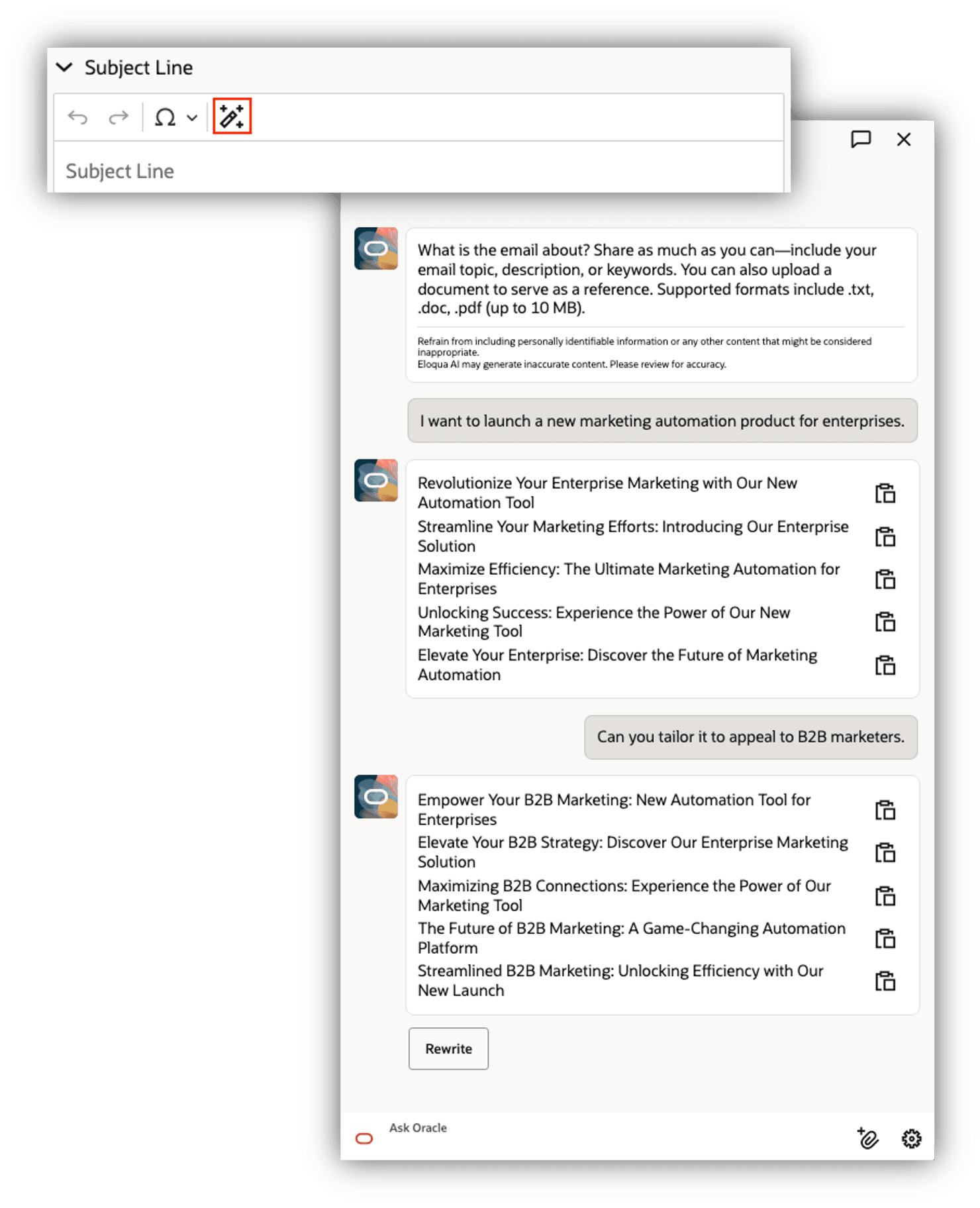
Conversational Subject Line Generation Experience
Business Benefits:
- Faster iteration to “final” subject lines: Multi-turn refinement reduces re-prompting and manual copy edits.
- More on-brand, context-aware outputs: Reference documents can improve alignment with brand voice, product terminology, and campaign intent.
- Improved usability for non-expert prompt writers: A conversational flow lowers the barrier to getting the desired result without crafting perfect prompts upfront.
Steps to enable and configure
- Redwood HTML Email Editor is required and is currently available through Controlled Availability. Thus, if you've not already opted in for Controlled Availability access for editor, you will need to submit a service request(SR) through Oracle Support.
- Once Redwood HTML Email Editor enabled, there are no additional steps to start using the conversational experience for generating subject lines in Eloqua.
Tips and considerations
- Best practice: Start with a clear initial intent (audience, offer, tone, length), then refine via follow-up instructions (e.g., “make it shorter,” “add urgency,” “avoid spammy words,” “use product name consistently”).
- Use reference documents deliberately: Attach concise, relevant source material (e.g., messaging guidelines or a campaign brief) to improve accuracy and reduce back-and-forth.
- Validate before use: Treat generated subject lines as drafts—review for brand compliance, accuracy, required legal language, and deliverability considerations per your standard process.
- Data hygiene: Avoid attaching documents that include sensitive, confidential, or regulated data unless your organization’s policies explicitly allow it for GenAI workflows.
NOTE: Enhancement will be gradually rolled out to Eloqua customers with GenAI enabled after the arrival of the 26B.