Flexible Design with Tactic Blocks
Tactic Blocks introduce a highly flexible framework that will enable Tactic Template Authors to design and configure custom participant journeys without relying on predefined tactic types. This approach will significantly expand what marketers can build, allowing them to create tailored, reusable journeys directly within Tactic Templates and adapt quickly to evolving campaign needs without dependency on product-driven updates.
Tactic Blocks will serve as modular components that represent stages or steps in a participant journey. Authors will be able to combine multiple blocks to define how participants enter and progress through a tactic. The primary block types will include Entry Blocks (e.g., scheduled segments, behavior-triggered entry) and Action Blocks (e.g., email, follow-up email). These blocks will support both simple and complex logic, enabling configurations that range from single-step actions to multi-stage workflows such as timed follow-ups with success criteria.
This approach will empower marketing administrators to build reusable, highly customized Tactic Templates that align with specific campaign strategies, without waiting for new feature releases. It will also enhance agility in campaign design while maintaining structure and re-usability for field marketers executing tactics.
In a nutshell, a Tactic is basically a participant journey designed to achieve a specific success criteria.
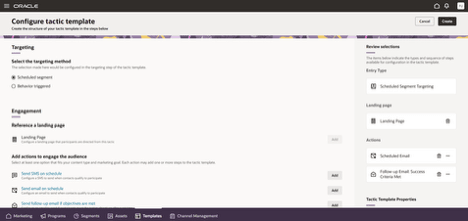
Configure Tactic Template
Business Benefits:
- Empowers marketers to design tailored participant journeys aligned to specific campaign needs
- Increases re-usability and scalability of Tactic Templates across teams and campaigns
- Enhances flexibility while maintaining structured, guided template creation
Steps to enable and configure
You don't need to do anything to enable this feature.
Tips and considerations
How to Start Using
- To start creating tactic templates using Tactic Blocks, the user will follow the same steps as they do now by going to the Templates section and clicking on the Create button under the Tactic Templates tab.
Tips and Considerations
- Combine multiple stages within a block to simplify complex workflows and reduce configuration overhead
- Standardize commonly used Automation Block patterns to promote consistency across templates
- Validate success criteria and timing logic when designing follow-up or conditional flows
- Train Tactic Template Authors on best practices to fully leverage the flexibility of this feature
Access requirements
Access Requirements:
- Ensure users have appropriate roles:
- Marketing Specialist (View and Preview)
- Marketing Manager (Management)
- Marketing Administrator (Publishing)
- Duty role: Marketing Template Management
- Requires the Marketing Orchestration Add-on for Fusion Unity Data Platform. Please contact your account manager for more information.