Created/Modified for Contacts feature Now Generally Available to All Customers
The Created/Modified for Contacts feature, introduced in Controlled Availability in Eloqua 25D, is now generally available to all customers. It enables users to audit the source type and the user who created or last modified a contact directly from the Redwood Contact UI.
Eloqua now records and displays the source user and source category whenever a contact record is created or modified.
- The source user represents the name of the user or automated system that performed the change.
- The source category refers to the asset or feature responsible for the action (e.g., import, form submission, API, user interface).
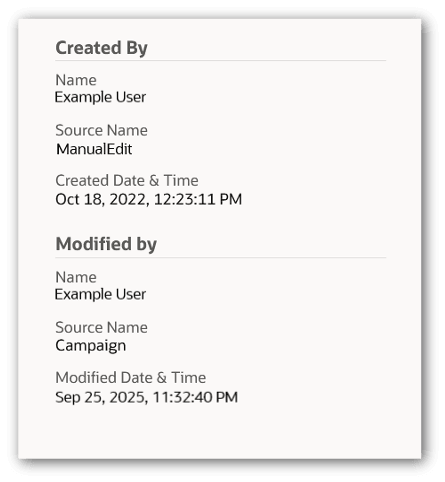
Create/Modify Interface
Business Benefit
- Delivering a new level of transparency, accountability, and compliance for Eloqua customer data operations—empowering organizations to maintain a robust audit trail, strengthen governance, and streamline troubleshooting across all contact record changes.
Steps to enable and configure
You don't need to do anything to enable this feature.
Tips and considerations
Try it out
- This information is visible via a new dedicated panel within the Redwood user interface (UI) for contact records, providing quick and easy access for power users and administrators. The data is not stored in standard contact fields, but instead is surfaced in this contextual UI panel for clarity and audit purposes.
- All clients will have access to view the Created/Modified by user and source for a contact.
- Visible in a new panel in the Redwood contact UI and not visible within contact fields or in contact views.
- Will only track contacts created or modified after the Eloqua 25D.
Note: Be advised that there is a related change when retrieving contacts using Application API 2.0, and when using the Bulk API. Learn more: Product Notice - Created/Modified by Eloqua API Changes [Generally Available with 26C - August 2026]
Key resources
- Product Notice - Created/Modified by Eloqua API Changes [Generally Available with 26C - August 2026]