Standardized Date-Time Handling Using Agency Time Zone
This feature standardizes fee calculation by ensuring that all date-time fields are converted to the agency’s time zone before being passed to the decision model (DMN). It introduces a configurable option—enabled by default for new customers and disabled for existing ones—to control this behavior. When enabled, every date-time value (including standard and custom fields) is converted to the agency time zone, displayed consistently in the UI, and used directly in calculations across intake, submission, recalculation, and payment flows. When disabled, only a limited set of fields follow this conversion, preserving existing behavior. The feature is primarily intended for agency staff and registered public users who configure and manage fee logic, and it delivers key business benefits such as improved consistency and accuracy in calculations, elimination of custom time zone handling in decision models, reduced implementation complexity, and maintained backward compatibility.
This example illustrates the FSM option page where the agency can enable the option 'Convert to Agency's Time Zone for Fee Calculations'.
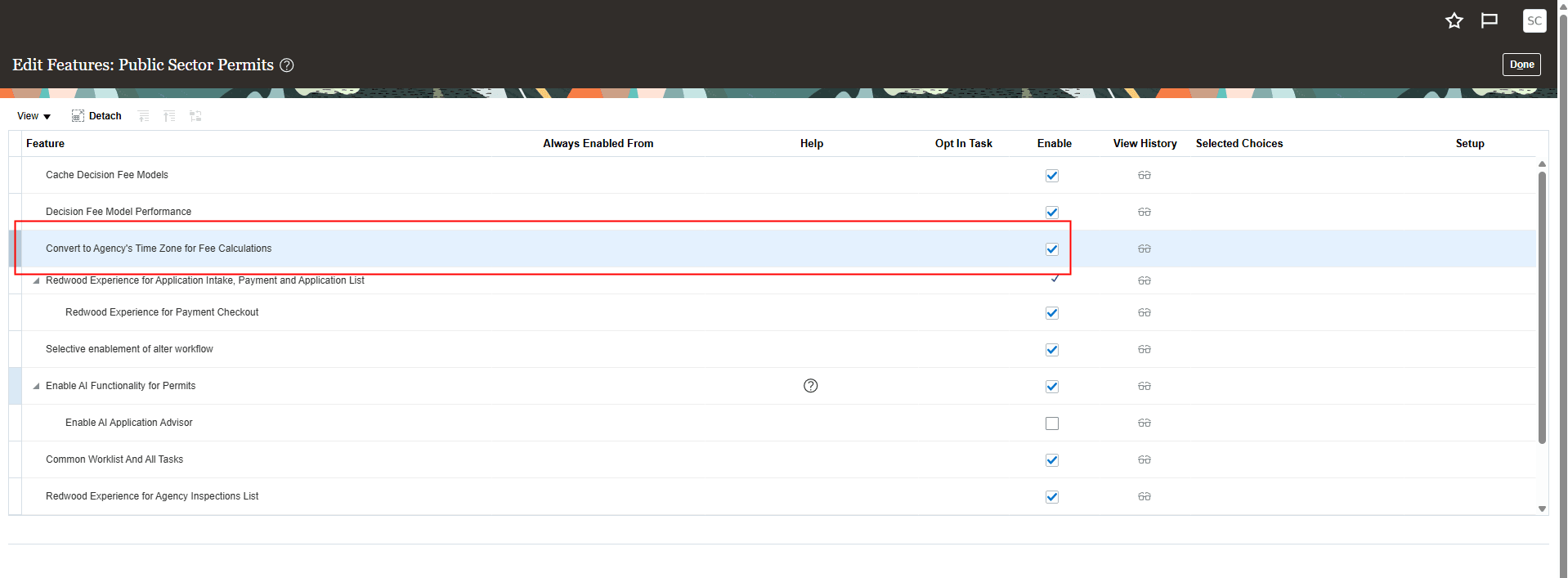
Edit Features Page
Business Benefit: Agency staff no longer needs to adjust fee calculations to accurately reflect the agency's time zone.
Steps to enable and configure
This feature is delivered as enabled for new customers, but for existing customers you will need to enable it through Functional Setup Manager (FSM).
To enable:
- Navigate to Setup and Maintenance of Offerings > Offering: Any > Change Feature Opt In.
- In the Public Sector <Offering> row, click the pencil icon in the Features column.
- In the "Convert to Agency's Time Zone for Fee Calculation" row, select the Enable checkbox.
- Click Done.
Tips and considerations
You may need to re-evaluate fee setups in DMN that are time-zone related, and remove any parts of the calculations that make up for the time zone discrepancies.
Note. If the "Convert to Agency's Time Zone" feature is disabled, only Submit Date, Current Date, and Received Date are converted to the Agency Time Zone.
Key resources
- See Implementing Your Financials Framework, "Setting Up Fees", Setting Up Agency Time Zone Conversion for Fee Calculations (NEW in 26C)