Mandatory address fields for public user registration
Public user registration now validates address information across registration entry points. For U.S. registrations, public and agency users must enter Address Line 1, City, State, and Postal Code, regardless of the agency’s address format configuration. Agency-configured required address attributes, such as Address Line 2 or County, are also required.
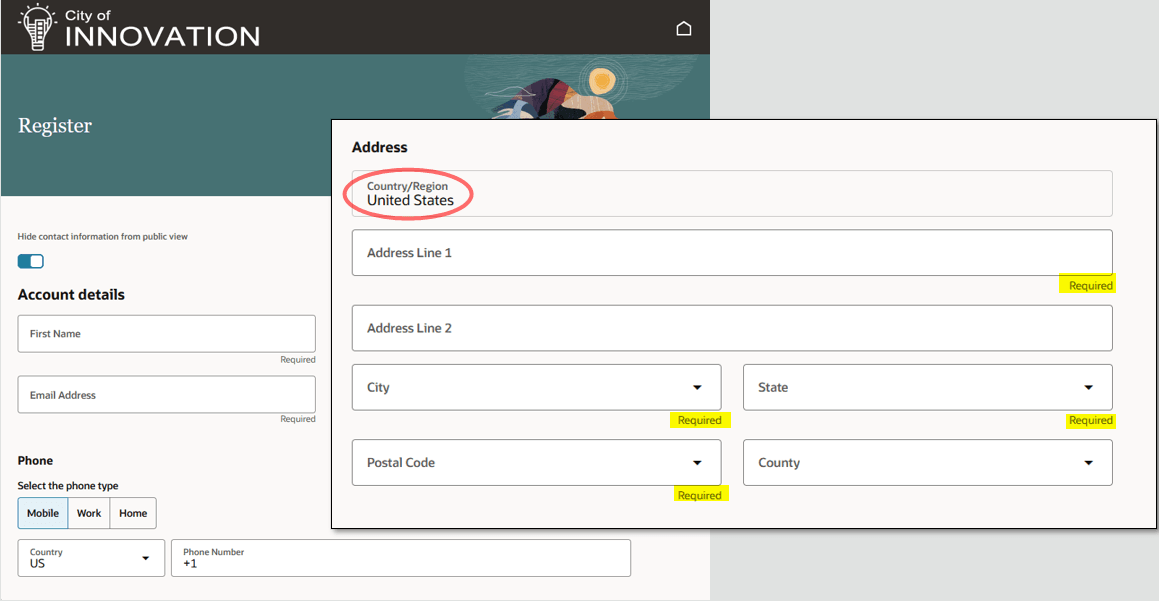
Register page with U.S.-required address fields
For other countries, the registration page follows the agency’s address format configuration. The registration country continues to default from the agency and is display-only.
When public users register through supported online registration flows, the application highlights missing required address fields and prevents registration until the required information is entered.
Address validation applies to registration initiated by public users or agency staff from these entry points:
- Self-service registration and Public User Access
- Agency landing pages and small form factor flows
- Copy Application and Apply to Subapplication actions
- Register a New Appellant
- Register New Contact for contractor contacts
Intake forms already require applicant address information; this feature maintains that behavior.
Business Benefit: This simplifies the application process by making ensuring that registered public users provide their complete contact information.
Requiring address information during registration reduces incomplete applicant data later in the permit, planning, and business-license application process. This helps public users avoid interruptions when an application requires an address, while allowing integrations to create U.S. public users without an address when no partial address data is supplied.
Steps to enable and configure
No steps are required for agencies located in the United States. For agencies located outside of the United States, you must make the address columns required in the Manage Address Formats page.
- Navigate to Setup and Maintenance > Offering: Any > Functional Area: Agency Profile > Manage Address Formats.
- Update the address columns as appropriate for your country.
Tips and considerations
Public users who have already registered without an address can update their contact address in two ways:
- Go to Manage Account and add an address.
- When applying for an application, they add an address. Once they enter their address and save the application, they are prompted to update their account with that address.
Key resources
- See Using Community Development Permits, "Managing Public User," The Public User Registration Process on the Oracle Help Center.