Calculate Specific Participants within a Pay Group or Compensation Plan.
While running calculations for participants belonging to a pay group or compensation plan, calculate only those participants within the pay group or compensation plan, who have new credits or new logged events.
These new options can be used when you submit calculation from the Manage Calculation Batches page, When you select Specific Participants in the Calculate For field, you will see 2 more options in the Select Participants By field: Participants in pay group with new credits or events and Participants in compensation plan with new credits or events.
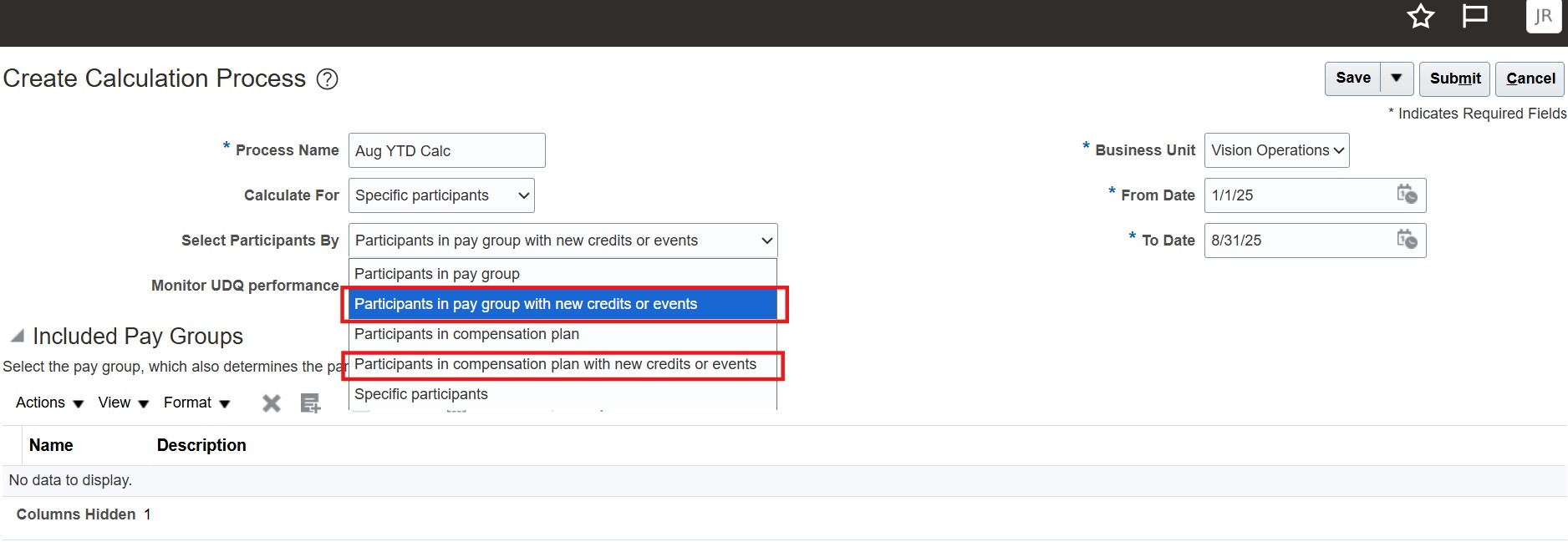
Calculate Specific Participants in Pay Group or Compensation Plan
If you choose either of these options, only those participants within the pay group or compensation plan you select, who have either new credits or new logged events will be picked up for calculation.
Use this option when you want to do very targeted calculations for only participants who have new credits or and events and your formula does not depend on any data for which events are not logged.
Get better calculation performance by calculating just a subset of participants within a paygroup or compensation plan, when your formulas don't depend on data for which events are not logged.
Steps to enable and configure
You don't need to do anything to enable this feature.
Tips and considerations
These options only calculate participants in a pay group or compensation plan who have new credits or events. If your formula depends on data for which events are not logged, there is a risk of leaving out participants whose earnings would be updated in a regular calculation. Example: Your formula refers to participant detail data and the participant detail data has changed. Since there are no events logged for this object, there is a chance that participants for whom only this data has changed will not get picked up for calculation if they don't have any new credits or other logged events.
Access requirements
- Incentive Compensation Analyst
- Incentive Compensation Manager