 Filter Inline Price Downloads
Oracle CPQ 25C introduced the ability for pricing administrators to search, filter, and view subsets of their prices within Price Models, Price Agreements, or Pricing Matrices to easily understand the pricing in place for a targeted set of products, prices, or charges. Beginning in Oracle CPQ 26A, administrators can select the columns they wish to download and upload for a Price Model, Price Agreement, or Pricing Matrix.
Export Filtered Price Items
Perform the following steps to export filtered pricing data:
- Navigate to Prices > Price Models or Price Agreements.
- Open the applicable Price Model or Price Agreement.
- Apply a pricing data filter. For more information, refer to the Oracle CPQ Administration Online Help > Prices > Pricing Portal > Price Models or Price Agreements – Filter Pricing Data.
- Select Filters from the Actions drop-down.
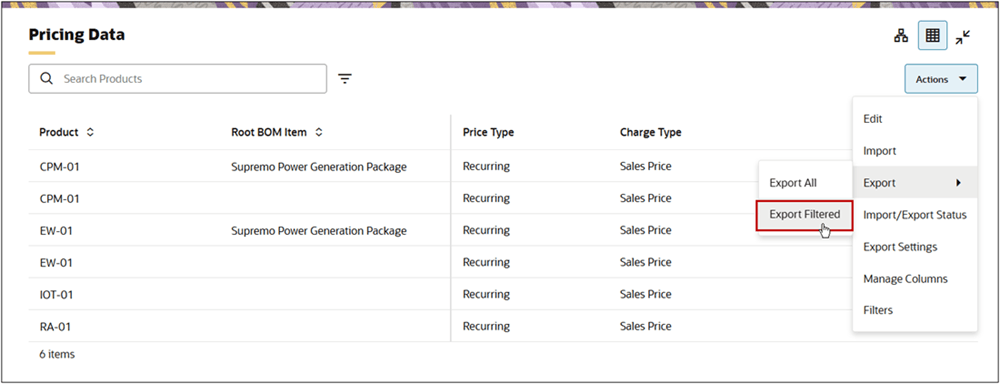
- When the export is complete, download the exported pricing data file.
- Click the <priceModelVariableName> link on the Export Status dialog.
- - or – -
-
- Select Import/Export Status from the Actions drop-down, then click on the applicable Pricing Data Export link.
Enterprises with large pricing administration teams and large numbers of products, prices and discounts can enable different people to efficiently edit and manage the prices and discounts for which they are responsible. This increases efficiency and reduces complexity and risks of errors by enabling different people to own responsibility for managing rows for products and matrix key values (such as region, channel, etc.) while others are responsible for managing only the prices and discounts for those rows.
Steps to enable and configure
You don't need to do anything to enable this feature.
Tips and considerations
The Export Filtered option is only available when pricing data is filtered. To filter pricing data, refer to the Oracle CPQ Administration Online Help > Prices > Pricing Portal > Price Models or Price Agreements – Filter Pricing Data.