Redwood Configuration Administration
Configuration administration is used to manage all product families, product family, product line, and model configurations; including the product definitions and catalogs. Administrators can use the context switcher to easily navigate within product lines and models for a family. The Product Family page displays the Product Family and child Product Lines or Models.
To access configuration administration, navigate to: Admin Home > Configurations > Product Family
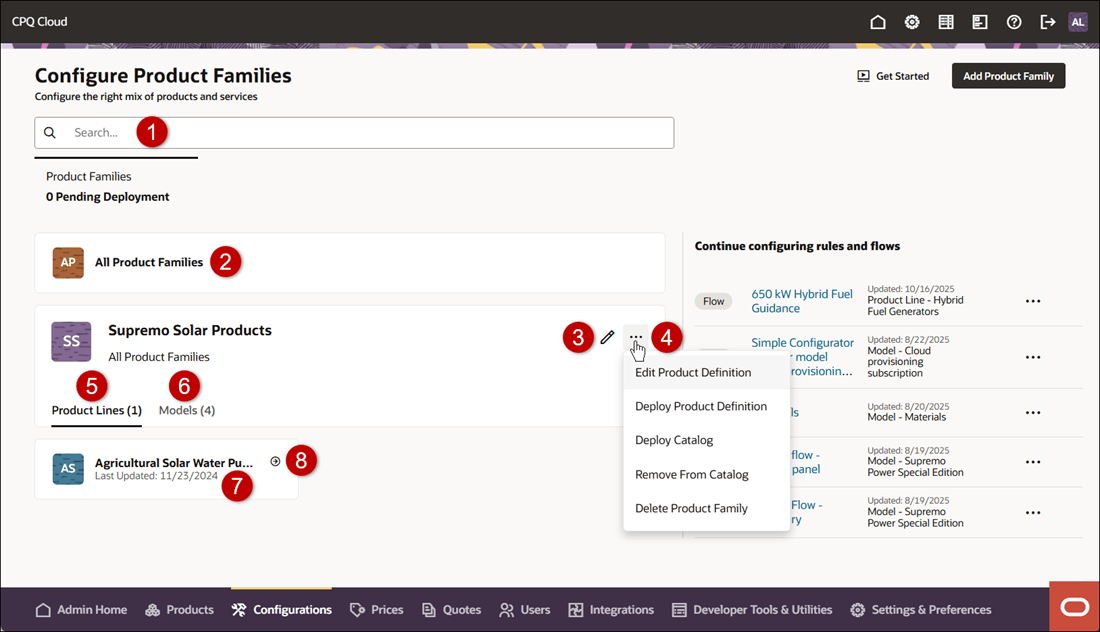
| Item | Description |
|---|---|
| 1 | Search for Product Families, Product Lines, and Models |
| 2 | Navigate to the All Product Families level |
| 3 | Manage the Product Family level Configurable Attributes, Actions, Rules, Flows, Integration, and Layout Access |
| 4 | Click on the Product Family action menu to: Edit Product Definition, Deploy Product Definition, Deploy Catalog, Remove from Catalog, or Delete Product Family |
| 5 | Show child Product Lines |
| 6 | Show child Models |
| 7 | Navigate to the Product Line level configuration administration |
| 8 | Manage the Product Line level Catalog Description, Configurable Attributes, Actions, Rules, or Configuration Flows |
Note: Refer to the Oracle CPQ Administration Online Help > Configuration > Redwood > Product Configuration > Configuration Administration to view page descriptions for all product levels.
The Redwood-style administration pages provide:
- Quickly see and navigate to product families that need to be deployed.
- Click on the Quick Links icon to quickly navigate within the product family.
- Powerful search and filter to see attributes and rules created for the selected context and inherited.
- Side menu navigation to quickly view configurable components, such as attributes, rules, and flows.
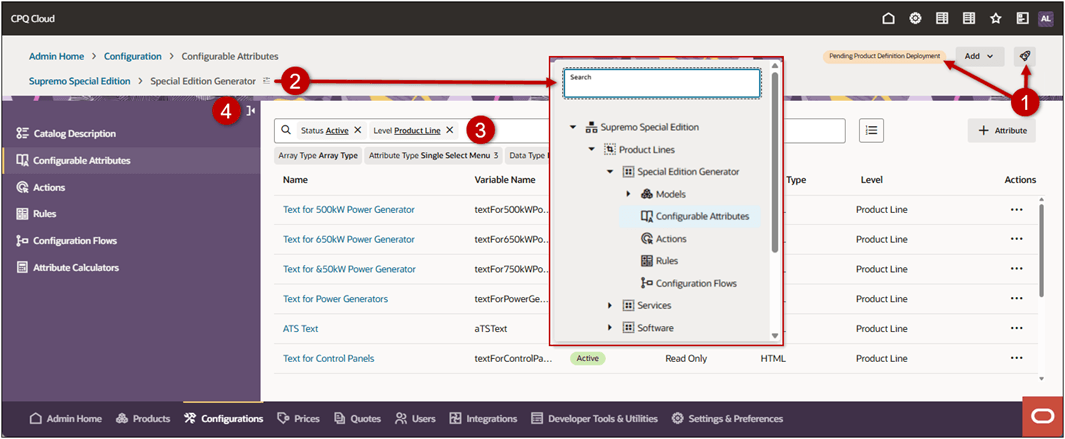
This feature provides the following business benefits:
- Modern user experience with improved navigation for quick access.
- Consolidate view to search configurable components across a product family
- Quickly see and navigate to product families that need to be deployed.
- One-click to pick up where you left off and continue configuring rules and flows.
Steps to enable and configure
You don't need to do anything to enable this feature.
Tips and considerations
Following upgrade to Oracle CPQ 26A, the Admin Home page defaults to the Redwood UI. You can explore the UIs and begin working through your tasks in the new redesigned interface. Existing customers will be able to revert to the Classic UI experience by navigating back to the Admin Home Page and clicking Switch to Classic. Oracle CPQ running in Oracle Fusion supports only the Redwood UI and does not have the Switch to Classic button.