Enhanced Effectivity Date Support in Pricing Engine
Oracle CPQ 26A introduces support for automatic end-dating when new pricing is defined. This feature adds Adjust End Dates Automatically and Start Dates Required options for Price Models, Price Agreements, Attribute-based Charge templates, and Scripting Price Model templates.
- When Adjust End Dates Automatically is enabled, you only need to enter the start dates to manage the effectivity dates of charges. End dates will be automatically adjusted based on the start date and will be read-only.
- When Start Dates Required is enabled, start dates must be entered when adding new charges. You can't enable this option unless start dates are set for all existing charges.
This feature provides the following customer benefits:
- Reduces the effort required by Pricing Administrators to manage effective dates.
- Ensures effective date accuracy and validity automatically to avoid inaccuracies and ambiguity.
- Supports efficient handling of frequent and high volume pricing updates needed in dynamic pricing environments.
Steps to enable and configure
Enable Effectivity Date Options for a Price Model or Price Agreement
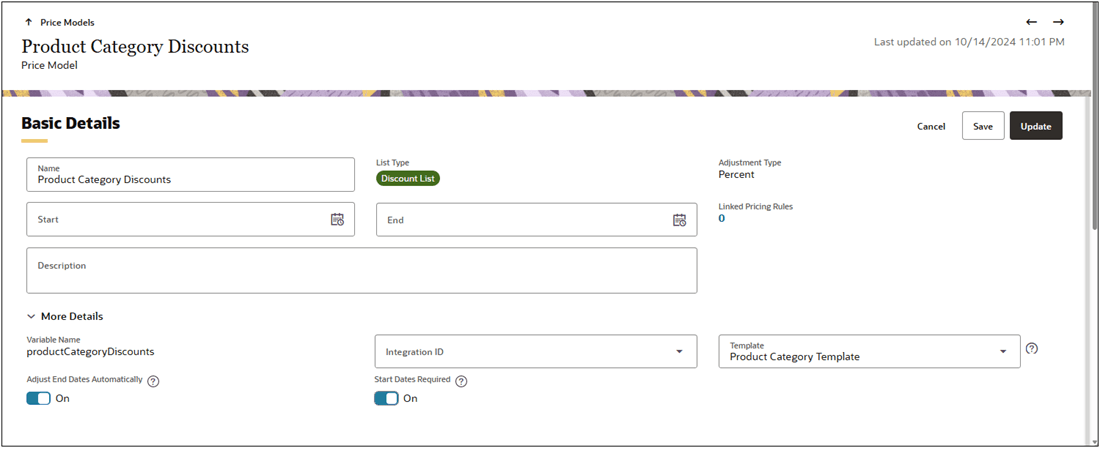
Complete the following steps to enable effectivity date options for a Price Model or Price Agreement.
- Navigate to CPQ Admin > Prices > Price Models or Price Agreements.
- Click on the applicable Price Model of Price Agreement.
- Click Edit, then click More Details.
- Enable Start Dates Required to make start dates mandatory when adding new charges.
- Enable Adjust End Dates Automatically to automatically adjust end dates based on the start date.
- Click Save or Update.
Add Start & End Dates to an Attribute-based Charge Template
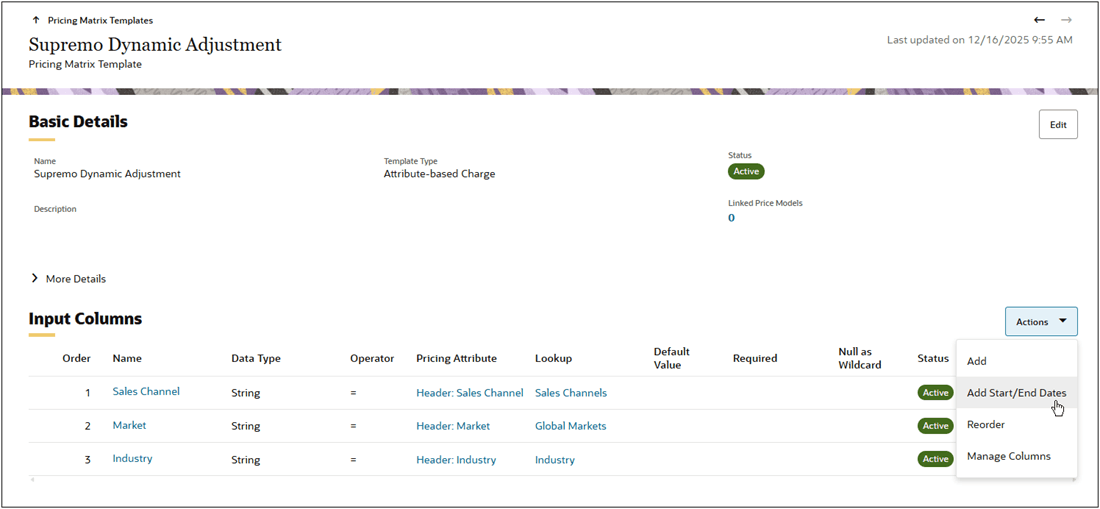
Complete the following steps to add start & end dates to an Attribute-based Charge type Pricing Matrix Template:
- Navigate to CPQ Admin > Prices > Pricing Matrix Templates.
- Click on the applicable Attribute-based Charge type Pricing Matrix Template.
- Select Add Start/End Dates from the Input Columns Actions menu.