Quantity Explosion for Standard Quote Process
Oracle CPQ 26A implements quantity explosion for the standard quote process to ensure child quantities adjust proportionally when the parent quantity changes. Quantity explosion is only applied to configured products; kits remain unchanged as they are treated as a single unit.
For example, when a sales user updates the Crossover SUV Subscription quantity to 2, the child quantities are automatically updated proportionally.
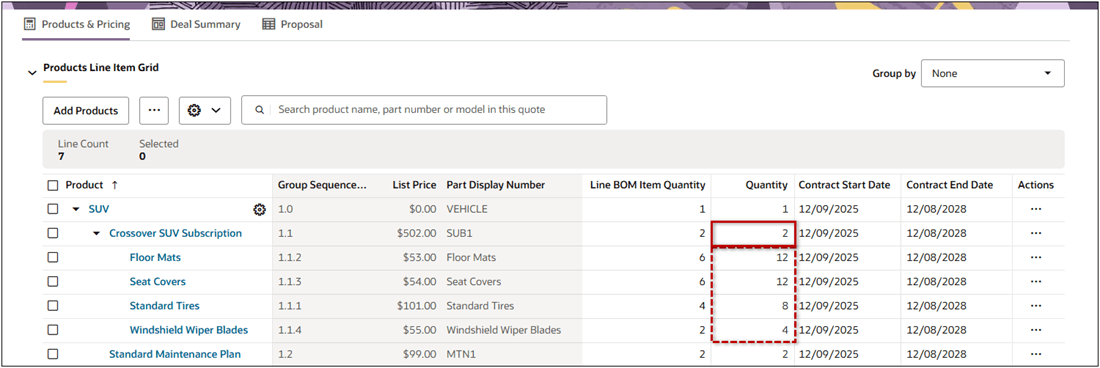
Quantity Explosion ensures that all dependent (child) item quantities automatically scale when parent quantities change, reducing manual adjustments and improving quote accuracy.
Steps to enable and configure
You don't need to do anything to enable this feature.
Tips and considerations
Complete the following steps to disable quantity explosion.
- Navigate to Admin Home > Quotes > Process > Manage Transaction.
- Open the Advanced section.
- Check Override Standard Auto Update – After Formulas, then click Save.
- Click Define Function.
- Set the Exploded BOM Quantity option to false.
put(extraParms, "explodedBOMQuantity", false);- Click Save or Save and Close.