Rule Advisor for CPQ Running in Fusion
Oracle CPQ 26C introduces a new agent-based experience for rule authoring in CPQ Configurator for administrators. Administrators can use the advisor to generate and refine CPQ rule text, review rules expiring in 90 days and/or becoming effective in the next 30 days, and search for rules using one or more attributes.
When creating a new rule, the advisor surfaces similar existing rules (including inherited rules), and lets administrators adjust operators and values inline before saving. When matches are found, you can review the top ranked rule and compare additional ranked results. After reviewing results, you can create a new rule or open an existing rule for edit.
The similar rules results are ranked using the following criteria:
- Duplicate rule type, condition, and action
- Rule type matches
- Similar conditions and rule type matches
- Contains some of the attributes in the condition (operators may not match) and rule type matches
Feature Highlights:
- Administrators can generate a new rule in sentence format from a typed description, review it, and then save.
- The experience checks for similar rules so users can review existing logic before creating a new rule.
- Rule operators and values can be adjusted inline, through Ask Oracle interactions, or by opening the rule editor.
- Coverage includes key rule scenarios validated through associated work items across filter, constraint, validation, access, and recommended-items contexts.
- Brings forward inherited rules that are expiring or becoming effective.
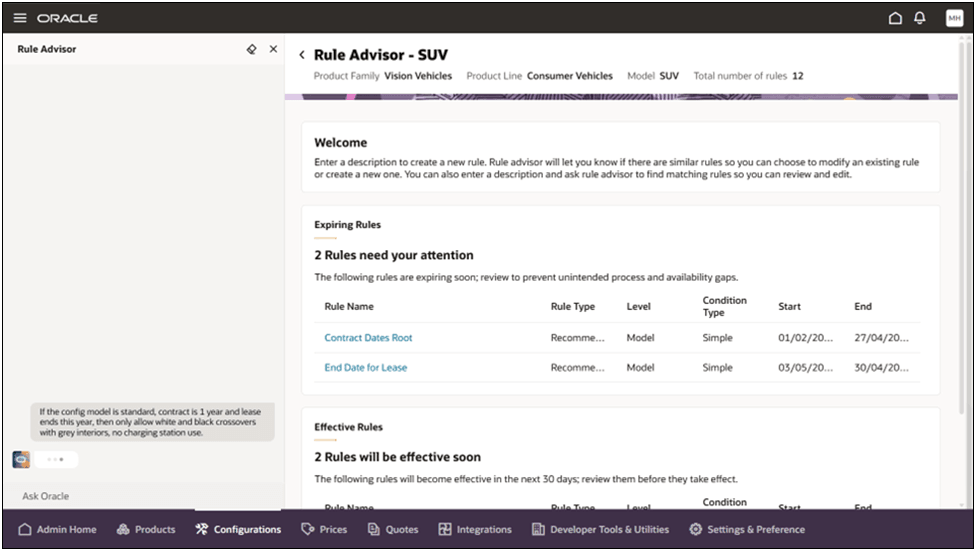
This feature provides the following benefits:
- Helps reduce duplicate or conflicting rules by promoting reuse of existing rules when possible.
- Improves authoring speed by surfacing the most relevant rules based on your intent.
- Supports better decision-making with ranked comparisons before rule creation.
Steps to enable and configure
This capability is intended for users who manage and maintain configuration rules for CPQ running in Fusion.
To use the Rule Advisor, complete the following steps:
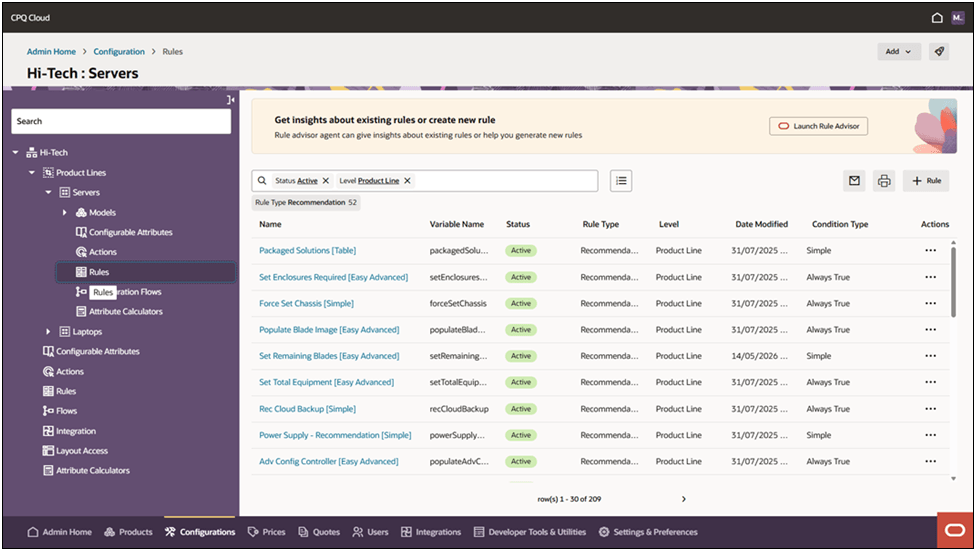
- Navigate to CPQ Admin > Configuration.
- Select the desired configuration product level.
- Click Rules in the left-side navigation.
- Click Launch Rule Advisor in the Rule Advisor banner at the top of the page.
- Enter a prompt in rule advisor to create a new rule or search for an existing rule by one or more attributes.
Tips and considerations
- Similar-rule review is read-only; you must select edit if you want to modify an existing rule.
- Rule Advisor is available in the CPQ Configurator for administrators running in Fusion.