Proposal Document Generation Supports .XLSX Format
Oracle CPQ 26C supports proposal document generation in .XLSX format. This update modernizes document output for teams using current spreadsheets and helps reduce disruption caused by legacy .XLS compatibility or document format warnings.
Sales users can distribute proposal files that are easier to open, review, and archive across company environments.
Steps to enable and configure
To generate a proposal document for.XLSX output format, complete the following steps:
- Navigate to CPQ Admin > Quotes> select any Process.
- Select Views and Templates in the left-side navigation.
- Click Printer Friendly/History XSL View.
- Open the XSL template used for proposal output.
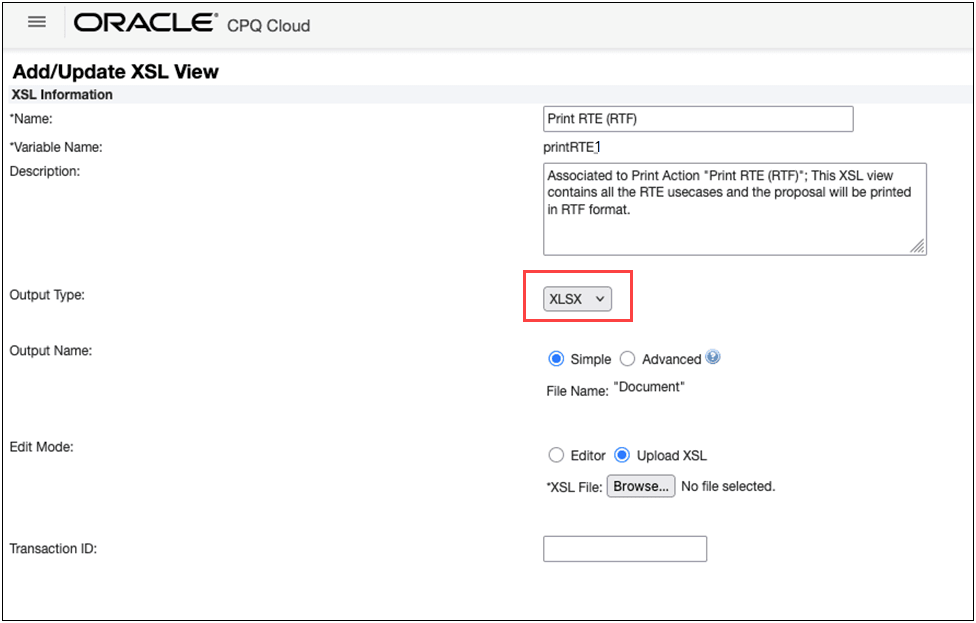
- Click Upload XSL for the Edit Mode.
- Select XLSX from the Output Type drop-down.
- Click Browse to select an XSL file to use for the transformation.
- Generate a test proposal document and validate the output.
- Click Save.
- Deploy the process.
Tips and considerations
- We recommend you validate all active templates that previously generated .XLS output.
- We recommend you review downstream integrations that parse generated spreadsheet files.