Configuration Layout Editor for Redwood UI Enhancements
Oracle CPQ provides an enhanced Redwood Configuration Experience for administrators and sales users. Administrators can configure Redwood layouts for array sets, action groups, custom action drawers, dynamic layouts, collapsible sections, and array set data grids.
Feature Highlights:
-
Configure custom drawers for array sets, including mapped fields, sections, styles and fonts.
-
Open row-specific array set drawers at runtime so users can review and update array set values in context.
-
Add field-level action groups and place actions inline, bottom left, or bottom right.
-
Launch configured drawers after supported custom actions complete.
-
Configure nested system configuration models from a right-side panel, with status indicators such as in progress, warning, and error.
-
View and modify dynamic layouts across levels, manage rule properties, and validate changes in Live mode.
-
Configure collapsible sections to start expanded or collapsed.
-
Reorder array set data-grid columns.
These enhancements help administrators model richer configuration experiences in Redwood without relying on Classic UI patterns. Administrators can create more flexible layouts, expose row-specific array set details, configure actions closer to the field where users need them, and support nested configuration flows with clearer runtime status. Sales users get a smoother configuration experience with fewer page reloads and more contextual interaction.
Steps to enable and configure
This capability is intended for users with the Administrator role who manage and maintain CPQ configuration layouts.
Complete the following steps to enable the Configuration Layout editor for Redwood UI:
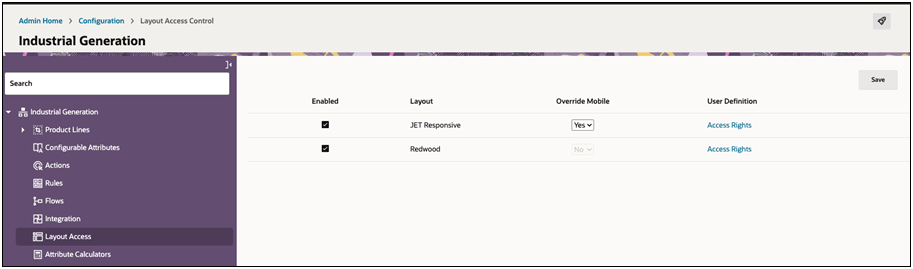
- Navigate to CPQ Admin > Configuration > Layout Access (per Product Family)
- Select the Enabled checkbox for the Redwood Layout.
- Navigate to Configuration Flows in the left-side navigation.
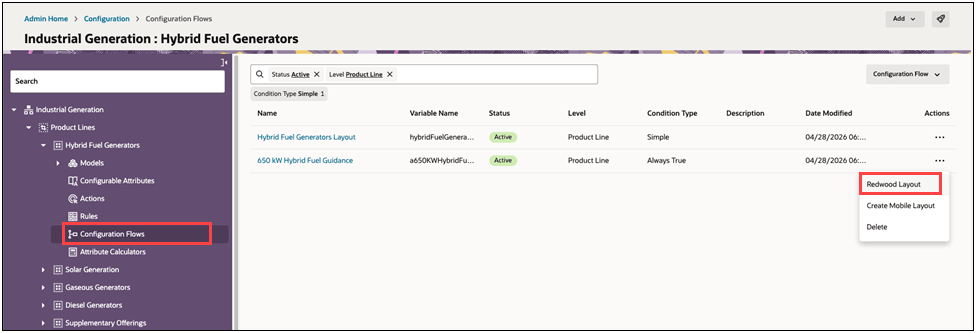
- Click Redwood Layout under Actions for the desired configuration flow.
- You can use the Redwood Configuration Layout Editor to design your configuration layout pages.
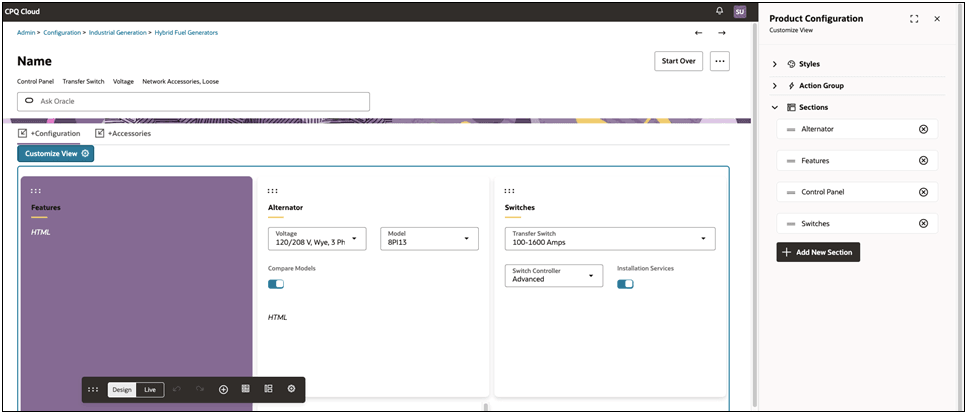
- When the layout is complete, deploy the new configuration layout.