Product catalog direct search for Oracle CPQ running in Fusion
Sales users can find and add eligible products from the Product Information Management (PIM) Product Catalog in the CPQ Add Products flow. The experience uses current product source data and product categories to make product discovery more efficient while respecting visibility criteria.
UnifyFusion PIM with Oracle CPQ running in Fusion to:
- Search PIM items by keyword and select item or category suggestions.
- Refine results with item type and category filters.
- Switch between list and card views without losing active filters, result counts, selections or item actions.
- Add standard PIM items directly to a quote.
- Configure PIM model items seamlessly and return the configured line to the quote.
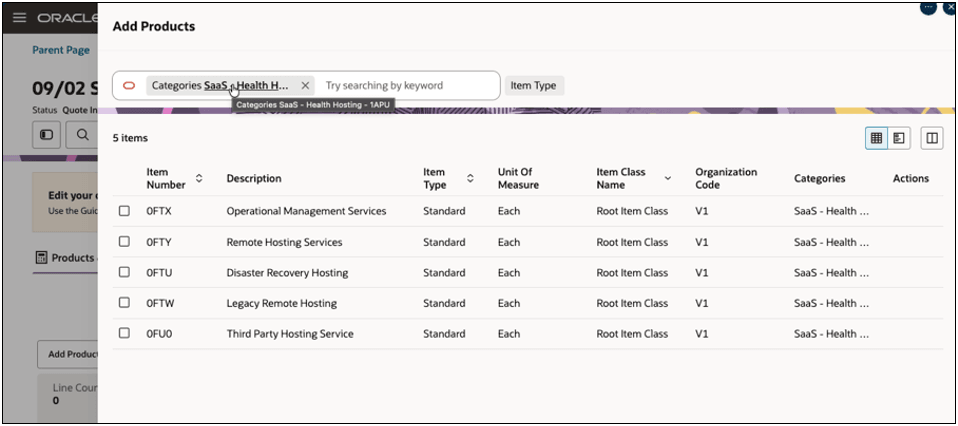
The Add Products flow shows products filtered by the selected PIM category
Sales users can discover and select eligible catalog items through current PIM catalog data and category hierarchies, reducing reliance on memorized item numbers and helping ensure that quotes use items available to the user.
Steps to enable and configure
Access Requirements: To enable this feature, the Administrator User be assigned the Application Implementation Consultant (ORA_ASM_APPLICATION_IMPLEMENTATION_CONSULTANT_JOB).
To enable this feature, you must enable the Unified Oracle CPQ in Fusion opt in:
- Navigate to Offerings.
- Select Configure Price Quote and click View Features.
- Open Features by clicking the Edit (pencil) icon.
- Enable the Unified Oracle CPQ in Fusion opt-in.
To try out this feature:
- Navigate to CPQ Admin Home > Quote List.
- Open a quote, click Add Products.
- Enter a keyword to search for products.
- Select the keyword-search action, an item suggestion, or a category suggestion.
- Use item type and category filters to refine results.
- Add a standard item to the quote or select Configure for a PIM model item.
Tips and considerations
- All new CPQ running in Fusion customers will be set up using the PIM-based Add Products flow by default.
- Existing Oracle CPQ customers will continue to use their current CPQ Add Products flow.
- Product visibility is determined by PIM Product Catalog (associated with “Sales” Functional Area), inventory organization, data-security, and territory/default criteria.
- While the search is being done directly on the PIM Catalog, CPQ 26D still needs the referene product data copy through Product Sync.