Salesforce Connector Managed Package 8.12
Oracle CPQ 26D and Salesforce Connector MP8.12 provide the support the following benefits:
- User Details Sync for Host Users - Oracle CPQ running in Fusion with MP8.12 aligns the user field mappings to Oracle CPQ 26D.
- User Details Sync for Partner Users - Oracle CPQ running in Fusion with MP8.12 now maps user fields to the Fusion Partner Contact and CPQ user.
Steps to enable and configure
To integrate with Salesforce Connector Managed Package 8.12, complete the following steps:
- Install the Salesforce Connector Managed Package 8.12. Refer to the appropriate Oracle CPQ with Salesforce Installation and Setup Guide.
Warning:
- For Oracle CPQ with Salesforce Connector implementations, installing the package is all you need to do for sucessful MP8.12 implementation.
- For Oracle CPQ running in Fusion, Fusion requires a country code to be populated in order for the user sync to be sucessful. Once you have the MP8.12 installed, you must complete the following steps in order for proper MP8.12 implementation.
- As a administrator, log in to Salesforce.
- Navigate to each of your user's User Details page.
- Edit the Oracle user.
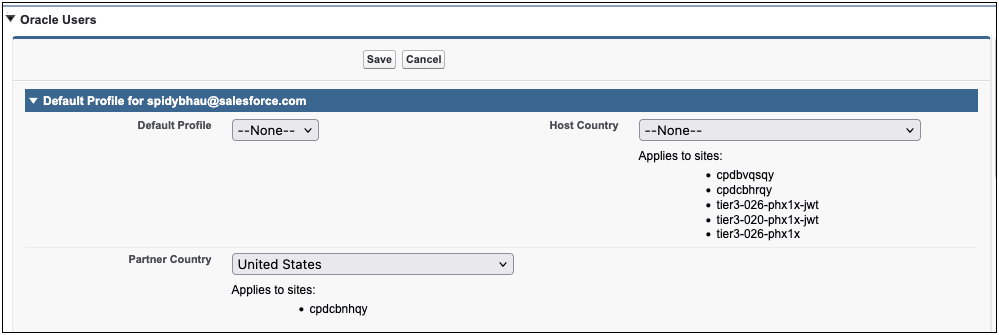
- Complete the field information below depending on your implementation:

- Click Save.
Tips and considerations
For advanced administrators if you want to bulk update the Country Code in Salesforce, you may assign the Country Code using the APEX or the Salesforce Data Loader. The fields that require update are:
User.cafsl__host_country__cAccount.cafsl__partner_country__c
The values for these fields must be a ISO 3166-1 alpha-2 country code.