Salesforce integration enhancements for Oracle CPQ
Oracle CPQ 26D provides the following enhancements for Salesforce integrations:
- Proof Key for Code Exchange (PKCE) Support - Your single sign-on from Salesforce into Oracle CPQ remains fast and secure, protecting quote data from interception without adding extra login steps. Oracle CPQ added industry-standard security verification (PKCE) during login redirects. CPQ creates a temporary security code, sends an encrypted version through the browser, and then verifies the secret code directly server-to-server with Salesforce to confirm identity before granting access.
-
Refresh Token Rotation Support - OAuth tokens renew automatically in the background, keeping continuous integrations like pricing updates, quote creation, and product syncing running without requiring manual token regeneration.
Steps to enable and configure
The enhancements are available automatically upon upgrade to Oracle CPQ 26D.
To take advantage of the features, you must complete the following steps in Salesforce:
- Login to Salesforce as a system administrator.
- Navigate to Setup > App Manager.
- Edit your connectect app.
- Under API (Enable OAuth Settings), select the Require Proof Key for Code Exchange (PKCE) Extension for Supported Authorization Flows checkbox.
- Click Save.
- Navigate to Setup > App Manger.
- Manage your connected app.
- Click Edit Policies.
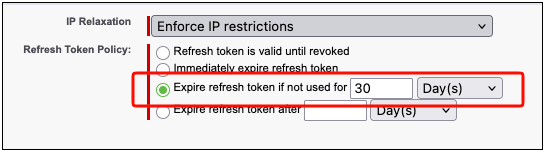
- Under OAuth Policies > Refresh Token Policy, select Expire refresh toke if not used for
<xx> <xx>.
Note: You can select the time duration that meets your business requirements. Oracle CPQ recommends 30 Days.
- Click Save.