Include Fusion Contracts terms and conditions in proposals for Oracle CPQ running in Fusion
Oracle CPQ 26D supports including Terms and Conditions (T&C) from Fusion Contracts in Oracle CPQ-generated proposal PDFs. Sales users can optionally include T&C during proposal generation or email, helping produce a unified customer-facing proposal without manual copy and paste, custom BML scripting, or external document assembly tools.
Administrators can configure a Contracts T&C commerce integration and associate the integration with print or email actions. During proposal generation, Oracle CPQ uses customer, business unit, and T&C contract type to create or update the related Fusion contract, validate the contract, retrieve the T&C PDF, and merge it into the proposal output. Contract IDs and numbers are stored on the transaction so later actions can reuse the related contract instead of creating a duplicate.
This feature streamlines proposal preparation by connecting CPQ proposal generation with contract terms stored in Fusion Contracts.
Use this feature to:
- Reduce manual effort required to copy contract terms into proposals.
- Improve consistency of contractual language in customer-facing proposal PDFs.
- Reduce dependency on legal, operations, or custom scripting for routine proposal assembly.
- Keep proposal generation sales-friendly while still using governed contract content.
- Lower the risk of sending proposals with missing or misaligned terms and conditions.
Steps to enable and configure
Access Requirements: Administrators need the existing access required to configure CPQ commerce integrations, print or email actions, quote attributes, and Doc Designer templates. Depending on authentication setup, integration users may also need Fusion Contracts access to create, validate, preview, activate, or terminate contracts.
Permissions required: ORA_OKC_ALL_BUSINESS_UNITS_CONTRACT_MANAGEMENT_DUTY and ContractOwnerId for CPQ app ID authentication.
To enable this feature, complete the following steps:
-
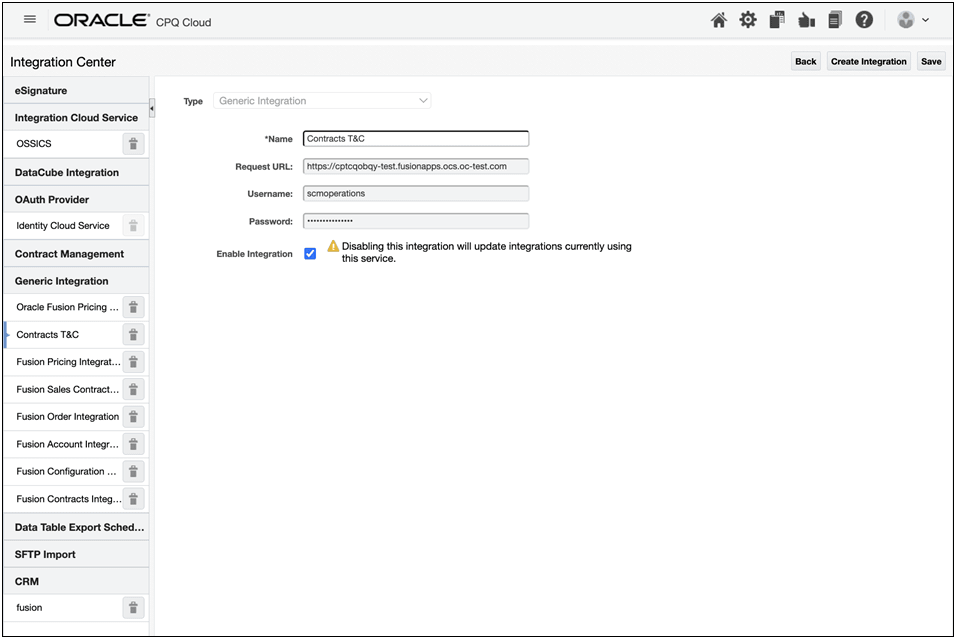
Configure a generic integration for Contracts T&C. Refer to Generic Integrations for more information.
-
Create a Commerce Integration of type Contracts T&C Integration.
-
Set the contract operation to Print.
-
Associate the Commerce Integration to the applicable Print or Email action.
-
Configure the quote attributes required by the integration, including:
_s_termsContractType_t_customer_idbusinessUnit_id
-
Configure CPQ Doc Designer so the T&C content appears in the required section, such as an appendix or a dedicated T&C section.
-
Test the proposal generation with and without T&C content included.
-
Test emailing the proposal from Oracle CPQ.
To use this feature, complete the following steps:
-
Open a quote.
-
Confirm the quote has the required customer, account, business unit, and T&C contract type context.
-
Generate or email the proposal.
-
Choose to include T&C when the proposal flow requires or exposes that option.
Note: If T&C content isn’t selected, proposal generation continues with the existing behavior.
-
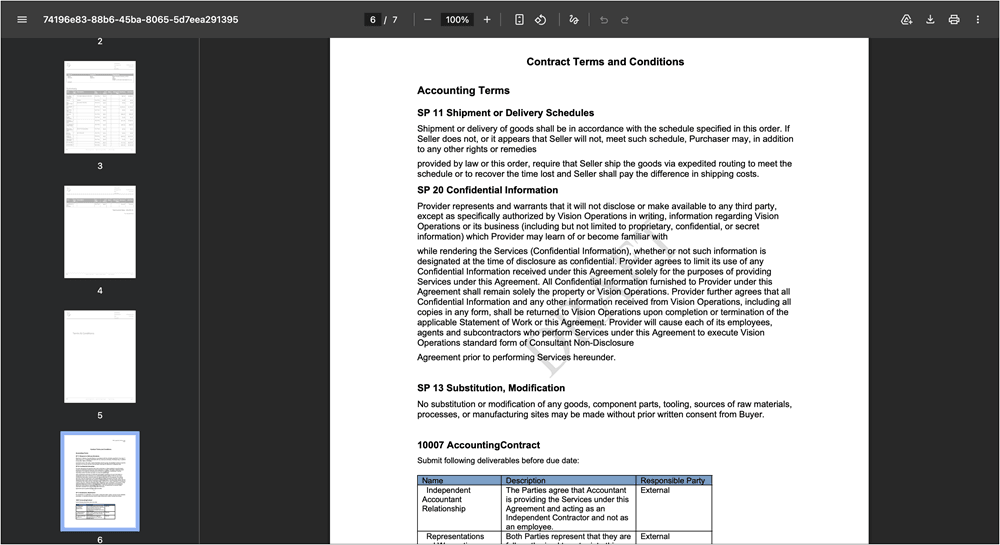
Review the generated proposal PDF with the contract terms included in the configured template section.
Tips and considerations
This feature focuses on simple, scalable inclusion of T&C in proposal PDFs. It does not replace full Fusion Contracts lifecycle management, contract authoring, clause negotiation, or legal redlining in Oracle CPQ.