Trigger Agent Teams in Event Routines for CPQ Transactions and Transaction Lines
CPQ Administrators can now trigger an agent team for Fusion CPQ transactions and transaction lines, by using event routines. In the Routines object, select the Transaction or Transaction Line process for the event routine. If the required process isn't available, run the Generate CPQ Metadata scheduled process from ESS Scheduled Jobs. This process generates the metadata that the Routines object uses to display the available objects, actions and rules. You may have to run the ESS process after additions or changes to commerce processes.
Administrators can now use create and update events to trigger a routine for CPQ transactions and transaction lines. The routine can all an agent team to automate complex, multi-step processes when create and edit events occur for a commerce transaction or transaction line, such as creating a transaction or updating the quantity on a transaction line. Agent teams automate actions, collect and analyze data and reduce manual effort.
Steps to enable and configure
Routines requires object metadata for object selection, actions and rule and rule validation. For CPQ running on Fusion, metadata for transactions and transaction lines is automatically generated by the Generate CPQ Metadata ESS scheduled process initial provisioning and each time there is an upgrade. If you deploy changes to a CPQ process or the Transaction and Transaction line processes don't appear in the Routines object or you don't see the expected rule attributes, run the Generate CPQ Metadata ESS scheduled process to regenerate the metadata.
Steps to run the ESS job:
- Select Schedule Processes, from the tools menu
- Click Schedule New Process
- Select Search from the drop down menu in the Name field
- Search for 'Generate CPQ Metadata' and press enter.
- Click OK and continue through the scheduling flow.
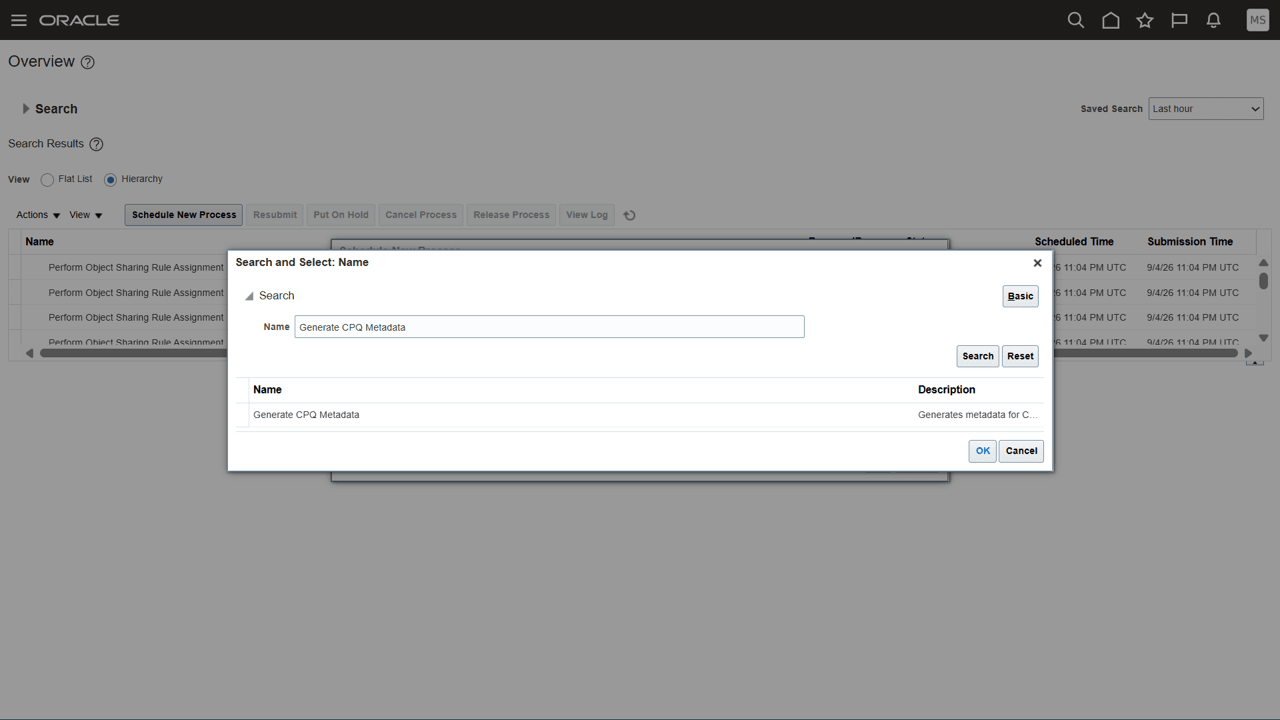
ESS Job to generate CPQ metadata for Routines
Tips and considerations
During provisioning, the Fusion CPQ site may be down and the ESS process to populate the object metadata for transaction and transaction lines may not be able to run. If the transaction and transaction line objects do not appear in the Routines object list, then manually run the ESS process to 'Generate CPQ Metadata'. The steps to do this are in the Steps to Enable section.
Key resources
For more information see: How do I get started with Routines?
Access requirements
To use this feature, you must have the appropriate privileges and job roles.
You must already have access to Routines via the privilege, ZCA_MANAGE_ROUTINES.
Assign the privilege, ZCA_SCHEDULE_ROUTINE_APPID, to the desired role.
During routine creation, this privilege will have an option to schedule the routine to run across all data in the trigger step.