Read Subinventory Descriptions in Your Language
Read each subinventory's description in your preferred language when you use Oracle Supply Chain Orchestration's redesigned pages, such as the New Supply Request page and the Supply Requests page.
Realize these benefits:
- Get multilingual support. View subinventory descriptions in your preferred language.
- Improve the user experience. Use localized descriptions to make navigation more intuitive for your global users.
- Globalize. Support a diverse, multilingual, workforce in multinational operations.
- Reduce error. Reduce confusion caused by English only descriptions.
- Integrate. Work consistently across Supply Chain Orchestration, Oracle Inventory Management, and other supply chain management applications.
Try it:
- Go to Home > Supply Chain Execution > Supply Chain Orchestration > New Supply Request.
- Enter values in the Item, Requested Delivery Date, and Requested Quantity attributes.
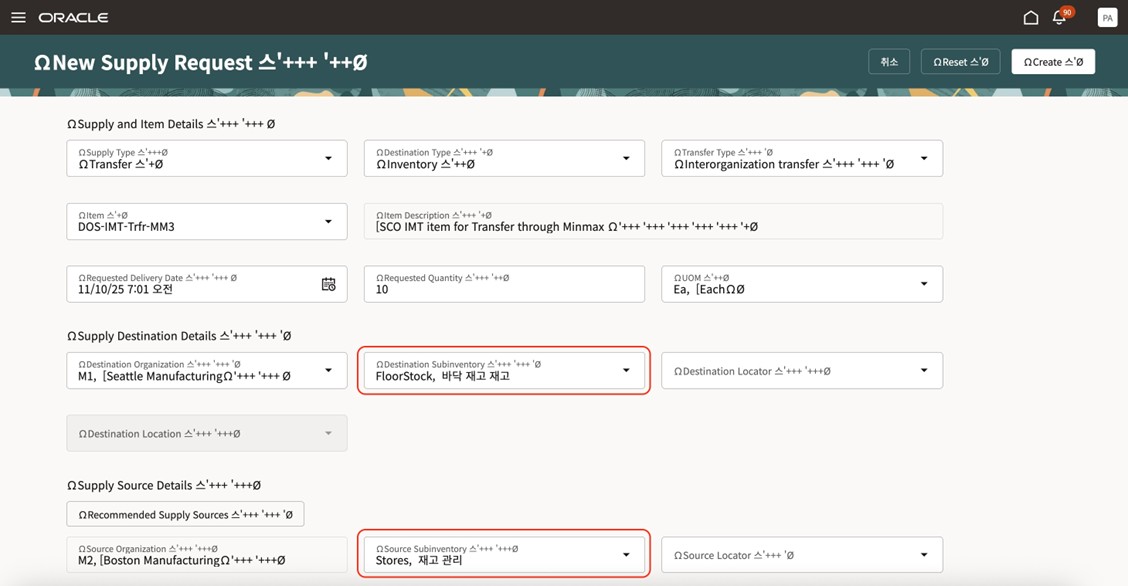
- Select the Destination Subinventory, then notice that the page displays the subinventory's description in your preferred language.
- Select the Source Subinventory and notice the same:
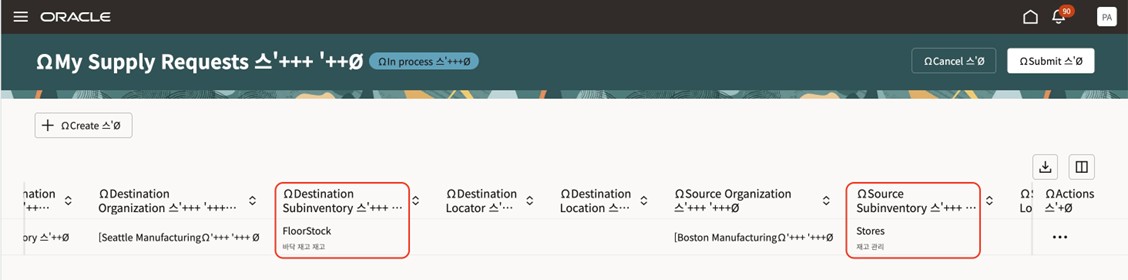
- Click Create > My Supply Requests.
- Notice that the Destination Subinventory and Source Subinventory descriptions display in your preferred language:
- Go to Home > Supply Chain Execution > Supply Chain Orchestration > Supply Requests.
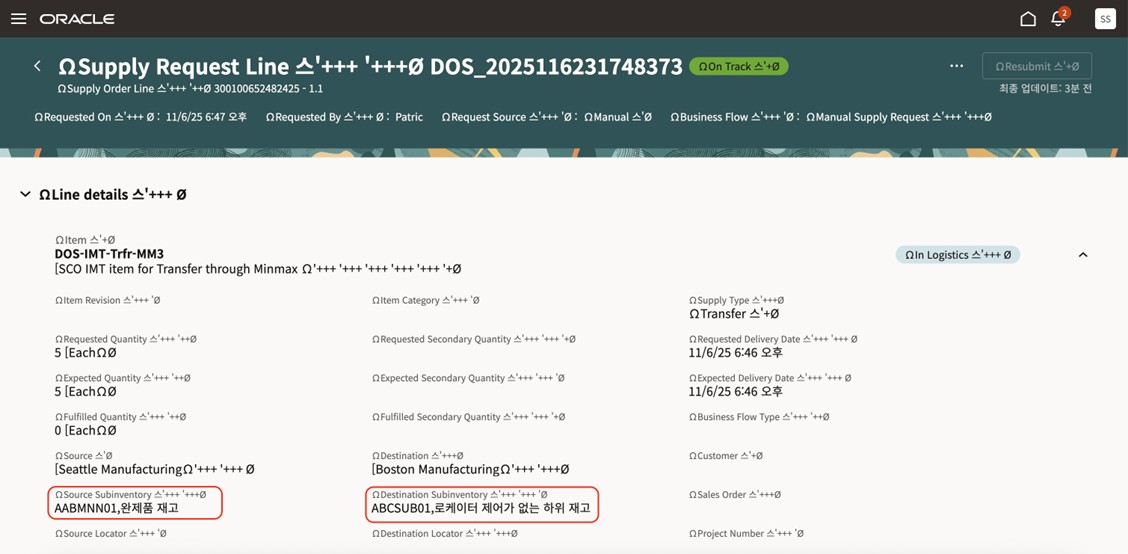
- Search for your supply request, then go to the Supply Request Lines page.
- Notice that Destination Subinventory and Source Subinventory descriptions display in your preferred language:
Steps to Enable and Configure
You don't need to do anything to enable this feature.
Tips And Considerations
Make sure:
- Each user sets their preferred language correctly in Settings and Actions > Set Preferences > User Preferences.
- You set up a translation for each subinventory's description in Inventory Management.
- You keep your subinventory's translation data synchronized across environments to make sure the translation is accurate.
Note this:
- Translation happens dynamically and has minimal impact on the page's performance.
- No additional privileges are required. All existing users can benefit from a localized, subinventory description.
- This feature works on Supply Chain Orchestration's redesigned pages and is consistent with other Oracle Fusion applications that support multilingual descriptions.
Key Resources
Access Requirements
Users who are assigned a configured job role that contains these privileges can access this feature:
- Process Supply Order Interface (DOS_PROCESS_SUPPLY_ORDER_INTERFACE_PRIV)
- View Supply Orders (DOS_VIEW_SUPPLY_ORDERS_PRIV)
- Manage Supply Request Exceptions (DOS_MANAGE_SUPPLY_REQUEST_EXCEPTIONS_PRIV)
- View Supply Order Exceptions and Status (DOS_VIEW_SUPPLY_ORDER_EXCEPTIONS_AND_STATUS_PRIV)
These privileges were available prior to this update.