Create Intraorganization Transfer Requests Without Selecting Source Subinventory
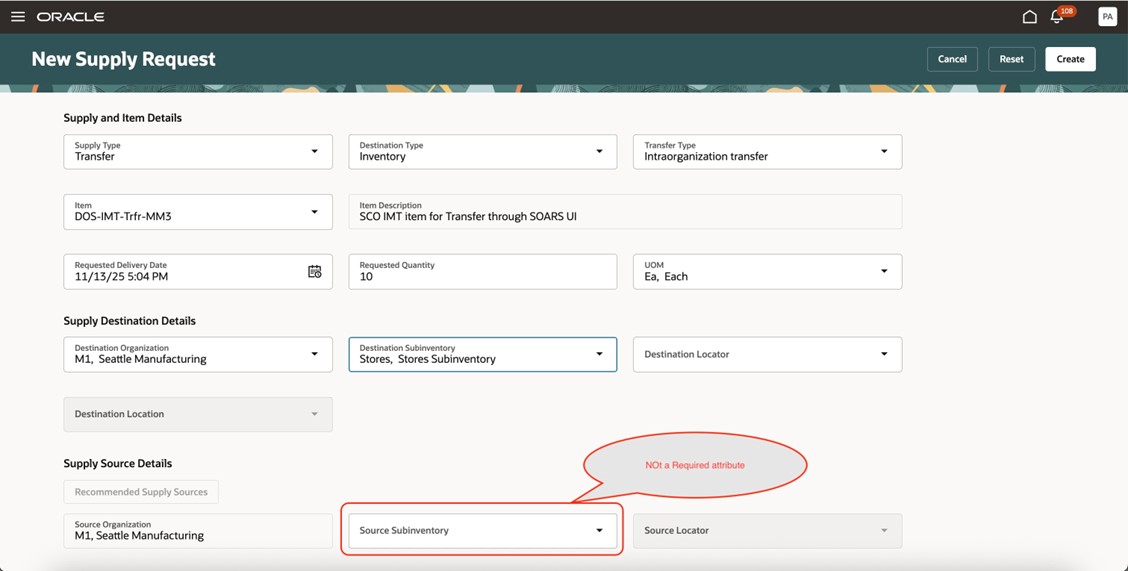
Use the New Supply Request page to create a transfer request that moves material between one subinventory and another subinventory in the same organization without having to select the source subinventory.
Realize these benefits:
- Create requests more quickly. You no longer have to identify or select a source subinventory, and that simplifies the transfer request process.
- Improve productivity. Minimize clicks and data entry so you can create requests more efficiently.
- Enhanced usability. Use a smoother and more intuitive user experience to create a material transfer.
Before this update, you were required to select a source subinventory that had available stock. This was time consuming, particularly when more than one subinventory contained the same item.
Now you can create a request to transfer supply without having to select a source subinventory. Oracle Inventory Management can determine the source subinventory while shipping the transfer order from the source organization. This allows you to complete the transfer request in fewer steps, improving turnaround time and minimizing errors.
Try it:
- Go to Home > Supply Chain Execution > Supply Orchestration > New Supply Request.
- Select the organization and destination subinventory.
- Enter the item and quantity to transfer. Select the date when you need the item. You don't need to identify or select the source subinventory.
- Review and submit the request:
Steps to Enable and Configure
You don't need to do anything to enable this feature.
Tips And Considerations
- Backward compatibility. Your current supply request processes and integrations that explicitly specify a source subinventory will continue to work without change.
- User guidance. Let your users know that they no longer have to specify the source subinventory. However, if a specific sourcing decision is necessary, then they can still specify it manually.
Key Resources
Access Requirements
Users who are assigned a configured job role that contains these privileges can access this feature:
- Process Supply Order Interface (DOS_PROCESS_SUPPLY_ORDER_INTERFACE_PRIV)
- View Supply Orders (DOS_VIEW_SUPPLY_ORDERS_PRIV)
- Manage Supply Request Exceptions (DOS_MANAGE_SUPPLY_REQUEST_EXCEPTIONS_PRIV)
- View Supply Order Exceptions and Status (DOS_VIEW_SUPPLY_ORDER_EXCEPTIONS_AND_STATUS_PRIV)
These privileges were available prior to this update.