Redwood: Use a Redesigned Collaboration Messaging Landing Page
You can use the new Redwood landing page for Collaboration Messaging to monitor the status of messaging operations such as inbound and outbound document delivery, errors, and overall message processing results.
Some of the key features include:
- Real-Time Monitoring: You can use live data to view up-to-date statistics about message transactions which makes it easy to spot failed communications. This helps you intervene quickly to ensure business continuity.
- Drill Down Capability: Click on the count hyperlink to navigate to the B2B Messages for detailed view and further investigation.
- Scorecards: The page includes five scorecards:
- Total: Shows the total number of messages in the last 24 hours, 7 days, or 30 days.
- Success: Shows the number of messages with a Success or Sent status.
- Failed: Shows the number of messages with a Failed status.
- Error: Shows the number of messages with an Error or B2B Error status.
- Other: Shows the number of messages with the remaining statuses of In-Process, Skipped, Delivered, Delivery in Progress, Pending Delivery, Received, or Terminated.
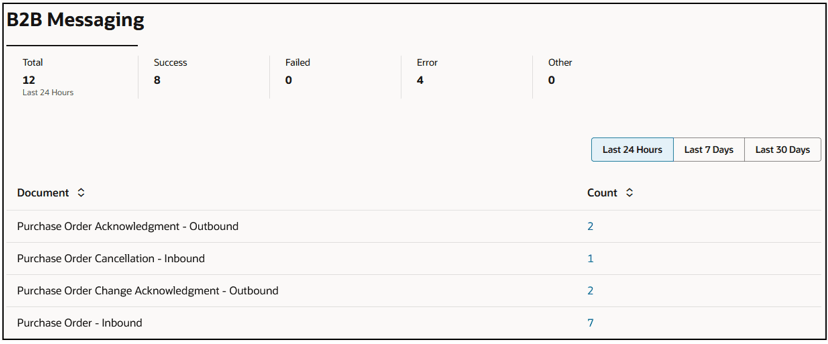
Landing Page With the Messages Logged in the Last 24 Hours
Some of the benefits of this page include:
- Faster load time and smoother interactions.
- Faster issue resolution and an early detection of issues.
- Operational efficiency that focuses the user attention on tasks that need it.
Steps to enable and configure
You can access this functionality by enabling the feature Simplify Configuration and Processing for B2B Messaging.
After you opt in, a new home link will be displayed on the Redwood in-app navigation bar.
Tips and considerations
In the next update, you will be directed to the Redwood landing page by default.
Access requirements
Users who are assigned a configured job role that contains these privileges can access this feature:
- Monitor Collaboration Messaging (CMK_MONITOR_COLLB_MESG_PRIV)
- Manage Collaboration Messaging Work Area (CMK_MANAGE_COLLAB_MESG_WORK_AREA_PRIV)
These privileges were available prior to this update.