 Issue an Item Multiple Times in an Operation for a Process Manufacturing Work Order
For a subset of process manufacturers, it is important to maintain the distinct identification and quantity of a material regardless of how many times it is added to an operation. This distinction may be driven by material traceability requirements or by work instructions with time-phased material consumption. Currently, a repeat ingredient can be added multiple times in an item structure or formula using a unique Find Number and assigned to the same operation. However, its quantities are consolidated in the operation when a work order is created.
You can now repeat a material using unique material sequences in an operation to maintain its granularity in a process manufacturing work definition and work order, and in production transactions. For each instance of a material in an operation, you can specify different attributes such as quantity, basis type, supply type, and supply subinventory and locator. The material sequence also carries forward to the list of materials displayed in the process manufacturing work order, reporting, reservation, picking, and execution, thereby displaying the order in which materials should be consumed in the operation.
The following screenshot shows a work definition where the material is assigned to an operation multiple times using a unique material sequence.
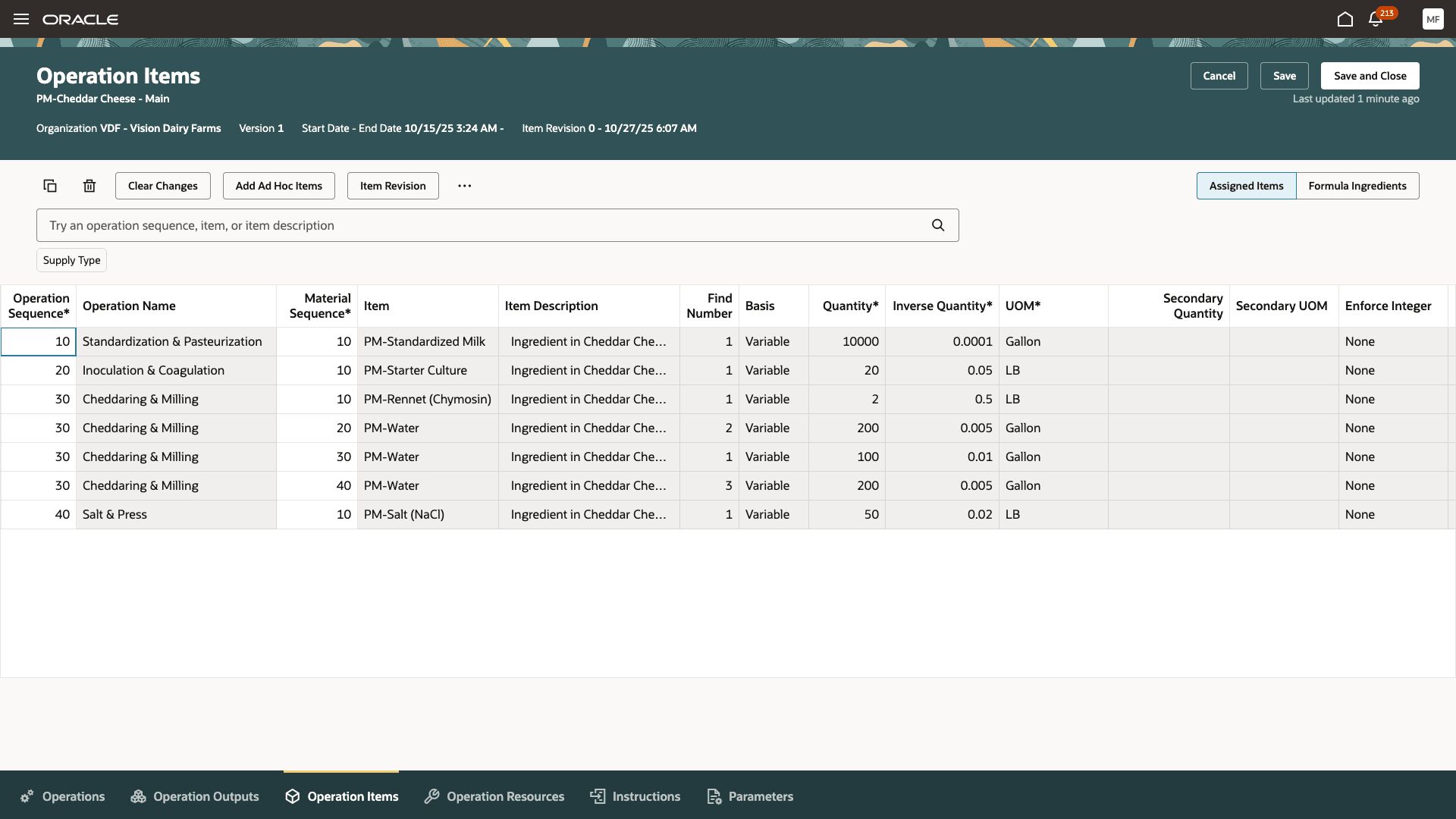
Repeating Material in a Work Definition Operation
The following screenshot shows the work order created from the work definition. The repeating material requirements in the operation are carried over to the work order for granular visibility.
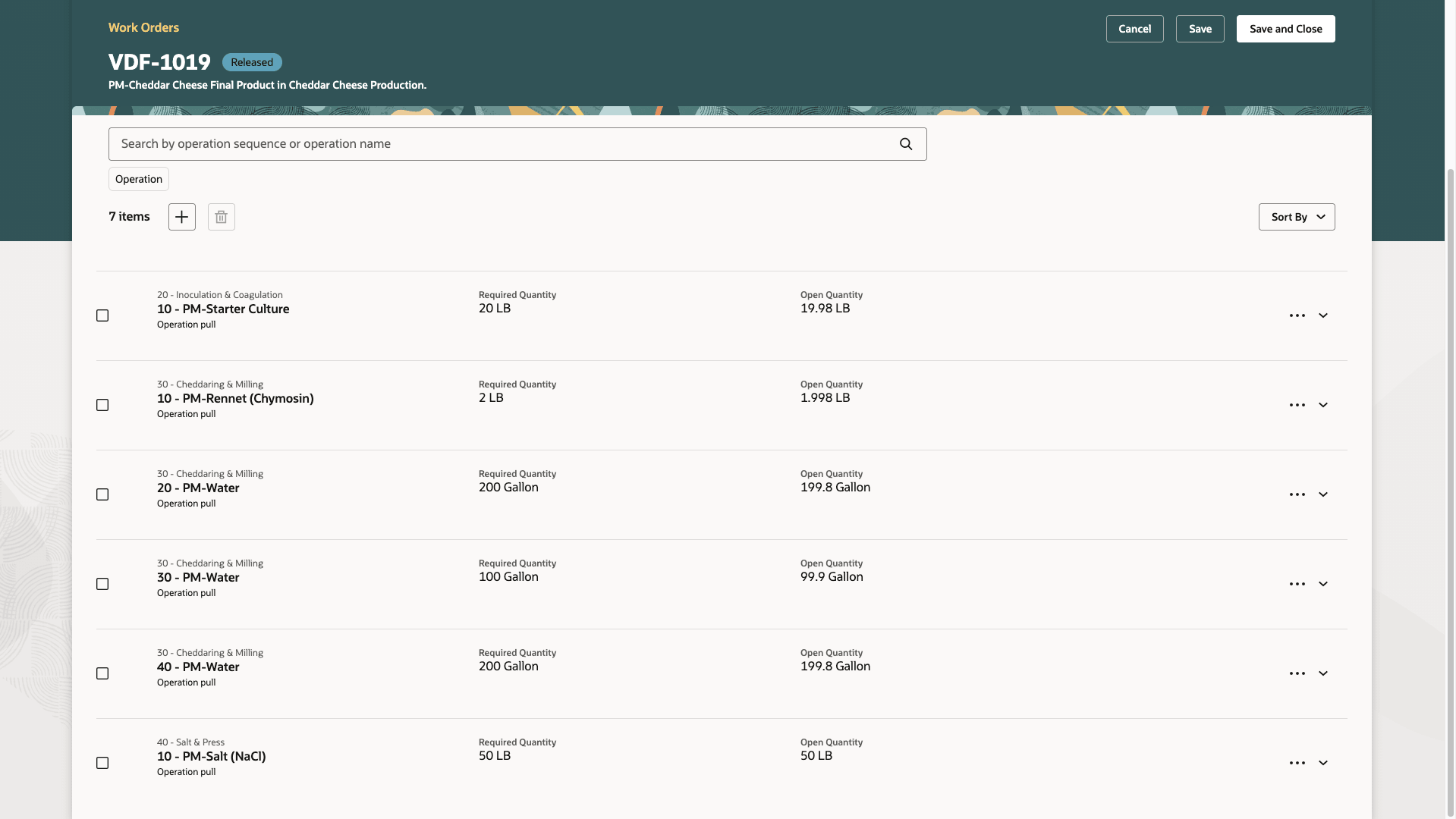
Repeating Material in the Work Order Operation
You can also add the material requirement in the work order directly, if you need to issue the repeating material separately in an operation.
The following screenshot shows issuing the material multiple times in an operation:
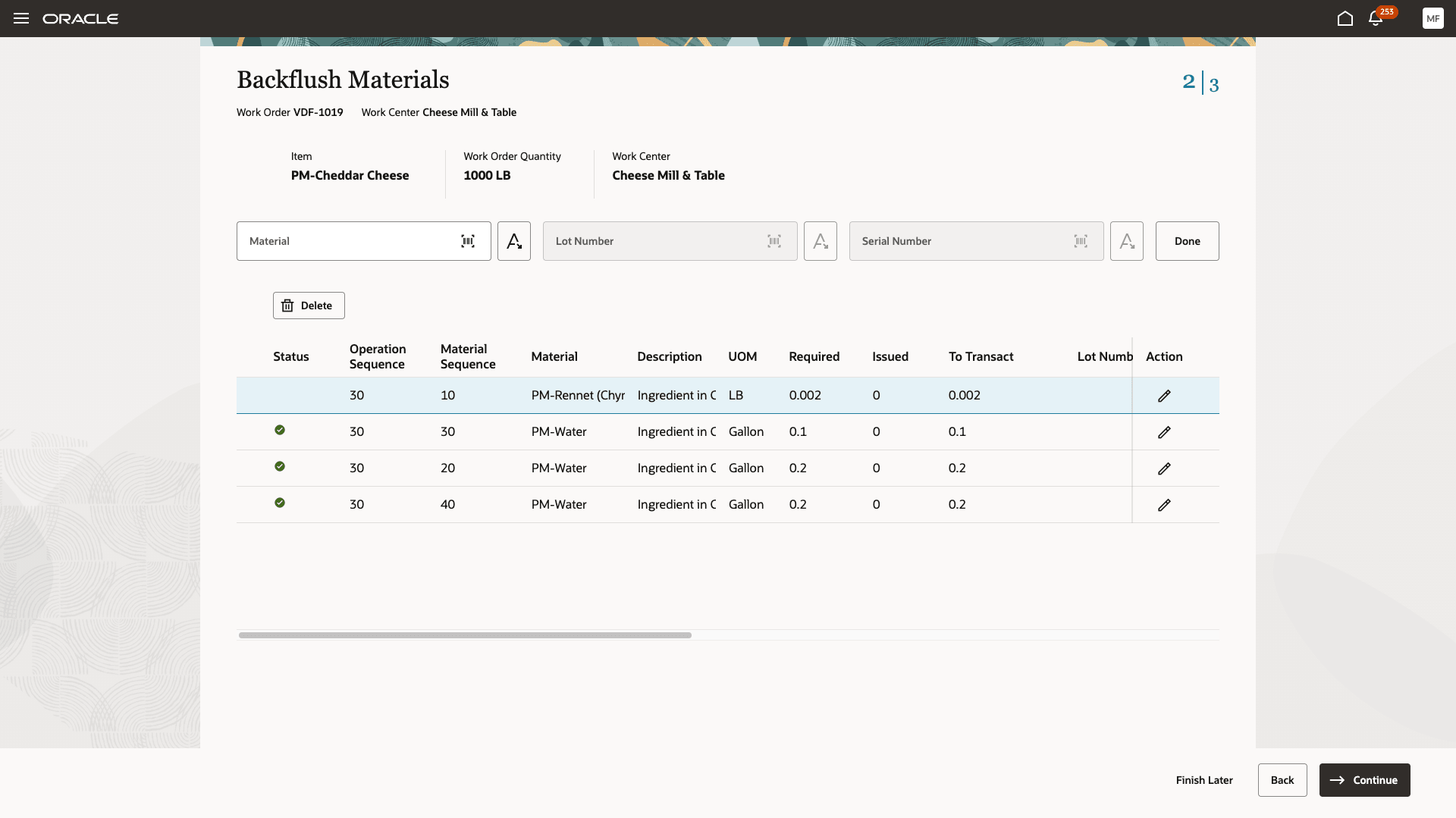
Issue Material Multiple Times in a Work Order Operation
The transactions for the repeating material in an operation are visible in the production transaction history page.
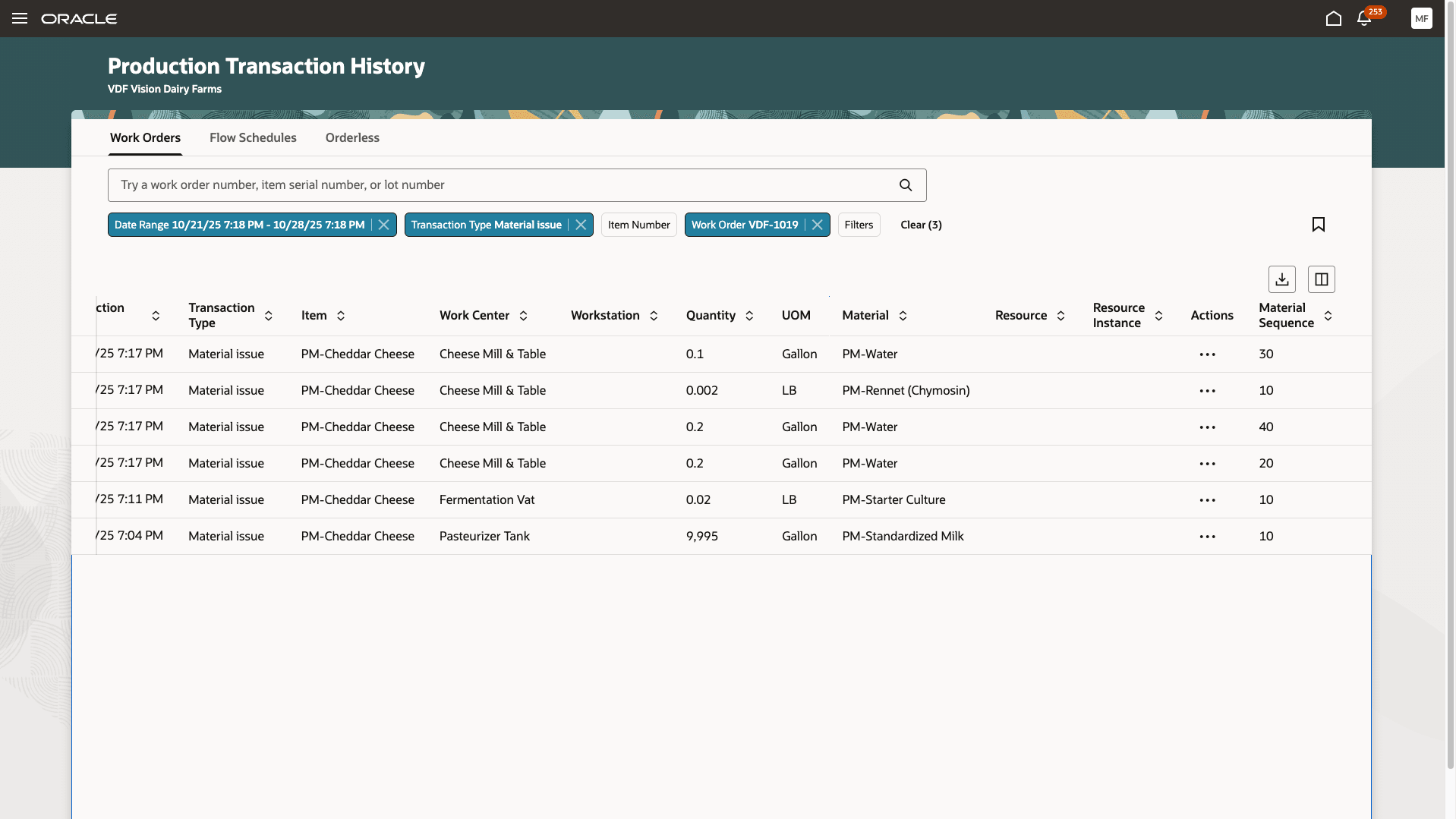
Issue Transactions of Repeating Material in an Operation
Pick release of the process manufacturing work order with the repeating ingredient creates movement request lines for the repeating ingredients with reference to the operation sequence and material sequence. The following screenshot shows the Movement Requests page:
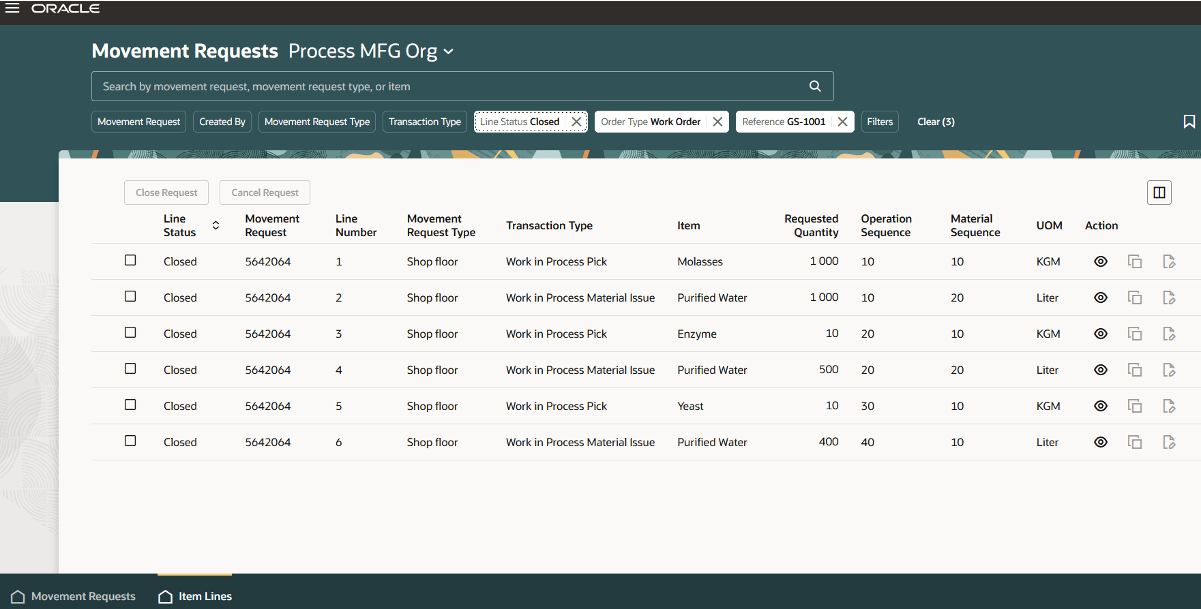
Movement Requests Page for Repeating Ingredients (Purified Water)
Reservations carry the operation sequence and material sequence reference for the repeating ingredients. The following screenshot shows the Reservations page with the repeating ingredient:
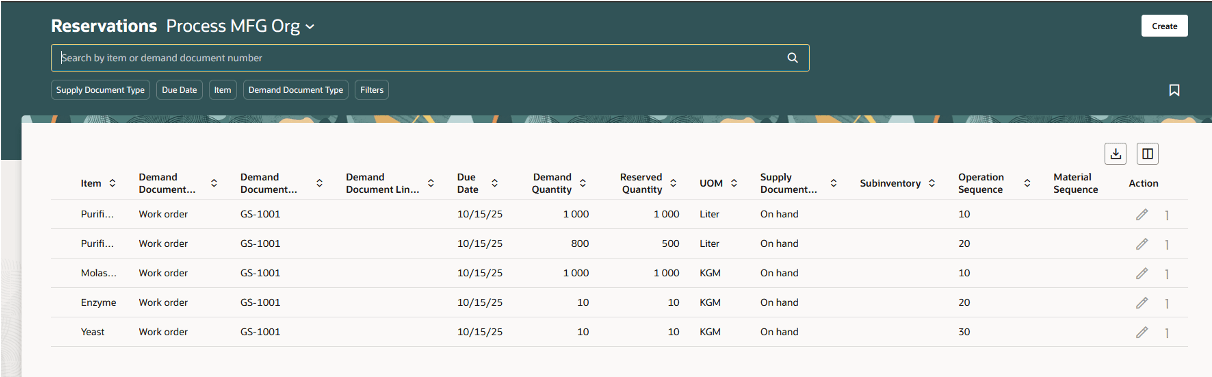
Reservations Page Showing the Operation Sequence and Material Sequence Information
Picks are created for the repeating ingredient for each combination of operation sequence and material sequence. Picks with reference to operation sequence and material sequence can’t be created manually.
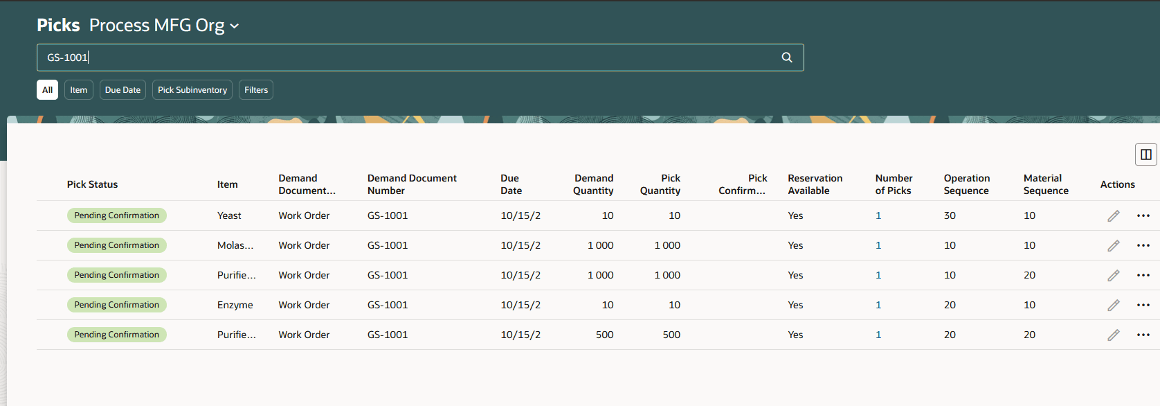
Picks Page Showing the Operation Sequence and Material Sequence Information for the Materials
The Confirm Picks mobile page carries the reference to the operation sequence and material sequence for a pick.
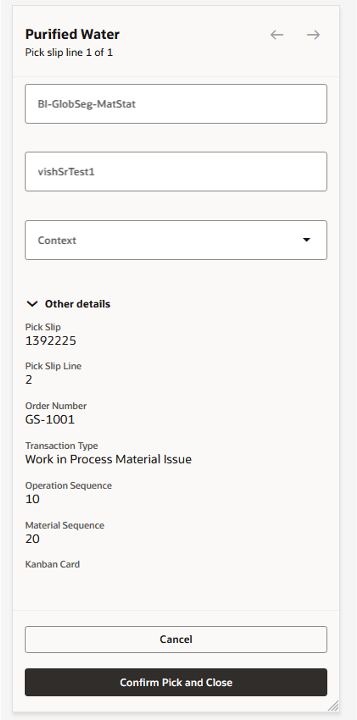
Confirm Picks Mobile Page Showing the Operation Sequence and Material Sequence Information
The pick lines for a pick slip on the Confirm Pick page carry the reference to the operation sequence and material sequence corresponding to a pick.
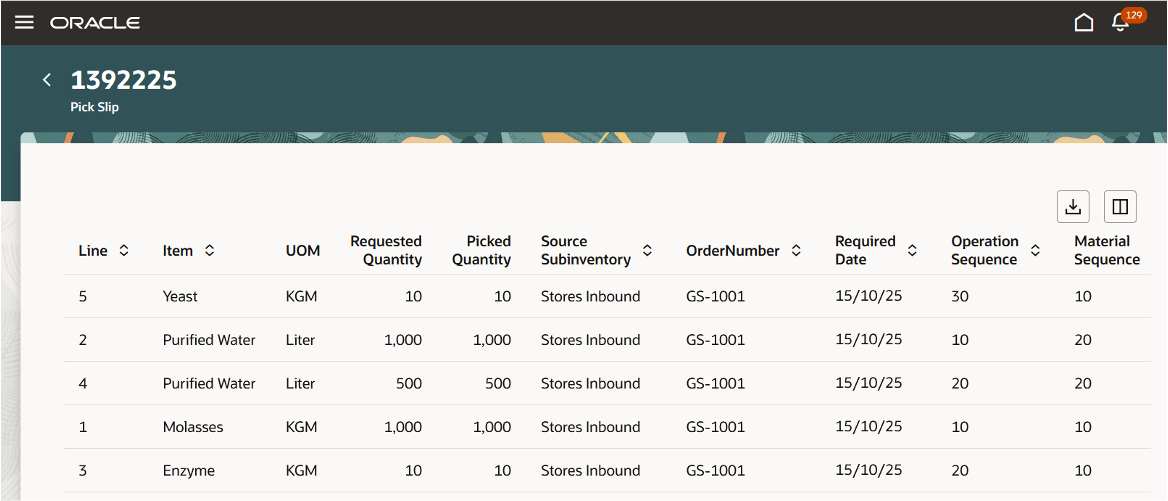
Pick Slip Page Showing the Operation Sequence and Material Sequence Information
The work order details section in the completed inventory transactions shows the operation sequence and material sequence associated with the material transaction for a repeating ingredient.
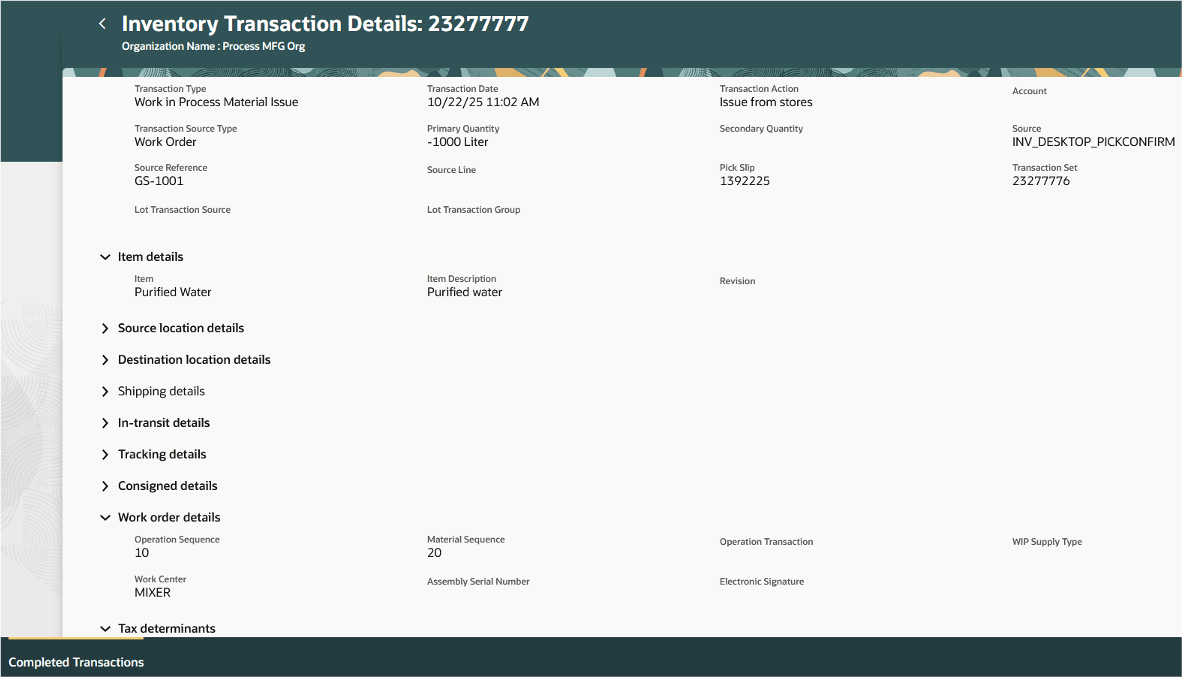
Operation sequence and Material Sequence in Work Order Details
Some key benefits of this feature include:
- Enhanced transparency and efficiency - With the repeating material requirements now visible in work orders, operators have greater transparency while issuing materials, resulting in a more efficient production process.
- Increased productivity - With the system accurately reporting the granular material requirements, production supervisors can focus on strategic improvements to the production process.
- Improved coordination - With the repeating material requirements in the work order, specific work instructions can be added for operators, material handlers, and other functions for better collaboration.
Here's the demo of these capabilities:
Steps to Enable and Configure
Set up the plant parameters to enable this feature:
- In the Setup and Maintenance work area, search for, and select the Manage Plant Parameters task.
- On the Manage Plant Parameters page, select the required inventory organization.
- In the Work Execution tab, under Manage Production, enable the Allow repeated consumption of ingredients in the same operation checkbox.
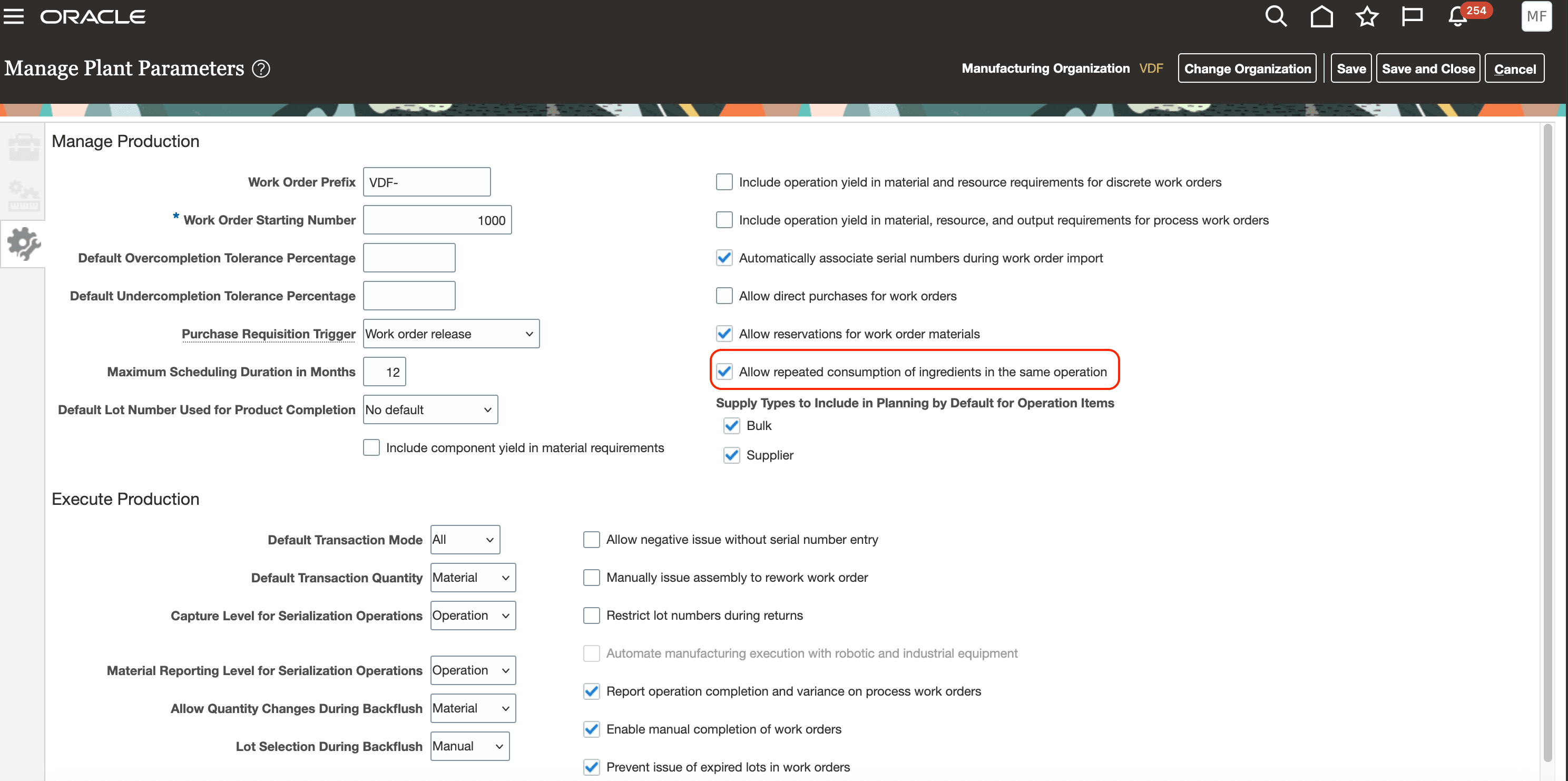
Manage Plant Parameters Page
Tips And Considerations
- The following describes alternate approaches in repeating materials in an operation:
- You can repeat an ingredient in an item structure or formula using a unique Find Number and specify the same suggested operation sequence to automatically assign it to an operation when a process manufacturing work definition is created. The Process Item Structure Changes to Work Definitions scheduled process automatically synchronizes item structure and formula changes to process manufacturing work definitions, as the item structure component or formula ingredient attributes are referenced.
- You can alternatively assign a formula ingredient quantity to a work definition operation and split the quantity to repeat it multiple times in the operation. The Process Item Structure Changes to Work Definitions scheduled process sends a notification when the item structure or formula changes, the suggested operation sequence is not specified in the item structure or formula, or the operation items have been overridden in the work definition.
- Refer to the related 26A feature Redwood: Synchronize and Notify When Formula Changes Impact Process Manufacturing Work Definitions for more information.
- You can add a material multiple times using different Find Number in an operation for a discrete manufacturing work order. However, the material quantities are currently combined in a discrete manufacturing work order.
- If the same item in a work definition operation also exists under a phantom item structure or formula, then the instances are maintained distinctly instead of combining during phantom explosion at work order creation.
- For the best user experience, use the Redwood pages as the material sequence attribute is visible only in Redwood pages for material transactions in Fusion Manufacturing.
- In Fusion Inventory, operation sequence and material sequence attributes have been added only to the Redwood pages. These attributes are hidden by default on the Redwood Inventory pages and can be exposed using business rules.
- If you use Fusion Supply Chain Planning, then you can't consider a repeating ingredient in an operation during planning collections at this time.
Key Resources
- Watch the Issue an Item Multiple Times in an Operation for a Process Manufacturing Work Order demo.
- Refer to the Oracle Fusion Cloud SCM: Using Manufacturing guide, available on the Oracle Help Center.
- Refer to the Oracle Fusion Cloud SCM: Implementing Manufacturing and Supply Chain Materials Management guide, available on the Oracle Help Center.
Access Requirements
Users who are assigned a configured job role that contains the following privileges can access this feature:
Manage Plant Parameters (RCS_PLANT_PARAMETERS_PRIV)
Manufacturing privileges
- Manage Work Definitions (WIS_MANAGE_WORK_DEFINITIONS_PRIV)
- View Work Definitions (WIS_VIEW_WORK_DEFINITIONS_PRIV)
- Get Work Definitions by Service (WIS_GET_WORK_DEFINITIONS_SERVICE_PRIV)
- Manage Work Definitions by Service (WIS_MANAGE_WORK_DEFINITIONS_SERVICE_PRIV)
- Manage Work Execution Work Area (WIP_MANAGE_WORK_EXECUTION_WORK_AREA_PRIV)
- Manage Work Order Headers (WIP_MANAGE_WORK_ORDER_HEADERS_PRIV)
- View Work Orders (WIP_VIEW_WORK_ORDERS_PRIV)
- Report Material Transactions (WIP_REPORT_MATERIAL_TRANSACTIONS_PRIV)
- View Production Transaction History (WIE_VIEW_MANUFACTURING_TRANSACTION_HISTORY_PRIV)
- Report Postproduction Transactions (WIE_REPORT_POSTPRODUCTION_TRANSACTIONS)
Inventory privileges
- Manage Inventory Movement Request (INV_MANAGE_INVENTORY_MOVEMENT_REQUEST_PRIV)
- Confirm Pick Using Responsive Inventory (ORA_INV_CONFIRM_PICK_PWA_DUTY)
- Confirm Pick Using Responsive Inventory (INV_CONFIRM_PICK_PWA_PRIV)
- View Inventory Pick Using Responsive Inventory (ORA_INV_VIEW_INVENTORY_PICK_PWA_DUTY)
- View Inventory Reservation Using Responsive Inventory (ORA_INV_VIEW_INVENTORY_RESERVATION_PWA_DUTY)
- Review Completed Inventory Transactions Using Responsive Inventory (INV_REVIEW_COMPLETED_INVENTORY_TRANSACTION_PWA_PRIV)
These privileges were available prior to this update.