 Select a Work Definition Based on Batch Size Range When Creating a Work Order for Process Manufacturing
In process manufacturing industries, different work definitions can be modeled for variations in plant setups, internal economies of scale, or seasonal materials. Rather than selecting a primary or alternate work definition based on its production priority, supply planners and manufacturing engineers can collaboratively define the conditions that drive a specific work definition when a work order is generated or created manually. These conditions determine the work definition that is used for manufacturing execution based on several factors including the batch quantity and effective date.
You can now optionally specify minimum and maximum batch quantities for user-defined batch quantity process manufacturing work definitions. The batch quantity must be between the minimum and maximum quantities. The minimum and maximum quantities are at the work definition version level, allowing them to be updated by creating a new version to account for variations. When creating a process manufacturing work order, a qualified work definition is automatically selected based on the work order batch quantity and the minimum and maximum quantities on the available work definitions for a primary output.
The following screenshot shows the new Minimum Quantity and Maximum Quantity fields available on the Create Process Manufacturing Work Definition page:
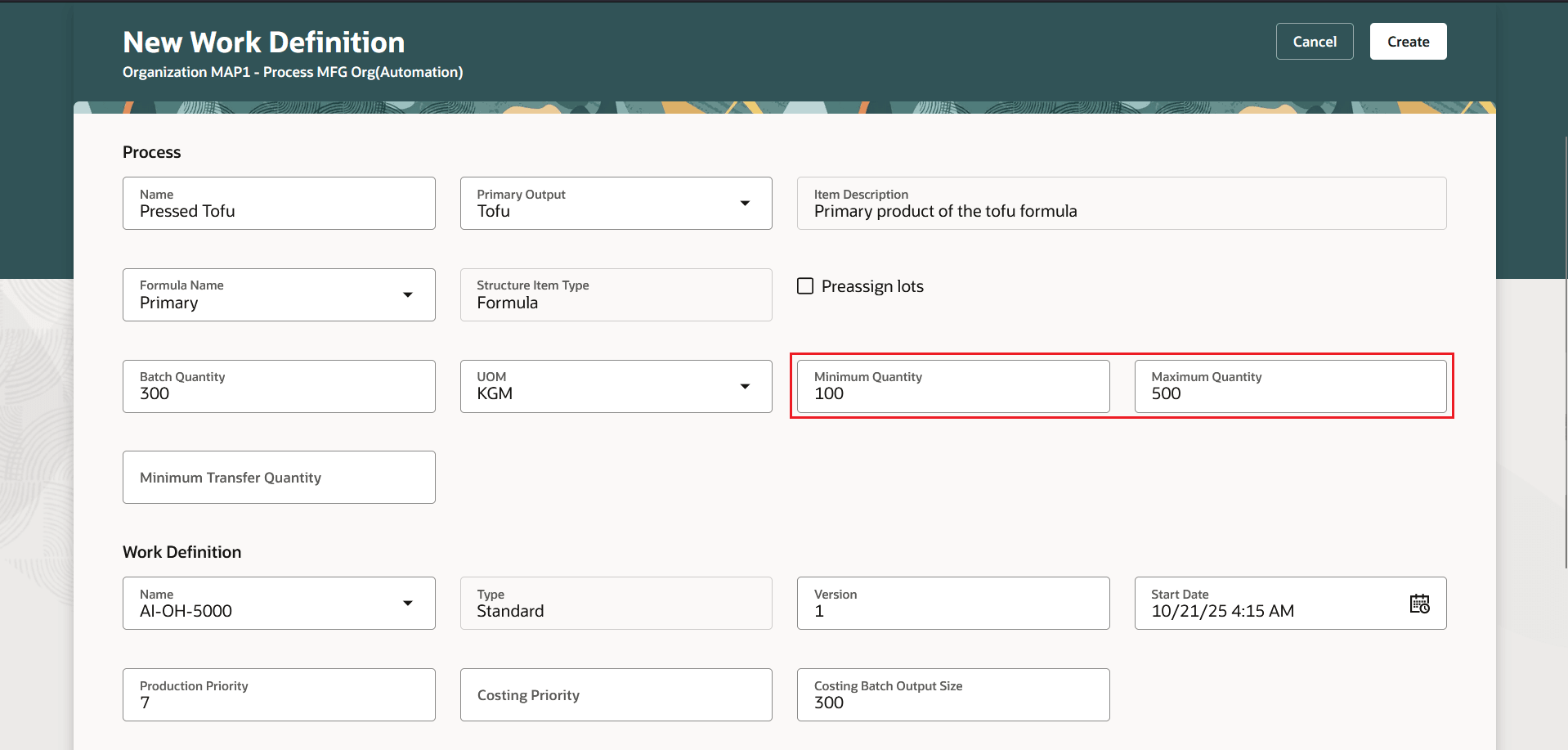
Minimum Quantiy and Maximum Quantity Fields
File-Based Data Import (FBDI) Changes:
The FBDI process work definition template, ProcessWorkDefinitionTemplate.xlsm, has been enhanced to enable the creation of a process manufacturing work definition with batch size range. New columns Minimum Quantity and Maximum Quantity have been added to the Work Definition Headers worksheet. Use the latest template after upgrade to 26A.
REST API Changes:
You now can create a process manufacturing work definition with batch size range using the Work Definition Requests REST API.
Enhanced work definition selection logic based on batch size range enables greater flexibility in adapting production to the variable needs of the physical manufacturing environment.
Here's the demo of these capabilities:
Steps to Enable and Configure
You don't need to do anything to enable this feature.
Tips And Considerations
- This feature is available only with the Redwood experience, which can be enabled using the profile option, Redwood Work Definitions Enabled.
- Minimum Quantity and Maximum Quantity are applicable to user-defined batch quantity process manufacturing work definitions.
- Scaling on the work order continues to be calculated based on the work order batch quantity.
- During process manufacturing work order creation, the criteria for selecting a work definition is initially based on the Minimum Quantity and Maximum Quantity, followed by the lowest production priority. The created work order is then scaled based on the specified batch quantity.
- The Minimum Quantity and Maximum Quantity in a process manufacturing work definition are not used by Costing for cost planning or cost scenarios.
- Updating the batch quantity on an unreleased or released work order doesn't automatically update the associated work definition.
- This feature isn't currently supported in Supply Planning.
Key Resources
- Watch the Select a Work Definition Based on Batch Size Range When Creating a Work Order for Process Manufacturing demo.
- Oracle Fusion Cloud SCM: Refer to the Using Manufacturing guide, available on the Oracle Help Center.
- Oracle Fusion Cloud SCM: Refer to the Implementing Manufacturing and Supply Chain Materials Management guide, available on the Oracle Help Center.
Access Requirements
Users who are assigned a configured job role that contains these privileges can access this feature:
- Manage Work Definitions (WIS_MANAGE_WORK_DEFINITIONS_PRIV)
- View Work Definitions (WIS_VIEW_WORK_DEFINITIONS_PRIV)
- Get Work Definitions by Service (WIS_GET_WORK_DEFINITIONS_SERVICE_PRIV)
- Manage Work Definitions by Service (WIS_MANAGE_WORK_DEFINITIONS_SERVICE_PRIV)
- Get Manufacturing Plant Set Up Data by Service (WIS_GET_MFG_PLANT_SETUP_SERVICE_PRIV)
These privileges were available prior to this update.