Monitor Production for Work Centers Without Workstations
Production supervisors monitoring the shop floor operations are responsible for ensuring production continuity without compromising on quality and delivery commitments. Manufacturing environments can include work centers that do not use workstations. Supervisors need to monitor these work centers that do not use the workstation context but have operators executing operations in real time. This update extends the Production Supervision capabilities to include work centers that do not use dedicated workstations.
With this update, supervisors can:
- Monitor Key Performance Metrics: View critical KPIs, such as Plan Adherence, Overall Labor Effectiveness (OLE), Availability, Performance, Quality, Completed Quantity, and Open Exceptions, for a work center without workstations.
- Drill Down for Details: Starting from the high-level metrics, expand into detailed operator performance and operation execution data to help identify bottlenecks or underperformance.
- Manage Long-Running Operations: Detect and resolve long-running sessions, such as operations inadvertently left active during shift changes, ensuring data accuracy and resource accountability.
- Configure Metrics: Manufacturing Engineers can set, add, or modify performance metric targets according to organizational standards. Supervisors can personalize metric views and layout for intuitive monitoring.
- Report Performance: Shift reports capture performance against applicable metrics automatically for comprehensive documentation and stakeholder consideration.
Metric calculations are tuned for work centers without workstations, using measurements at the work center and operator levels for the shift.
Plan Adherence: This metric displays the percentage of actual completion, as compared to the planned completion for a work center during the shift. The actual completion is the sum of completed operation quantities by the operators in the current shift. The planned completion is the sum of operation quantities for operations whose planned start date or completion date falls in the current shift.
Planned Quantity: This metric displays planned completion quantity for a work center during the shift. It represents the total quantity for all operations that are scheduled to start or finish within the current shift. The planned quantity calculation considers the operation yield of both the current and preceding operations.
Completed Quantity: This metric shows the quantity completed by an operator during the current shift. The completed quantity at the work center level is the aggregate quantity completed by all the operators for the current shift.
Overall Labour Effectiveness (OLE): OLE is a key new metric, which combines Availability, Performance, and Quality to offer a holistic view of labor effectiveness in manufacturing environments without workstations. This metric measures the production efficiency of the operator at a specific work center for the current shift. Expressed as a percentage, OLE is calculated by multiplying its key components: Availability, Performance, and Quality for the current shift. The values from all operators who worked during the current shift are combined to calculate the average OLE for the work center.
OLE = Availability X Performance X Quality
Availability: This metric provides information on the operator’s availability in the current shift. It signifies the percentage of time that operators are working productively. Operator availability on a shop floor is calculated as the ratio of the total time an operator spends on productive work to the total duration of their shift.
Availability % = (Runtime / Planned Production Time) x 100
Availability calculates the percentage of runtime divided by the planned production time. The planned production time is taken as the shift duration. Runtime is calculated as the time spent by the operator in executing operations. Availability is calculated for each operator and then aggregated across all operators who worked during the current shift to calculate the average availability for the work center.
Performance: This metric assesses the operator’s performance by considering the impact of slow cycles that slow down manufacturing. Performance signifies the rate at which operators produce output compared to the expected rate. The performance percentage is calculated as follows:
Performance % = ((Ideal Cycle Time x Total Count)/RunTime) x 100
The ideal cycle time for an operation is obtained from the resource usage rate of the work order operation being executed at the workstation. Runtime is calculated as the time spent by the operator in executing operations.
Quality: This metric calculates the percentage ratio of good units to total units produced during the current shift. It assesses the quality of manufactured products produced during the current shift. Products that do not meet the quality standards, including products that need rework, lower the quality metric value. Quality is calculated for each operator and then aggregated across all operators who worked during the current shift to calculate the average Quality for the work center.
Open Exceptions: This metric shows the count of open exceptions logged for a work center.
The following screenshot shows the Work Center Monitoring page for a work center without workstations:
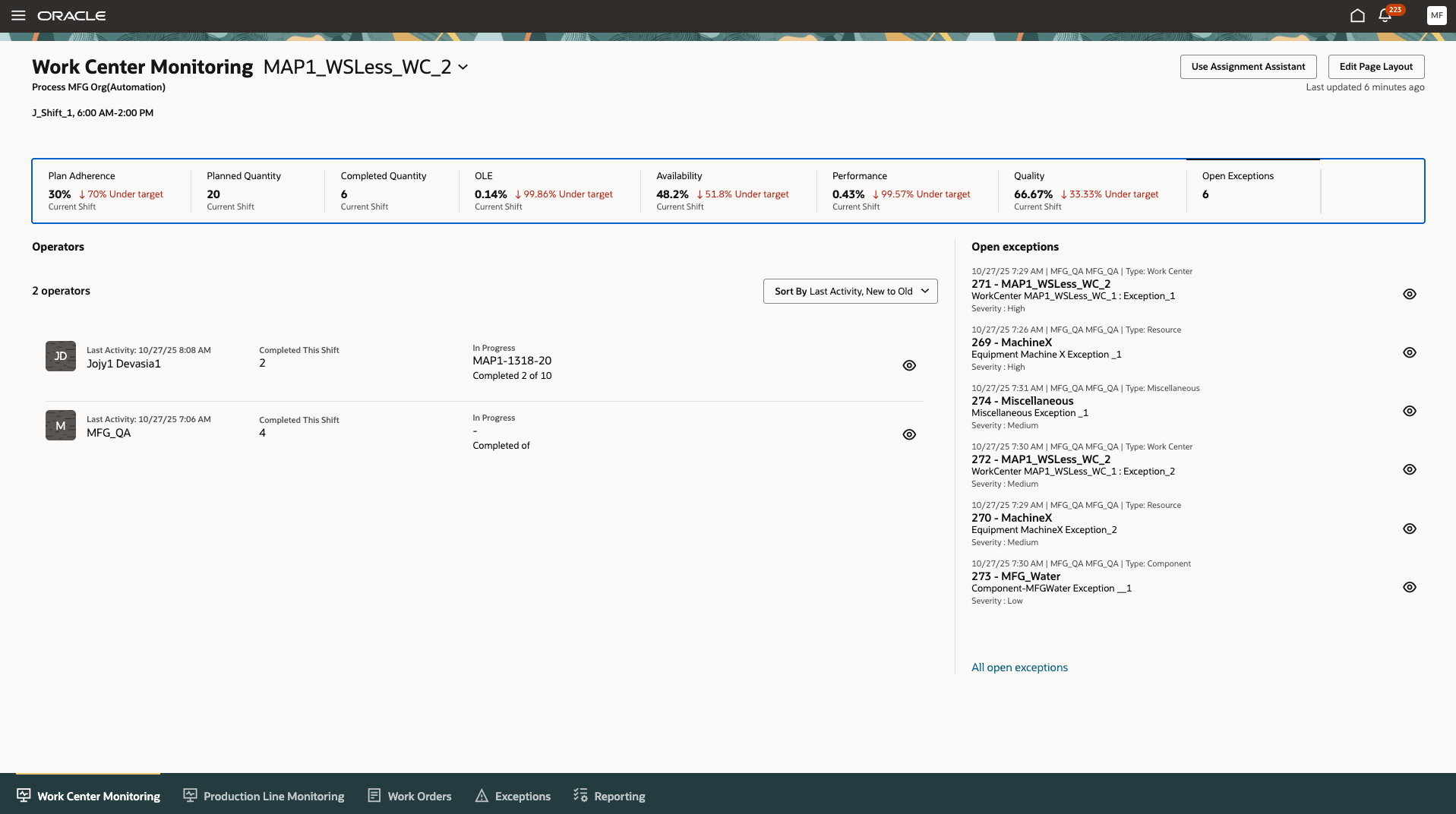
Monitoring Page to Monitor a Work Center Without Workstations
The following screenshot shows the monitoring page for an operator working on a work center without workstations: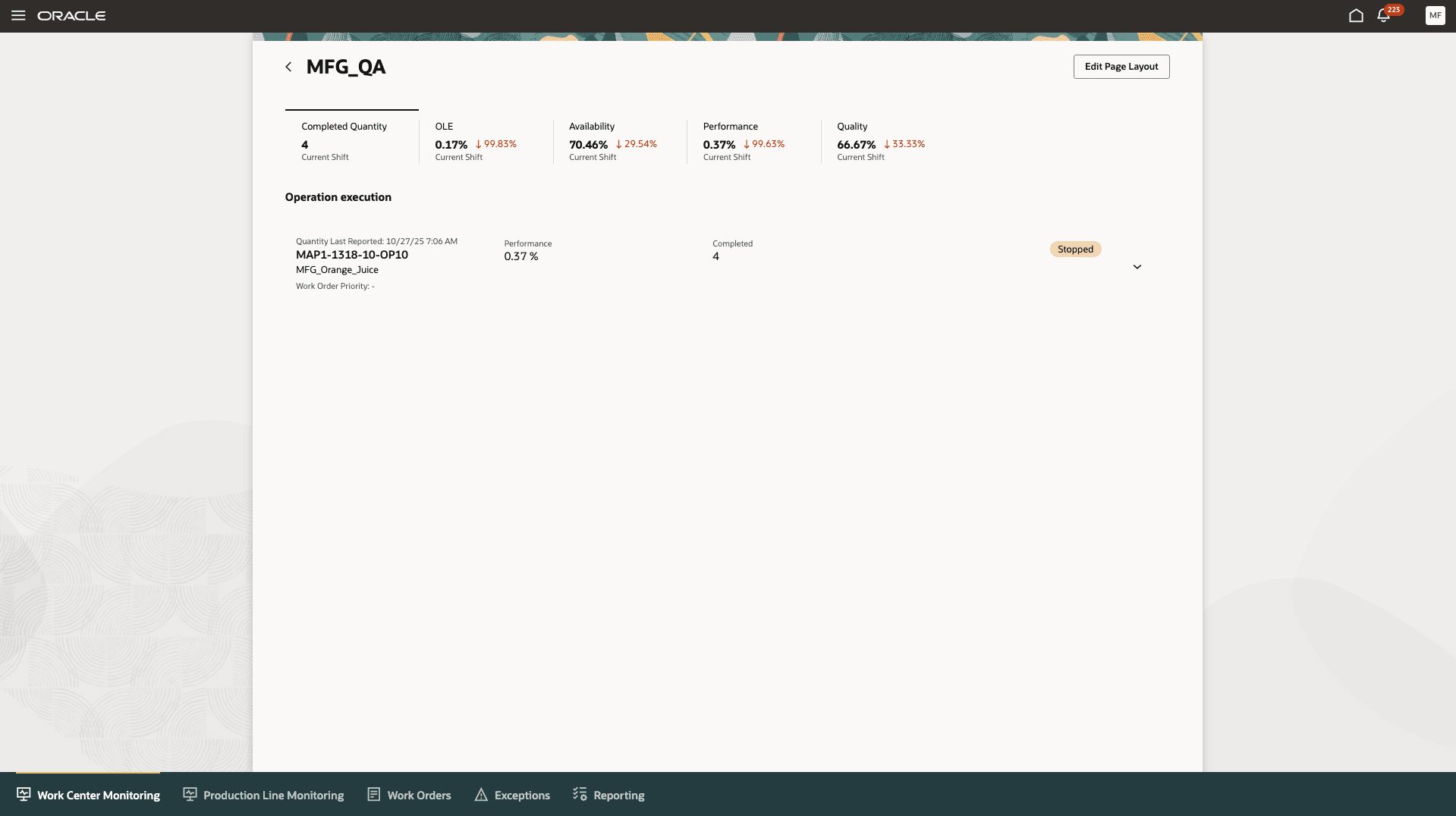
Operator Monitoring Page
This enhancement supports real-time performance tracking for manufacturing environments using Smart Operations without workstations, offering greater flexibility and streamlined shop floor management. This is especially beneficial for organizations without granular workstation setups.
Here's the demo of these capabilities:
Steps to Enable and Configure
Use the Opt In UI to enable this feature. For instructions, refer to the Optional Uptake of New Features section of this document.
Offering: Manufacturing and Supply Chain Materials Management No Longer Optional From: Update 26C
To use this feature, you need to set up the Smart Operations Configurations task by specifying the following details:
- Metrics: Specify benchmark values of key metrics available under Production Supervision.
- Reporting UOM: Specify the Reporting Unit of Measure. This provides a common unit for measure to compute the metrics when work orders use different units of measure.
Tips And Considerations
- All metrics are calculated and displayed per work center and shift. If a work center has a mix of workstation and workstation-less execution, the workstation monitoring view is shown to the user.
- To improve the accuracy of OLE calculations:
- Ensure that all long-running sessions, whether left open accidentally or not closed properly by operators, are promptly closed. Operators should end their sessions immediately after completing their tasks to maintain accurate availability and performance metrics.
- Operators should perform all executions using the Production Execution task, as only these executions are included in OLE calculations.
- Verify that UOM conversions between the Work Order UOM and the Reporting UOM are properly defined to ensure precise metric calculations.
Key Resources
- Watch the Monitor Production for Work Centers Without Workstations demo.
- Refer to the Oracle Fusion Cloud SCM: Using Manufacturing guide, available on the Oracle Help Center.
- Refer to the Oracle Fusion Cloud SCM: Implementing Manufacturing and Supply Chain Materials Management guide, available on the Oracle Help Center.
Access Requirements
Users who are assigned a configured job role that contains these privileges can access this feature:
- Supervise Production (WIP_SUPERVISE_PRODUCTION_PRIV)
- View Production Exceptions (WIP_VIEW_PRODUCTION_EXCEPTIONS_PRIV)
- View Production Shift Details (WIP_GET_PROD_SHIFT_DETAILS_PRIV)
- Report Shift Work (WIP_REPORT_SHIFT_WORK_PRIV)
- Generate Supervisor Report (WIP_GENERATE_SUPERVISOR_REPORT_PRIV)
- Configure Smart Operations Parameters (WIP_CONFIGURE_SMART_OP_PARAMETERS_PRIV)
These privileges were available prior to this update.