Manage Extensions That Run Too Long
Use the Manage Order Management Extensions task in the Setup and Maintenance work area to identify extensions that are running too long. Modify your Groovy code so it's more efficient, test, then reassess.
Realize these benefits:
- Track extensions that exceed a runtime threshold so you can quickly identify inefficient code.
- Detect and fix slow running extensions to reduce overall transaction time and improve system responsiveness.
- Get insight into your extension's performance, then take corrective action without waiting for diagnostics.
- Make inefficiency more visible so you can write more efficient logic and use alternative approaches.
- Prevent unnoticed performance degradation that can impact high volume order flows.
- Monitor and optimize extensions so you can maintain consistent performance.
Try It:
- Go to the Manage Order Management Extensions task in the Setup and Maintenance work area.
- Click the Runtime Threshold tab, then view the list of extensions that have run too long:
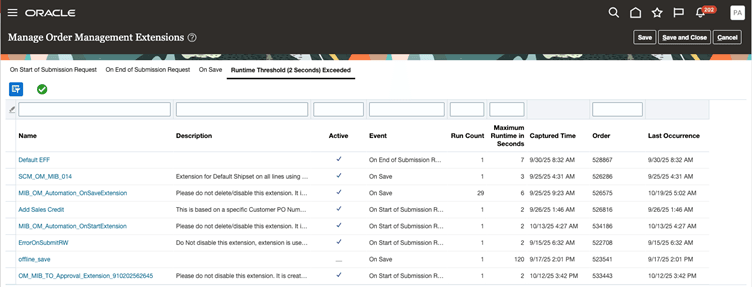
- Click the extension's name to view and modify it.
- Click the green check icon to remove the extension from the list.
Steps to enable and configure
You don't need to do anything to enable this feature.
Key resources
Access requirements
Users who are assigned a configured job role that contains this privilege can access this feature:
- Manage Order Management Extensions (FOM_MANAGE_ORDER_MANAGEMENT_EXTENTIONS)
This privilege was available before this update.