Redwood: Manage Currency Conversion Lists
Use redesigned pages in the Pricing Administration work area to create, read, update, and delete your currency conversion lists:
- Manage your currency conversions in the improved Redwood pages.
- Set up fixed conversion rates in Pricing or reference a dynamic rate from the general ledger.
Realize these benefits:
- Simplify how you set up a currency conversion for transactions in different currencies.
- Automatically calculate price in different currencies and simplify how you process complex sales orders.
- Streamline how you generate revenue and improve your cash flow.
Try it:
- Go to Home > Order Management > Show More > Manage Currency Conversion Lists – New.
- You can also launch Manage Currency Conversion Lists from Pricing Administration landing page.
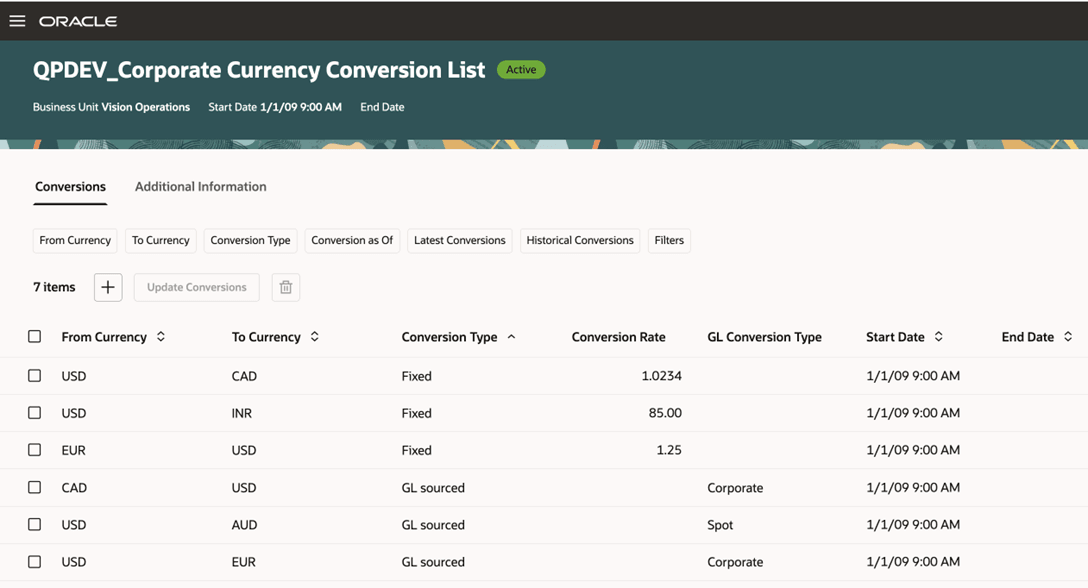
- Create a new list or open an existing one, then set up your conversion. For example:
- Use the + icon to start creating your conversions...
- For fixed conversions, select From and To Currency, conversion rate and the dates
- For GL sourced conversion, select From and To Currency, conversion type and the dates
Steps to enable and configure
You don't need to do anything to enable this feature.
Tips and considerations
- Use the filter chips to view the conversion rates that you want to see
- You can fetch the conversion rates from General Ledger and save them as fixed rates
Access requirements
Users who are assigned a configured job role that contains these privileges can access this feature:
- Approve Currency Conversion Lists (QP_APPROVE_CURRENCY_CONVERSION_LISTS)
- Manage Currency Conversion Lists (QP_MANAGE_CURRENCY_CONVERSION_LISTS)
These privileges were available before this update.