Redwood: Use Workflow Approvals for Item Associations
In Product Management, you can now route changes to the item organization associations or item supplier associations through a workflow approval process. Select a pending revision of an item and then select the Edit in Change Order action to edit the item. The page is displayed in the change context, where you can add supplier associations and update the existing associations. All these updates are redlined as shown in the following screenshot. After all the updates are done, you can submit the Change Order for approval.
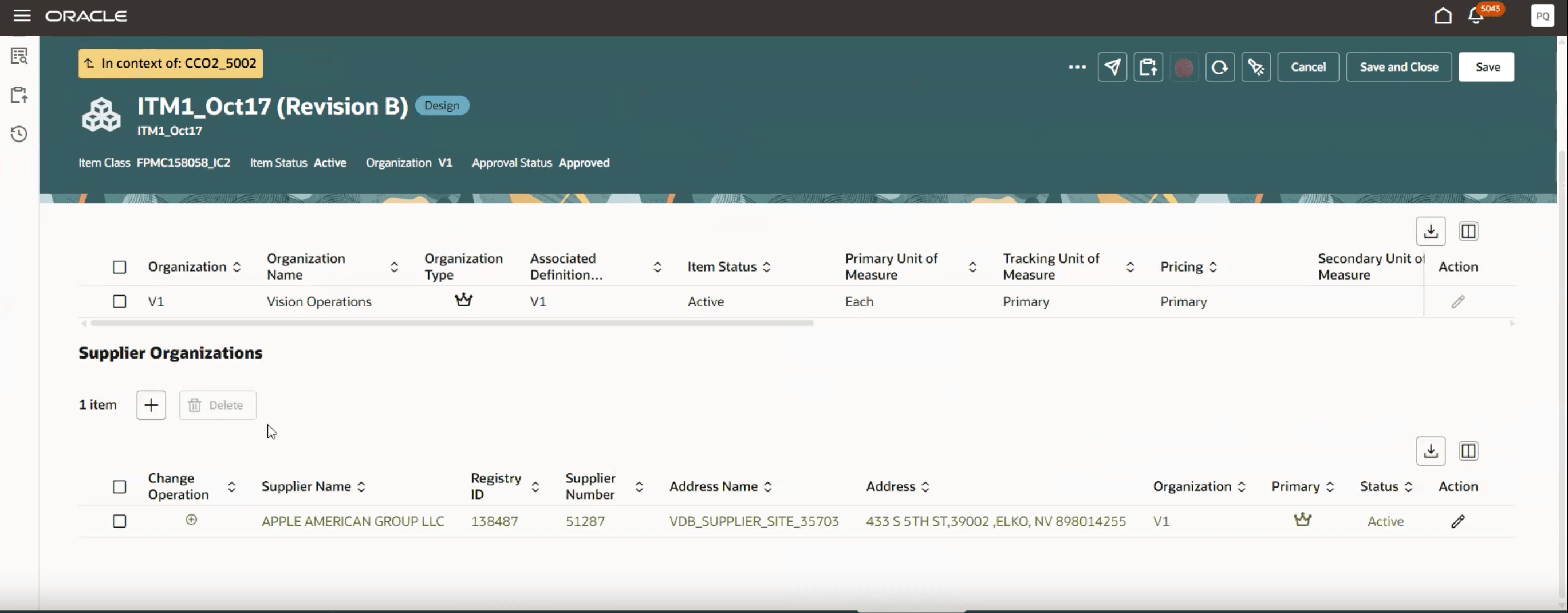
Supplier Association Addition in Change Order Context
This feature drives business value by enhancing flexibility and control by allowing you to route the changes to the item associations using the approval process.
Steps to enable and configure
You don't need to do anything to enable this feature.
Tips and considerations
You can create item rules to make sure that the item associations and item supplier associations are routed through approval rules.
Key resources
- Item Associations chapter in the Oracle Fusion Cloud SCM: Using Product Master Data Management guide, available on the Oracle Help Center.
- Oracle Fusion Cloud SCM: Implementing Product Management Guide, available on the Oracle Help Center.
Access requirements
Users who are assigned a configured job role that contains these privileges can access this feature:
To view or edit workflows on the new workflow pages, or to access notifications, for change orders:
- View Change Order (ACA_VIEW_CHANGE_ORDERS_PRIV) or
- Manage Change Orders (ACA_MANAGE_CHANGE_ORDERS_PRIV)
To create workflows from the Actions menu on the Item pages:
- Create Change Order (EGO_CREATE_CHANGE_ORDER_PRIV)
- Access Change Types Using a REST Service (EGO_GET_CHANGE_TYPES_REST_PRIV)
To create a change order from the item, either through a Needs Approval rule or by using the Assign to action:
- Create Change Order (EGO_CREATE_CHANGE_ORDER_PRIV)
- Manage Change Orders (ACA_MANAGE_CHANGE_ORDERS_PRIV)
- Access Change Types Using a REST Service (EGO_GET_CHANGE_TYPES_REST_PRIV)
To search for items on Redwood pages and view the item:
- Product Search (ORA_EGI_PRODUCT_SEARCH_DUTY)
- View Item Redwood Items (EGP_VIEW_REDWOOD_ITEM_PRIV)
To add item supplier associations:
- Manage Item Supplier Associations (EGP_MANAGE_REDWOOD_ITEM_SUPPLIER_ASSOCIATION_PRIV)
To add item organization assignments:
- Manage Item Redwood Associations (EGP_MANAGE_REDWOOD_ITEM_ASSOCIATION_PRIV)
To change item class of an item:
- Manage Item Redwood Items (EGP_MANAGE_REDWOOD_ITEM_PRIV)
These privileges were available prior to this update.