Redwood: Respond to Large Negotiations
Suppliers can now respond to large negotiations and category managers can enter surrogate responses to large negotiations on behalf of the suppliers.
For large negotiations, a response is initially created without lines.
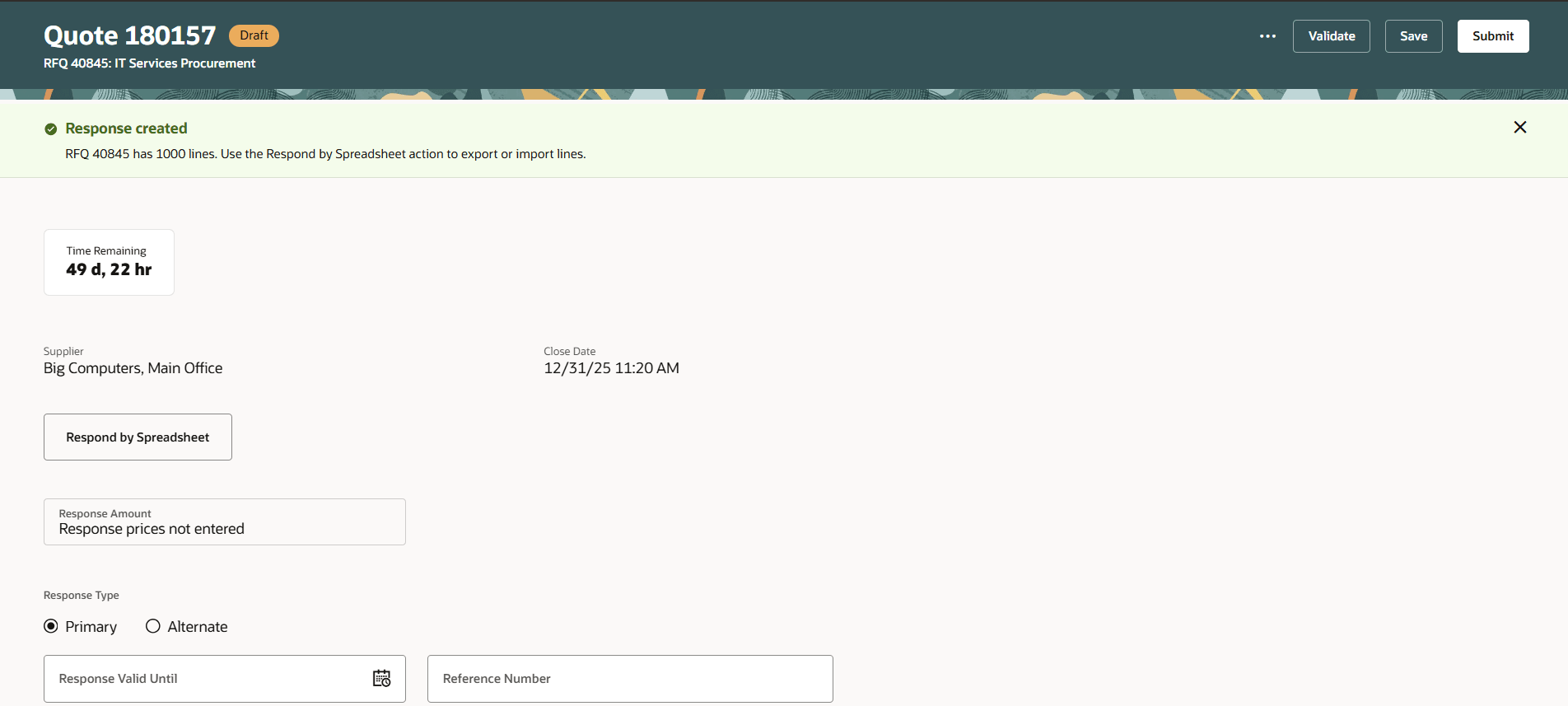
Response Created
Invited suppliers receive an invitation notification with the response lines spreadsheet (.CSV) and the negotiation details PDF as an attachment. Suppliers can directly use this response lines spreadsheet to prepare the response and import it.
"Suppliers can now search lines and edit their responses online using the details drawer. With the ‘From’ and ‘To’ line number filters, they can export selected lines and upload their responses in batches, making it easier to manage the large line volumes.
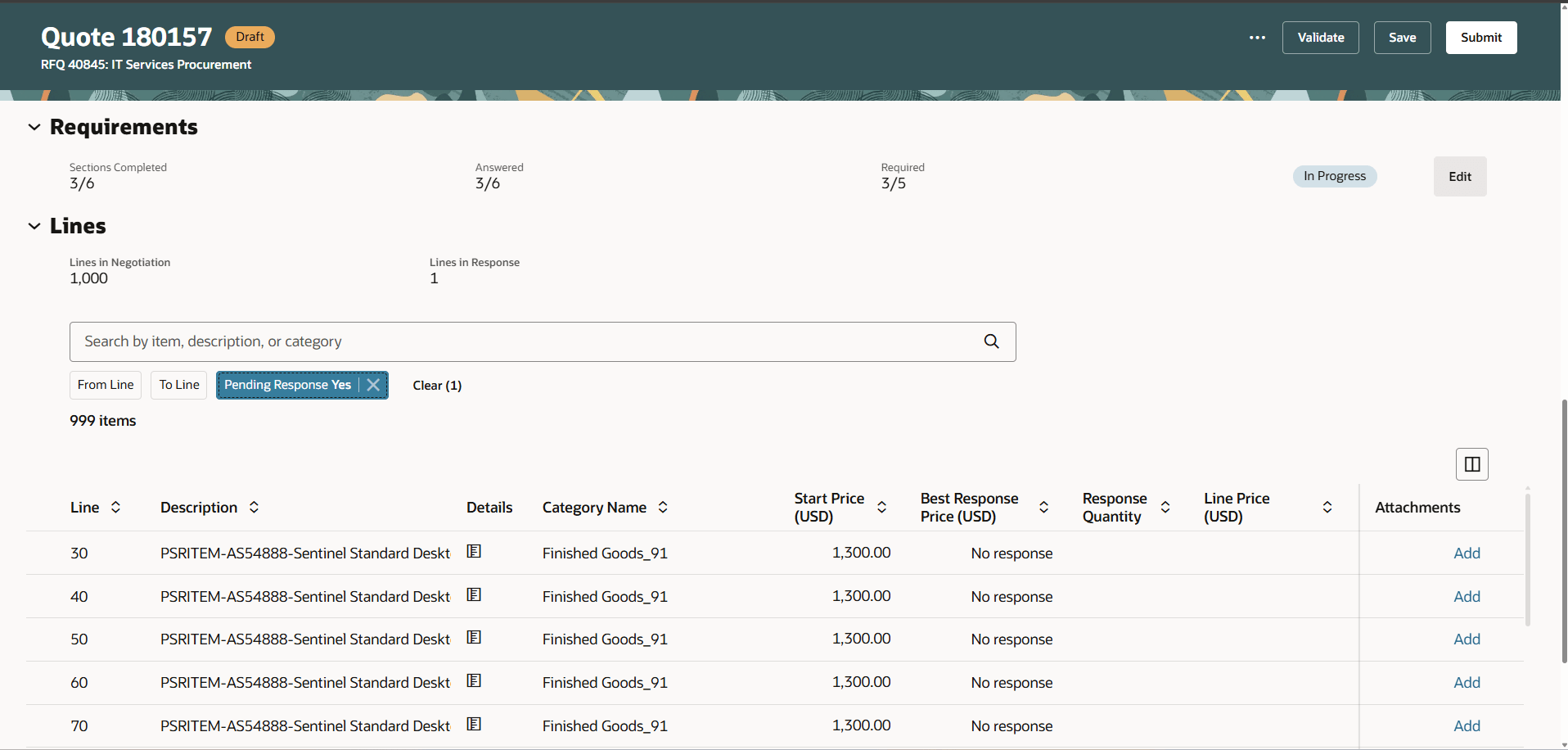
Search by Filters
After importing lines, suppliers can view the total number of lines and those already responded to and use improved filters to find lines pending response. The process to enter the response header and requirements related responses remains unchanged.
Actions such as export response lines spreadsheet, import response lines spreadsheet, validate response, and submit response, trigger background processes. Suppliers can monitor them in the Monitor Processes page and they are notified after the job is completed.
Category managers can also respond to large negotiations to create surrogate responses on behalf of suppliers in the same way.
Leveraging easy-to-use spreadsheets allows suppliers to work offline responding to a large number of lines. Background processes with timely notifications increases supplier efficiency for submitting responses.
Steps to enable and configure
Use the Opt In UI to enable this feature. For instructions, refer to the Optional Uptake of New Features section of this document.
Offering: Procurement
To enable the Redwood: Respond to Large Negotiations for suppliers, you must opt in to the required feature and enable the corresponding profile option if you haven’t already.
- Feature Redwood: Enable the New Supplier Portal Home Page Experience opt-in within the Supplier Portal functional area under the Procurement offering. For instructions on opting in to a feature, refer to the Optional Uptake of New Features section of this document.
To use the Redwood: Respond to Large Negotiations feature for category managers and internal users, you must enable these profile options if you haven't already:
- Redwood Pages for Sourcing Enabled (ORA_PON_SOURCING_REDWOOD_ENABLED).
- Redwood Page to Create Negotiation Enabled (ORA_PON_CREATE_NEGOTIATION_REDWOOD_ENABLED)
For instructions on enabling a profile option, refer to the Set Profile Option Values topic
Key resources
- Create response to a large negotiation.
- For information about using Oracle Visual Builder Studio to extend your Redwood application pages, see Oracle Fusion Cloud HCM and SCM: Extending Redwood Applications for HCM and SCM Using Visual Builder Studio.
Access requirements
Users who are assigned a configured job role that contains these privileges can access this feature for Suppliers:
- Create Supplier Negotiation Response (PON_CREATE_SUPPLIER_NEGOTIATION_RESPONSE_PRIV)
Users who have been assigned a job role that contains these existing privileges can access this feature for internal users:
- Create Supplier Negotiation Response as Surrogate (PON_CREATE_SURROGATE_SUPPLIER_NEGOTIATION_RESPONSE_PRIV): Allows users to create surrogate supplier negotiation responses on behalf of suppliers.
- Monitor Supplier Negotiation (PON_MONITOR_SUPPLIER_NEGOTIATION_PRIV): Allows users to view the Monitor Processes page.
These privileges were available prior to this update.