Redwood: View Supplier Details
The Supplier Details page now provides a streamlined view of key supplier information, enabling category managers to make faster, more informed decisions when inviting suppliers or making award decisions. You can access the supplier details page by clicking on the supplier name when inviting them or when viewing the negotiation.
Some key improvements in the Redwood experience compared to the classic application:
- Flexible Page Layout Control - Users can use the Edit Page Layout button to create tabs to add your own OTBI-based KPIs and data visualizations that best represent your business and are critical for your category managers to monitor regularly.
- Receive Warning for Any Purchasing Documents on Hold - The warning banner on overview tab alerts if any supplier sites are on purchasing hold
- View Supplier Contact Name - Within the Supplier Contacts table, you can quickly and easily identify the primary point of contact.
- Search for Qualifications and Assessment - Within the Qualifications tab, users are now able to easily locate qualifications and assessments tied to their suppliers using the new search bar.
- Search for Approved Supplier Entries - In the Approved Supplier Entries tab, users are now able to easily locate Approved Supplier Entries using the new search bar. Users can either search by value or description.
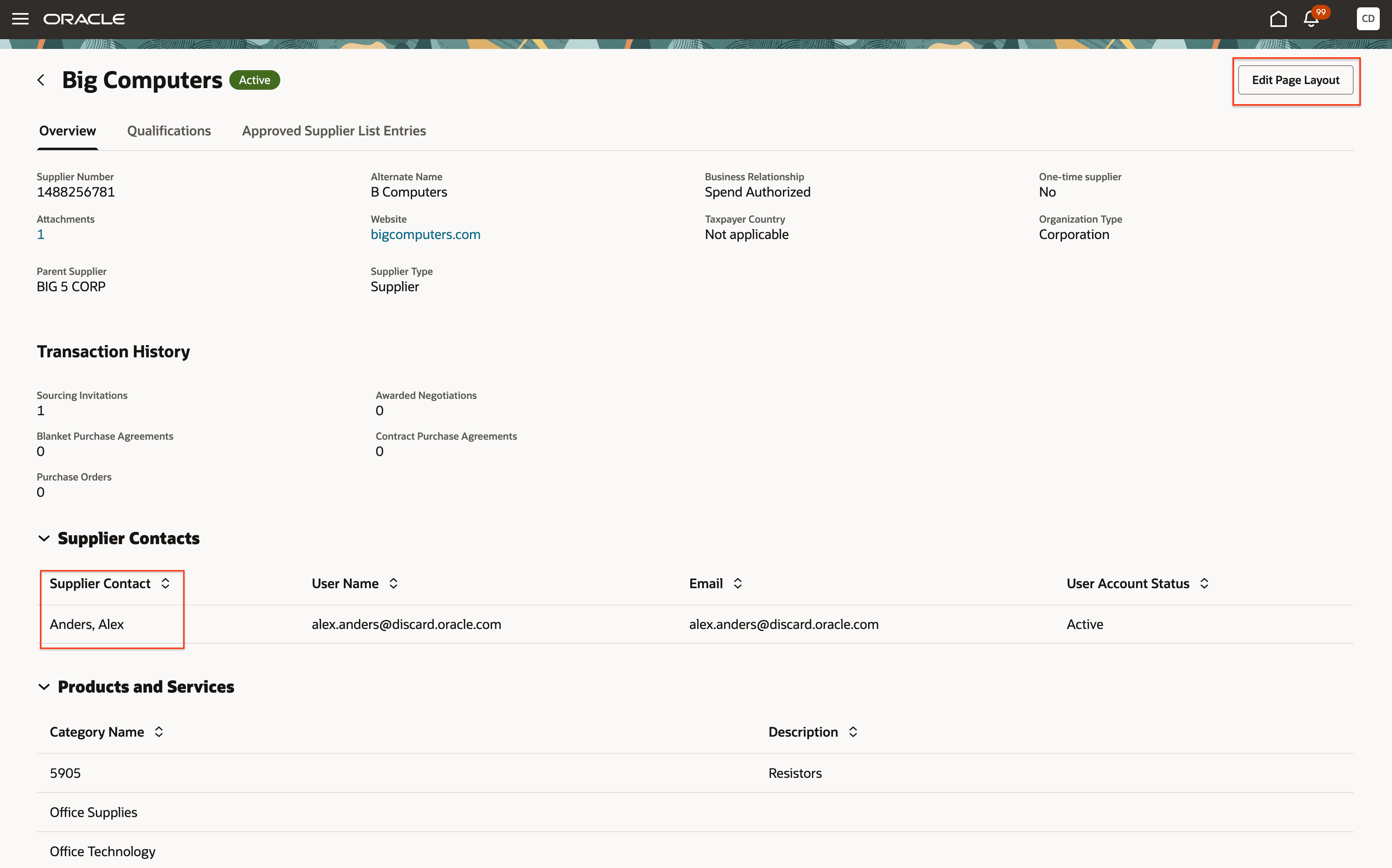
Customize Your Page Layout and View Your Supplier Contacts
The new user experience makes it easier to locate key supplier information and evaluate suppliers more efficiently. The updated layout and improved navigation enables faster, more consistent supplier evaluations.
Steps to enable and configure
To use this feature, you must enable these profile options if you haven't already.
- Redwood Pages for Sourcing Enabled (ORA_PON_SOURCING_REDWOOD_ENABLED).
- Redwood Page to Create Negotiation Enabled (ORA_PON_CREATE_NEGOTIATION_REDWOOD_ENABLED)
For instructions on enabling a profile option, refer to the Set Profile Option Values topic.
Key resources
- For information about using Oracle Visual Builder Studio to extend your Redwood application pages, see Oracle Fusion Cloud HCM and SCM: Extending Redwood Applications for HCM and SCM Using Visual Builder Studio.
- Refer to Overview of Guided Journeys in the Oracle Fusion Cloud Human Resources: Implementing and Using Journeys guide, available on the Oracle Help Center.
- For details about how to add your own key performance indicators (KPIs) and visualizations to your page, see Flexible Reporting in Redwood Dashboards.
Access requirements
Users who are assigned a configured job role that contains these existing privileges can access this feature:
- Research Suppliers (PON_ANALYZE_NEGOTIATION_SUPPLIER_PRIV)
- View Supplier (POZ_VIEW_SUPPLIER_PRIV)
- View Supplier Qualification (POQ_VIEW_SUPPLIER_QUALIFICATION_PRIV)
- View Supplier Assessment (POQ_VIEW_SUPPLIER_ASSESSMENT_PRIV)