Redwood: Add Lots and Groups
Category managers can now add lots and groups when creating negotiation lines using the Redwood experience.
The behavior for lots and groups in Redwood is the same as the classic application.
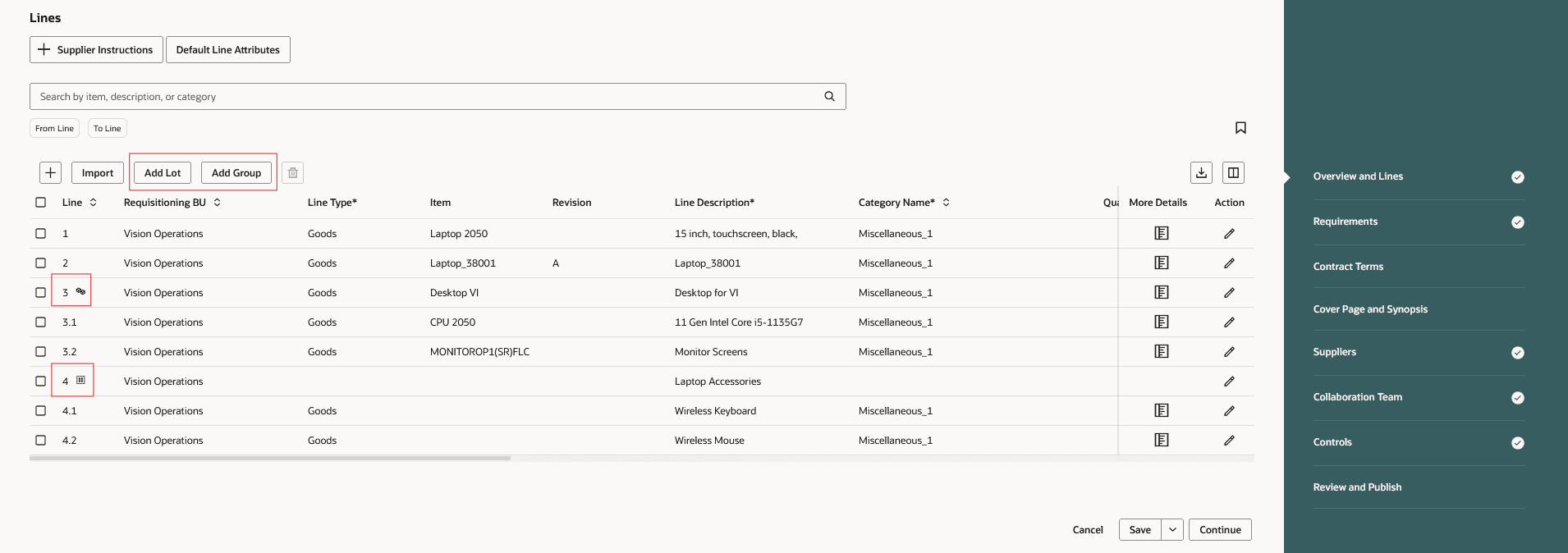
Add Lots and Groups
Lots and groups facilitate organizing lines when creating a negotiation.
Steps to enable and configure
To use this feature, you must enable these profile options if you haven't already.
- Redwood Pages for Sourcing Enabled (ORA_PON_SOURCING_REDWOOD_ENABLED).
- Redwood Page to Create Negotiation Enabled (ORA_PON_CREATE_NEGOTIATION_REDWOOD_ENABLED)
For instructions on enabling a profile option, refer to the Set Profile Option Values topic.
Tips and considerations
Suppliers can bid on lots. Lot lines are for additional info, and don't roll up to the lot level. For groups, suppliers must bid on the individual group lines. The prices will get rolled up at the group level to show the group amount.
Key resources
- For information about using Oracle Visual Builder Studio to extend your Redwood application pages, see Oracle Fusion Cloud HCM and SCM: Extending Redwood Applications for HCM and SCM Using Visual Builder Studio.
- Refer to Overview of Guided Journeys in the Oracle Fusion Cloud Human Resources: Implementing and Using Journeys guide, available on the Oracle Help Center.
Access requirements
Users who have been assigned a job role that contains these existing privileges can access this feature:
- Create Supplier Negotiation (PON_CREATE_SUPPLIER_NEGOTIATION_PRIV)
- Edit Supplier Negotiation (PON_EDIT_SUPPLIER_NEGOTIATION_PRIV)