 Redwood: Override Planned Dates for Reserved Order Lines
You can now override the planned ship date or planned arrival date for previously reserved order lines. Use this option to update dates based on new supply information not yet shown in the Backlog Management plan. The overridden dates remain in effect during rescheduling until the order lines are released or the next collection process completes.
You can override Planned Ship Date, Planned Arrival Date, and Planned Shipping Method for fully and partially reserved order lines. However, you cannot override Planned Ship-from Organization or edit input attributes for reserved order lines.
Select the reserved order lines for which you want to override the planned dates. You can check the Reserved Quantity in the Backlog Analysis UI. Then, click the edit icon.
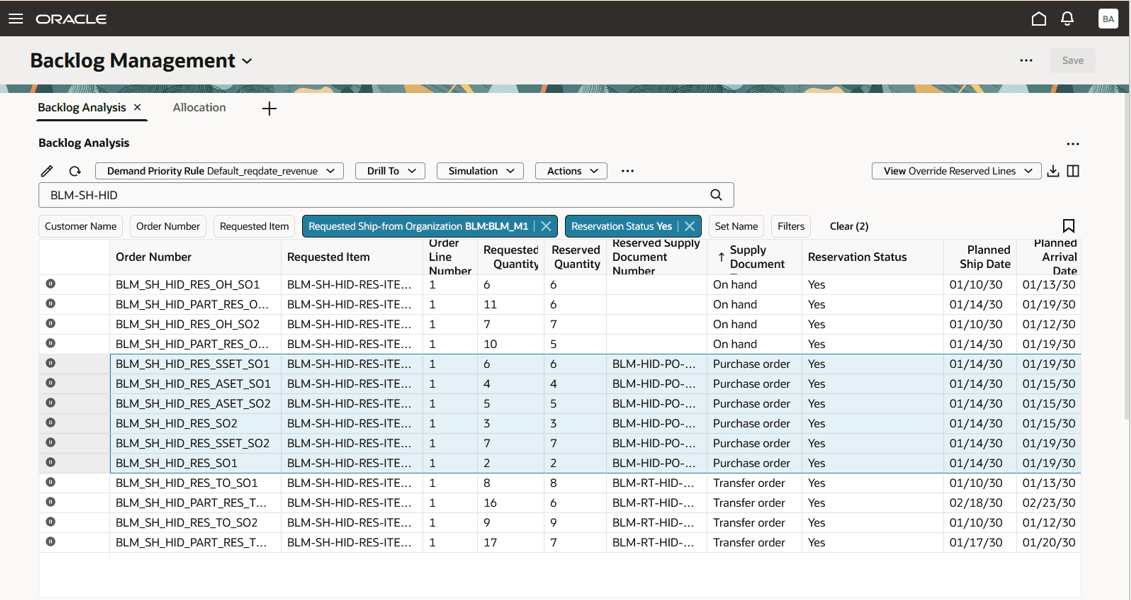
Selecting Reserved Lines to Override
In the Order attributes drawer, enter the overridden Planned Ship Date or Planned Arrival Date, then click Apply.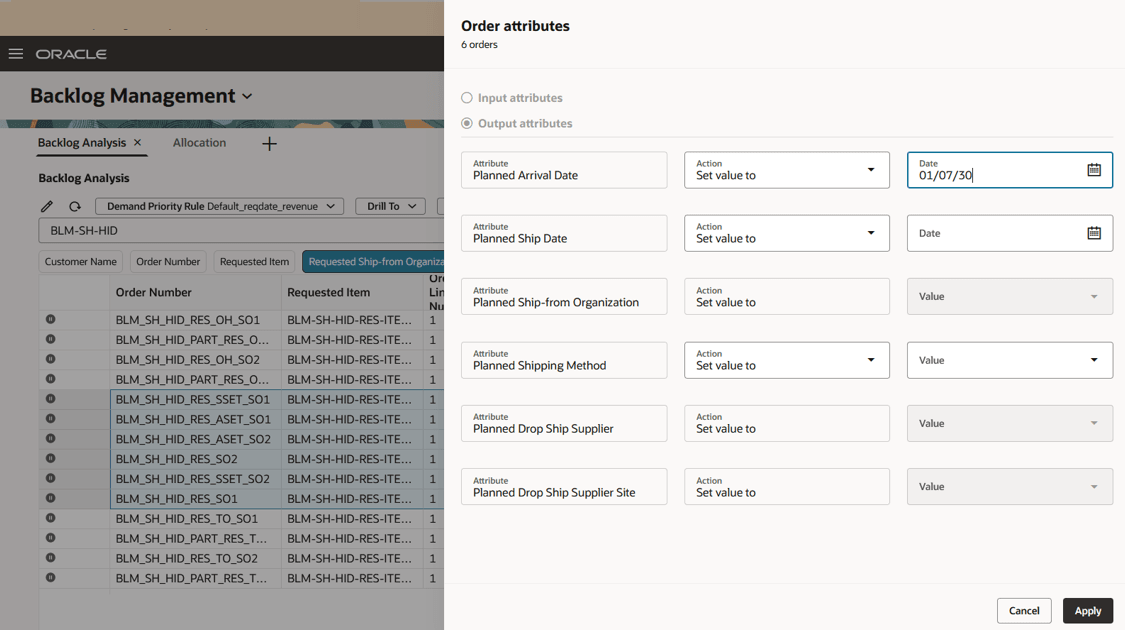
Override Planned Dates
After the override, the affected order lines display the override icon in the first column. Then, run the backlog plan and save the backlog plan results.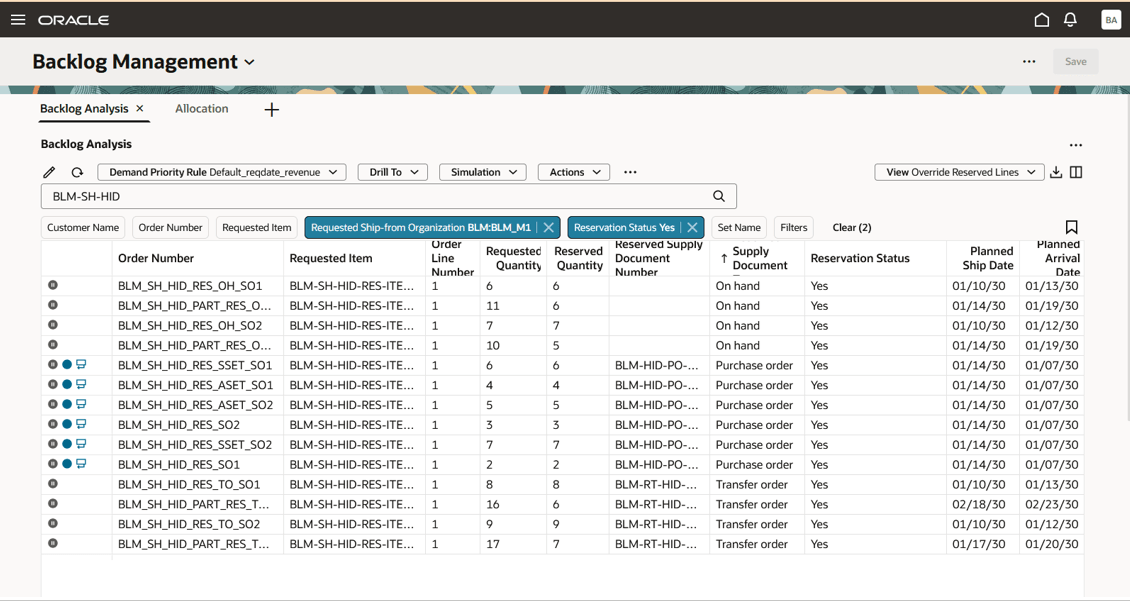
Overridden Reserved Order Lines
The overridden planned dates for reserved order lines can be released to your order management system. When you release an overridden date for back-to-back order lines to Oracle Fusion Cloud Order Management, the underlying reserved supply due date is also updated automatically in their respective systems. For example, the due dates for underlying supplies such as Purchase Orders, Work Orders, and Transfer Orders are updated in Oracle Fusion Cloud Purchasing, Oracle Fusion Cloud Manufacturing, and Oracle Fusion Cloud Inventory respectively.
For example, override the Planned Ship Date for a reserved sales order line for a back-to-back item reserved to a purchase order.
The following key points apply to the data shown in this example:
- System Date (Plan run date): 1/7/2030
- Request Type: Ship
- Sales order line for back-to-back item is reserved to purchase order
- Due date of purchase order: Jan 28th,2030
- Post-Processing Lead and Pick-Pack Lead Time are not set
- The date January 7th, 2030, falls on a Monday
The Planned Ship Date originally planned by Backlog Management is January 28th, 2030. This is based on the Purchase Order due date in the collected data.
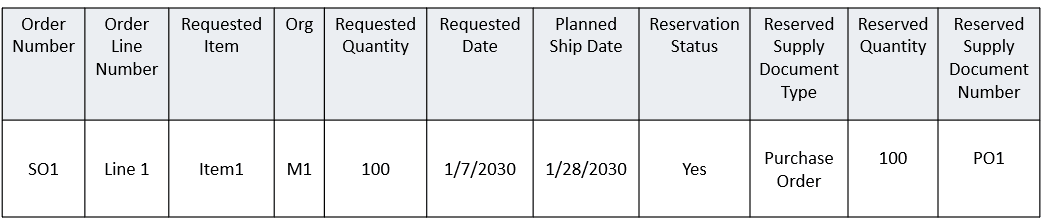
Reserved Back-to-Back Sales Order Line Originally Planned by Backlog Management
Based on an internal discussion with the supplier, the purchase order is now expected to arrive early on January 14th, 2030. Let us override the Planned Ship Date to January 14th, 2030, and then run the backlog plan. After the backlog plan run, the order is planned on the overridden Planned Ship Date, and the Planned Arrival Date is calculated automatically based on the transit time from the Requested Ship-from Organization to the customer.
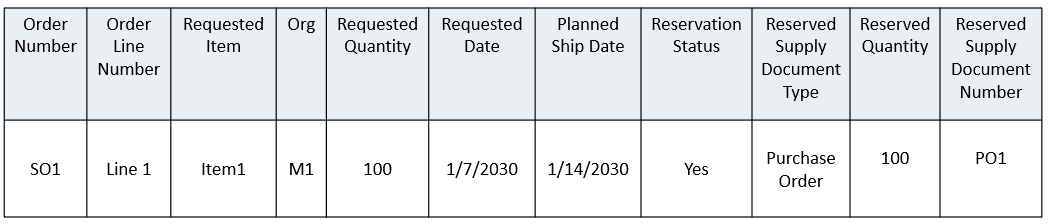
Reserved Back-to-Back Sales Order Line Planned After Override
Now you can release backlog planning results to Oracle Order Management. After the release, the sales order line Scheduled Date is updated to January 14th, 2030 in Oracle Order Management and the corresponding reserved supply Purchase Order due date is automatically updated to January 14th, 2030.
Steps to enable and configure
Use the Opt In UI to enable this feature. For instructions, refer to the Optional Uptake of New Features section of this document.
Offering: Supply Chain Planning
Tips and considerations
If you want to use the Redwood: Override Planned Dates for Reserved Order Lines feature, then you must opt in to its parent feature: Order Backlog Management. If you’ve already opted in to this parent feature, then you don’t have to opt in again.
Features Delivered Enabled: Ready for Use by End Users
Additional Tips and Considerations:
- The due date of underlying reserved supply is updated automatically in the corresponding Oracle Fusion system only for back-to-back orders.
- If you select both reserved and non-reserved order lines for inline or mass edit, only the Planned Ship Date, Planned Arrival Date, and Planned Ship-from information can be overridden.
- When you override the Planned Dates for non-reserved order lines, it is not mandatory to override Planned Ship-from organization or Planned Drop Ship Supplier along with it.
- You can override planned dates for reserved order lines only in the Redwood user experience.
Key resources
- Refer to the Cloud Applications Readiness content for the following 25B Supply Chain Planning features for more information on the Supply Chain Planning Work Area:
- Redwood: Analyze and Replan Backlog Using a New User Experience
Access requirements
Users who are assigned a configured job role that contains these privileges can access this feature:
- Monitor Backlog Management Work Area (MSC_MONITOR_BACKLOG_MANAGEMENT_WORK_AREA_PRIV)
- Create Backlog Plan (MSC_CREATE_BACKLOG_PLAN_PRIV)
These privileges were available prior to this update. The following site-level profile should be enabled:
- Redwood Backlog Management Pages Enabled (ORA_MSC_BACKLOG_MANAGEMENT_REDWOOD_ENABLED)