Use Sequencing Rules to Schedule Production Lines
With this update, you can now schedule production lines more effectively by applying attribute-based sequencing rules that control how flow schedules are sequenced. Minimum and maximum run sizes, must-follow conditions, or spacing targets ensure that flow schedules with certain attribution are arranged in an efficient, balanced sequence. You can leverage item and work order header attributes to define these sequencing rules. This capability improves line balancing, reduces jamming or starvation of stations along the line, and ensures an overall smoother flow of product.
Set the Scheduling Strategy to Rule-based sequence for a production line.
- On the Production Lines page, click the Actions menu to navigate to the Flow Sequencing Rules page.
- Define the attribute-based sequencing rules for this production line. The rules specified here will be considered during schedule calculation.
All sequencing rules use item attributes maintained as item extensible flexfields and work order header descriptive flexfields. Only those attributes that are assigned to a production line are considered during sequencing. You can assign attributes to a flow production line in the Scheduling Organization data setup pages. If you wish to define sequencing rules based on the item name, then you must populate an item extensible flexfield with the name of the item and treat that like any other custom attribute.
Note that a work order header attribute isn’t considered for flow sequencing, if two or more work orders, that produce the same item, have different attribute values for that attribute. Any flow sequencing rule that uses such work order header attribute is ignored. Flow sequencing rules for different attributes that apply to these work orders will still be considered.
The following screenshot shows some sample flow sequencing rules.
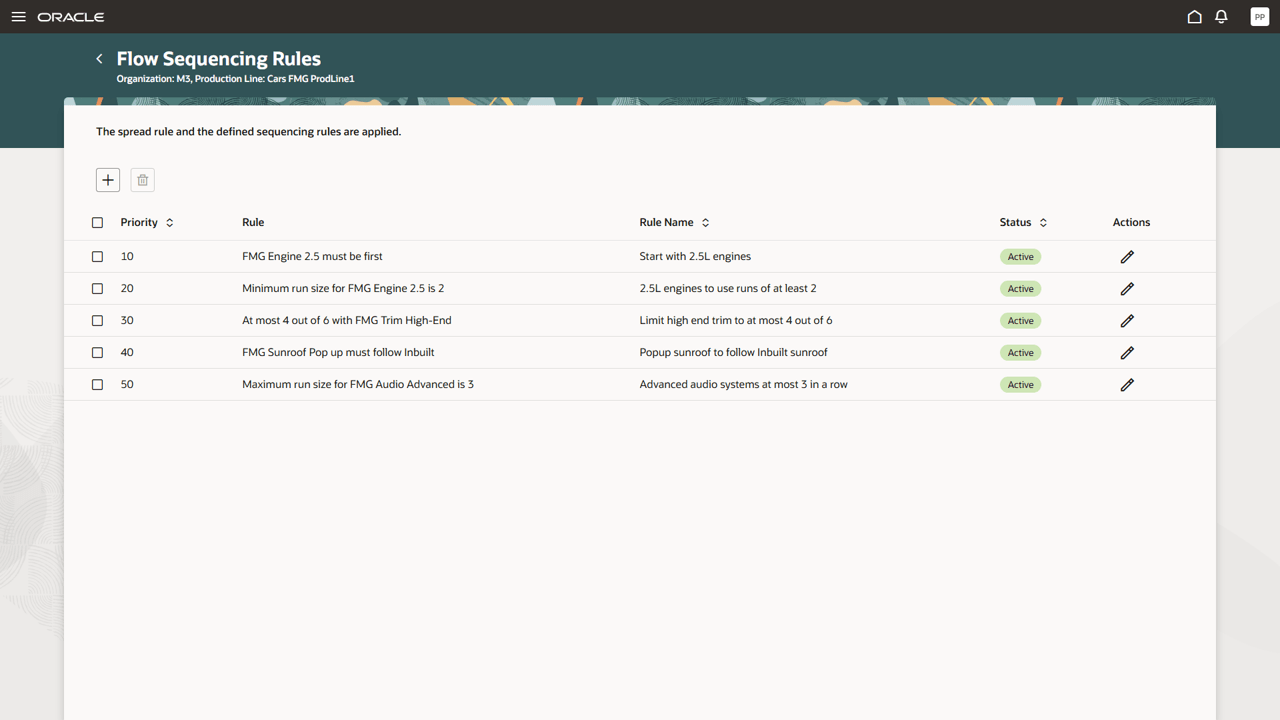
Flow Sequencing Rules for a Production Line
When adding or editing a sequencing rule in the drawer, specify the fields that are common to all rule types: The rule priority, the rule type, the rule name, an attribute, an attribute value; you can optionally enter a rule name. Additional details that are specific to each rule type must be entered as listed in the following table.
Available Flow Sequencing Rule Types
| Rule Type | Rule Type-Specific Properties |
|---|---|
| Minimum Run | Minimum Run Size |
| Maximum Run | Maximum Run Size |
| Must Follow | Previous Attribute Value |
| Must not Follow | Previous Attribute Value |
| At Least K of N | At Least (K Value), Out Of Every (N Value) |
| At Most K of N | At Most (K Value), Out Of Every (N Value) |
| Must be First | - |
Following screenshot shows the drawer with rule details for one rule, the At Most K of N rule.
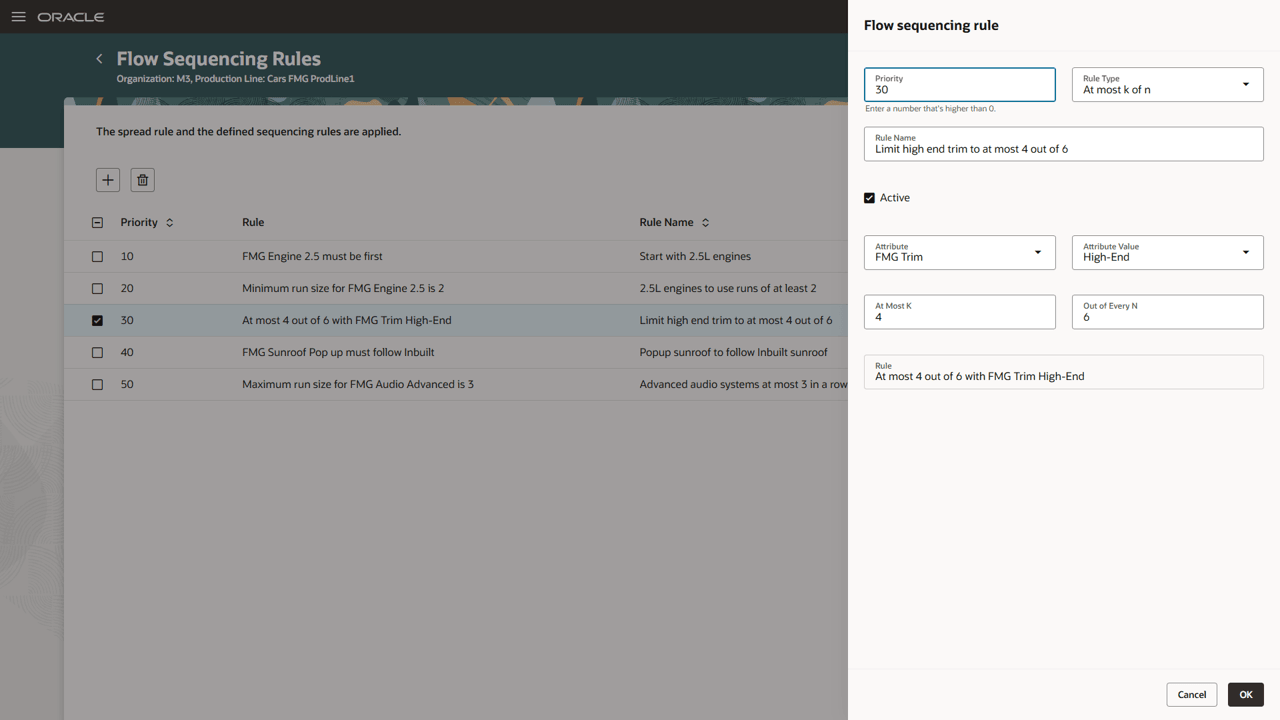
Specifying Details for an At Most K of N Sequencing Rule
Not all sequencing rules can always be satisfied as it may not be possible for the given set of flow schedules and the set of defined rules. This is especially true when contradictory rules are defined. For example, a maximum run size rule is defined for a certain attribute and attribute value with a maximum run size of 3 units. Also, a minimum run size rule is defined for the same attribute and attribute value with a minimum run size of 4 units, or having two different Must be First rules defined, as only one item can be first. In such situations, Production Scheduling aims to satisfy the rules with lower rule priority numbers over those with higher priority numbers. You can change the rule priority in the side drawer.
The spread behavior will always be implicitly applied. It can’t be turned off for any production line that is set up with scheduling strategy as Rule-based sequence. Any explicitly defined sequencing rule is considered with higher priority, even if it counteracts the spread behavior, as the Minimum Run rule naturally will do.
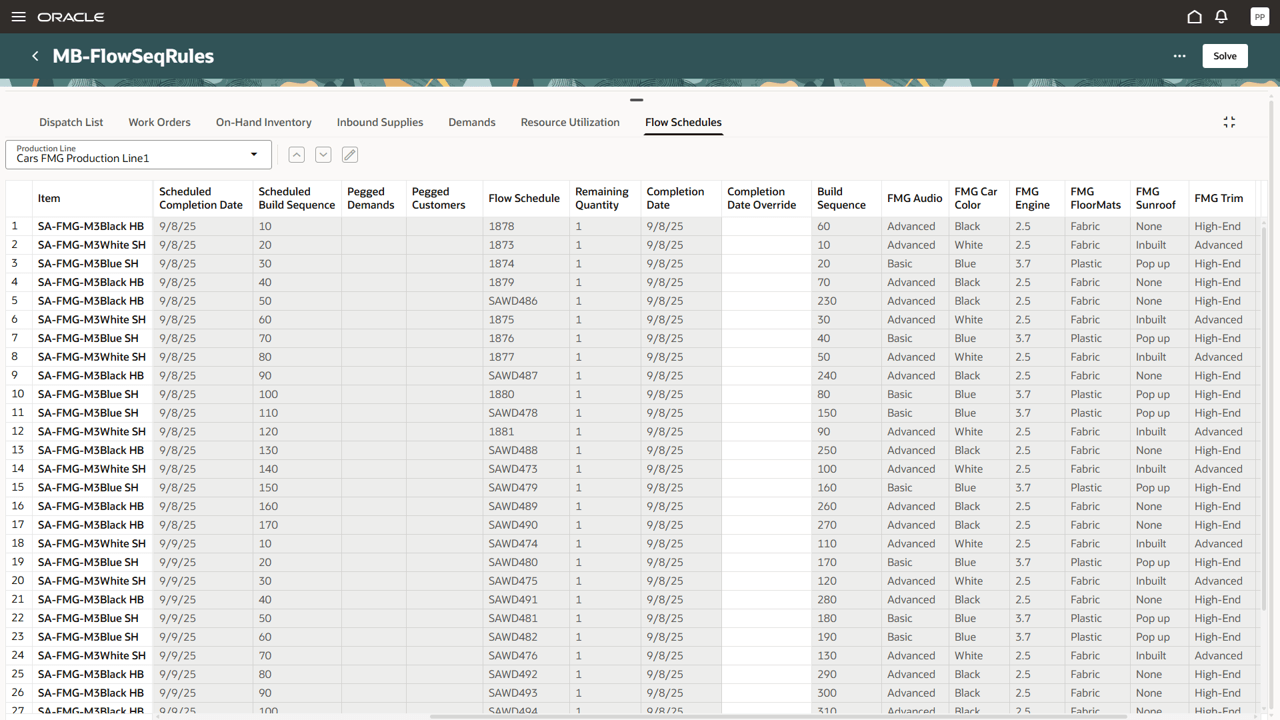
Displaying Flow Schedules with Attributes
Consider the generated flow schedule sequences as shown in the screenshot. We can observe how the specified rules were considered and where they were violated, for example:
- The sequence starts with a 2.5L FMG Engine, satisfying the first rule with priority 10.
- The 2.5 FMG Engine is typically scheduled in runs of 2 or 3, satisfying rule with priority 20.
- Looking at runs of 6 items (up to row 26), the High-End FMG Trim appears at most 4 times, satisfying rule with priority 30. Only starting row 26 is this rule violated, as there are only High-End FMG Trims left to schedule in this data set.
- The Popup Sunroof mostly follows Inbuilt Sunroof, but not always. Several flow schedules violate rule with priority 40, for example, flow schedule 1880, SAWD478, SAWD481.
- Flow schedules with FMG Audio Advanced are generally scheduled in runs of 2 or 3, but flow schedules SAWD476, SAWD492, SAWD493, SAWD494 towards the end do exceed the maximum run size of 3, thus violating rule with priority 50. This is an example where the data set forces such violation, as too many of the flow schedules do have FMG Audio Advanced attribution.
The Completion Date and Build Sequence are the current values from Oracle Manufacturing for these flow schedules. The Scheduled Completion Date and Scheduled Build Sequence correspond to the results calculated by the solve or repair actions and are used to update the flow schedules’ completion dates and build sequence numbers in Oracle Manufacturing upon schedule release.
All sequencing rule violations are listed in the Run Scheduling Solve log file. You can navigate to the Schedules Processes UI page, use the Request ID to find the relevant process, and retrieve the log file.
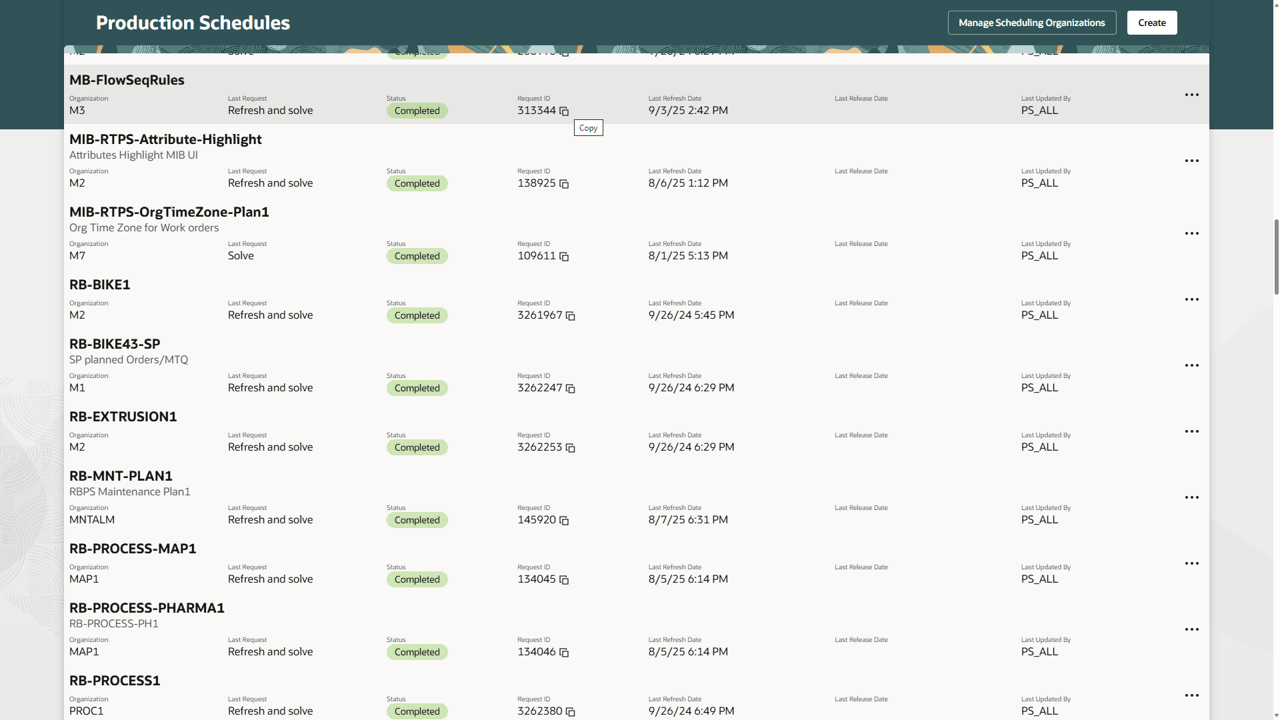
All Sequencing Rule Violations are in Log File
Steps to enable and configure
Use the Opt In UI to enable this feature. For instructions, refer to the Optional Uptake of New Features section of this document.
Offering: Supply Chain Planning
Tips and considerations
If you want to use the Use Sequencing Rules to Schedule Production Lines feature, then you must opt in to its parent feature: Production Scheduling. If you’ve already opted in to this parent feature, then you don’t have to opt in again.
You can copy flow sequencing rules from one production line to another production line using the Copy Flow Sequencing Rules action. This will replace existing rules on the current production line with the rules from the other production line.
Key resources
- Visit https://redwood.oracle.com/ for more information about the Redwood experience.
Access requirements
Users who are assigned a configured job role that contains this privilege can access this feature:
- Edit Production Schedule (MSC_EDIT_PRODUCTION_SCHEDULE_PRIV)
This privilege was available prior to this update.