Schedule Considering Work Order Header Attributes
You can now use Descriptive flexfields maintained on work order headers to drive schedule calculation using changeover rules, attribute sequences, and flow sequencing rules. In addition, you can use them in the schedule views to support schedule analysis.
Before this update, you could use work definition operation descriptive flexfields and item extensible flexfields as customer specific attributes within Production Scheduling. With this update, you can now also use work order header descriptive flexfields. The work order header descriptive flexfield applies to both work orders and flow schedules.
Similar to the work definition operation descriptive flexfields and item extensible flexfields, the work order header descriptive flexfields’ value sets must be defined with validation type as Independent.
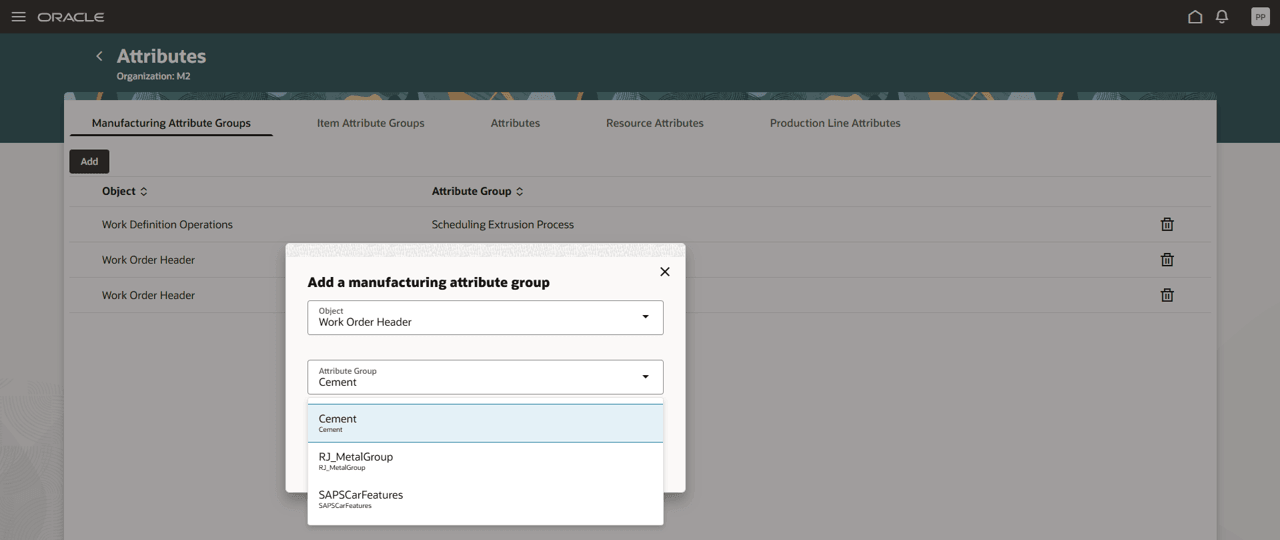
Declaring a Work Order Header Attribute Group for Use in a Scheduling Organization
After adding work order header descriptive flexfields as manufacturing attribute group in Production Scheduling, a scheduling organization Refresh action retrieves the attributes and their values into Production Scheduling. You can then use these attributes to define changeover rules, user-defined attribute sequences, and flow sequencing rules, all of which are considered during schedule calculation. In addition, to support schedule analysis, the attributes are displayed in the dispatch list and flow schedules table and are used in the Gantt chart for highlighting and in the tooltips.
An attribute’s value set Sort Order field maintained in the Setup and Maintenance module is now also carried through to Production Scheduling. This applies not only to work order header descriptive flexfields, but also to work definition operation descriptive flexfields and item extensible flexfields. In the respective Scheduling Organization data maintenance page, you can specify whether the sort order field from the value set shall be considered in Production Scheduling when defining an attribute sequence.
Steps to enable and configure
Use the Opt In UI to enable this feature. For instructions, refer to the Optional Uptake of New Features section of this document.
Offering: Supply Chain Planning
Tips and considerations
If you want to use the Schedule Considering Work Order Header Attributes feature, then you must opt in to its parent feature: Production Scheduling. If you’ve already opted in to this parent feature, then you don’t have to opt in again.
Key resources
- Visit https://redwood.oracle.com/ for more information about the Redwood experience.
Access requirements
Users who are assigned a configured job role that contains this privilege can access this feature:
- Edit Production Schedule (MSC_EDIT_PRODUCTION_SCHEDULE_PRIV)
This privilege was available prior to this update.