AI Agent: Planning Order Release Assistant
Use a workflow AI agent in Oracle AI Agent Studio called Planning Order Release Assistant to help manage planned orders from Oracle Supply Planning. Instead of manually reviewing every order, use the AI agent. The Order Release Assistant applies the business rules you care about such as the exception types and the thresholds you configure to automatically decide which orders are ready for release.
The Planning Order Release Assistant is an AI Agent available as an integrated workflow within Supply Planning. It is accessible in the plan’s action menu.
Use the Order Release Assistant to examine your selected orders. The agent evaluates their exceptions according to a set of rules you define in the threshold document. It then marks them for release if they pass the thresholds in your defined rules. This saves you a significant time by automating the routine checks and keeping you focused only on the exceptions that need attention.
Threshold Document
The threshold document contains the business rules or exceptions you define to mark the orders for release. This document can be a PDF file, a text (.txt) file, or a .csv file. Your threshold document should list the exceptions you want to review for your orders, and what severity threshold you would like to set for each exception. Once uploaded, you can reuse the threshold document each time you submit the evaluation to Order Release Assistant.
For example, you can define the Order Release Assistant to evaluate orders with the demand exception, Late Supply Pegged to Sales Order. Consider the following exception:
Exception: "Late Supply Pegged to Sales Order", Exception days > 7
It’s evaluated as follows:
If an order has a Late Supply Pegged to Sales Order exception and the exception days value is greater than 7, then the order won’t be marked for release. Orders with the exception days of less than or equal to 7 are marked for release.
Since exceptions apply to different plan types, you must group your exceptions by exception type. The rules document is processed by the AI agent. So, you must follow the format that is understood by the AI agent. Here is the complete format of how to write the rules in the threshold document.
|
This is the rule book to classify orders based on some predefined exception rules. 1. Demand Exceptions: 2. Supply Exceptions: |
Make sure you use the same numbering pattern and indentations as given in the example. The additional informational text is required for the LLM to process the rules.
In the given example, for demand exception, Late Supply Pegged to Sales Order is the demand exception and Exception days >7 is the qualification criteria.
Similarly, for supply exception, Orders to be Rescheduled In is the supply exception and Reschedule Days > 10 is the qualification criteria.
Supported Exception Types
The demand exceptions can be evaluated using the attributes Exceptions Days, Days Late, and Order Value. The following demand exceptions are supported for evaluation:
- Late Replenishment for Sales Order
- Late Replenishment for Forecast
- Demand Quantity Not Satisfied
- Demand at Risk Due to Resource Shortage
- Demand at Risk Due to Supplier Capacity Shortage
- Late Supply Pegged to Forecast
- Late Supply Pegged to Sales Order
- Past Due Sales Orders
- Demand at Risk Due to Insufficient Lead Time
- Late Demand Due to Resource Capacity Constraints
- Late Demand Due to Supplier Capacity Constraints
- Demand at Risk Due to Insufficient Maturity Time
The supply exceptions can be evaluated using the attributes Exceptions Days, Order Value, Compression Days, Reschedule Days, and Days Past Due. The following supply exceptions are supported for evaluation:
- Past Due Orders
- Orders To Be Canceled
- Orders To Be Rescheduled Out
- Orders To Be Rescheduled In
- Orders with Insufficient Lead Time
- Planned Order Uses Alternate Work Definition
- Planned Order uses Substitute Component
- Planned Order uses Alternate Resource
- Order Sourced from Alternate Facility
- Order Sourced from Alternate Supplier
- Items with Expired Lots
Supported Operations
Use the following operators to define the exception criteria:
| Operation | Description |
|---|---|
| > | Greater than |
| >= | Greater than or equal to |
| == | Equal to (note this uses 2 equal signs) |
| < | Less than |
| <= | Less than or equal to |
| != | Not equal to |
| Exclude | Exclude value |
Using the Planning Order Release Assistant
- Open Supplies and Demands visualization.
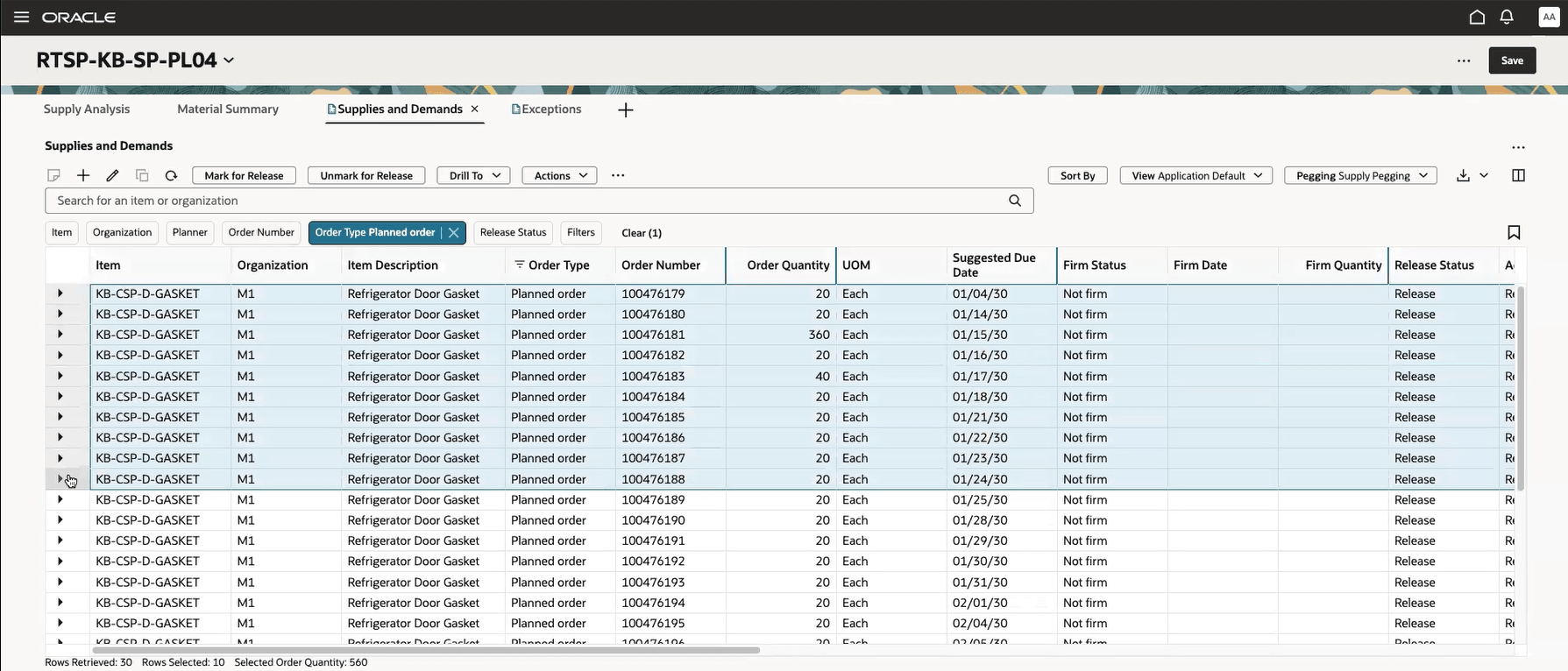
Supplies and Demands Page
- Select one or more planned orders that you want to evaluate for release. The Order Release Assistant will process the first 200 selected orders.
Note: Only new planned orders, existing supply reschedules, or cancellations and sales orders, may be reviewed by the AI agent. If any of the orders you select include ineligible orders, the ineligible orders will be ignored, and the rest of the orders will be submitted.
- From the Action menu, select Use Order Release Assistant. The Order Release Assistant drawer opens.
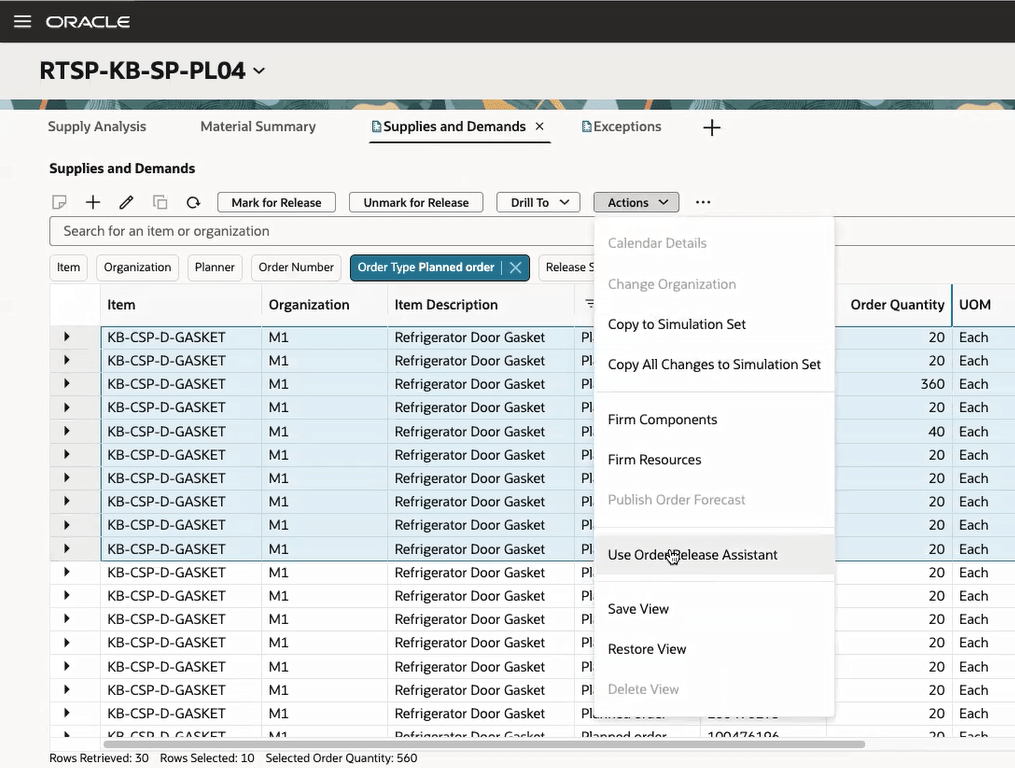
Order Release Assistant Action Menu
- Choose Selected rows or All rows to select specific rows or to include all your search results respectively.
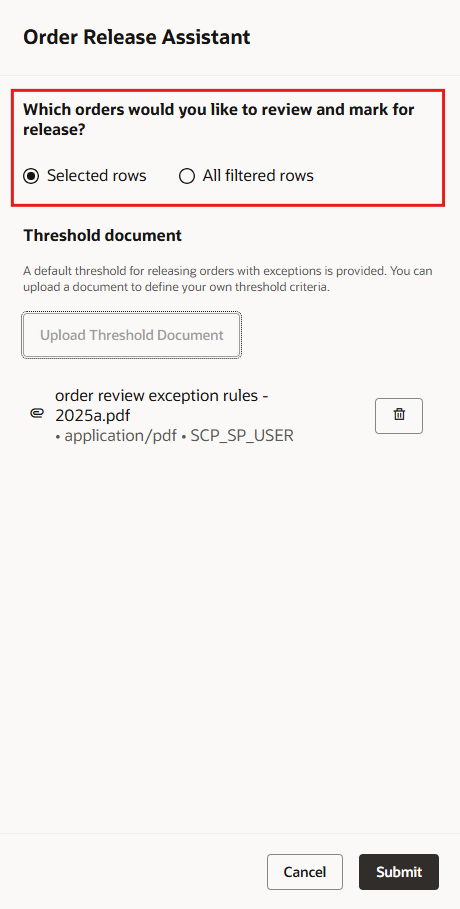
Order Release Assistant Drawer
- If you haven’t already, upload the threshold document. You define the exceptions in this threshold document.
Note: If there isn’t any threshold document uploaded, the Order Release Assistant uses the thresholds that are available by default.
If a threshold document was already uploaded, you can see the last uploaded document with time stamp.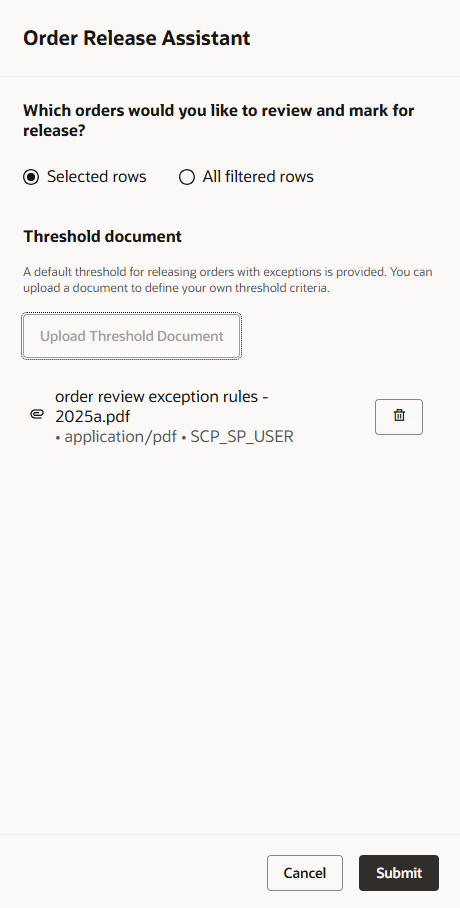
Order Release Assistant Drawer Displaying the Last Uploaded Document
- Click Submit.
The AI agent reviews the planned orders against the exception rules mentioned in the threshold document. Orders that meet your criteria are marked for release. The orders that don’t match the criteria are available in the list for further review.
After the workflow process is complete, a message displays the total number of orders evaluated and the number of those orders marked for release.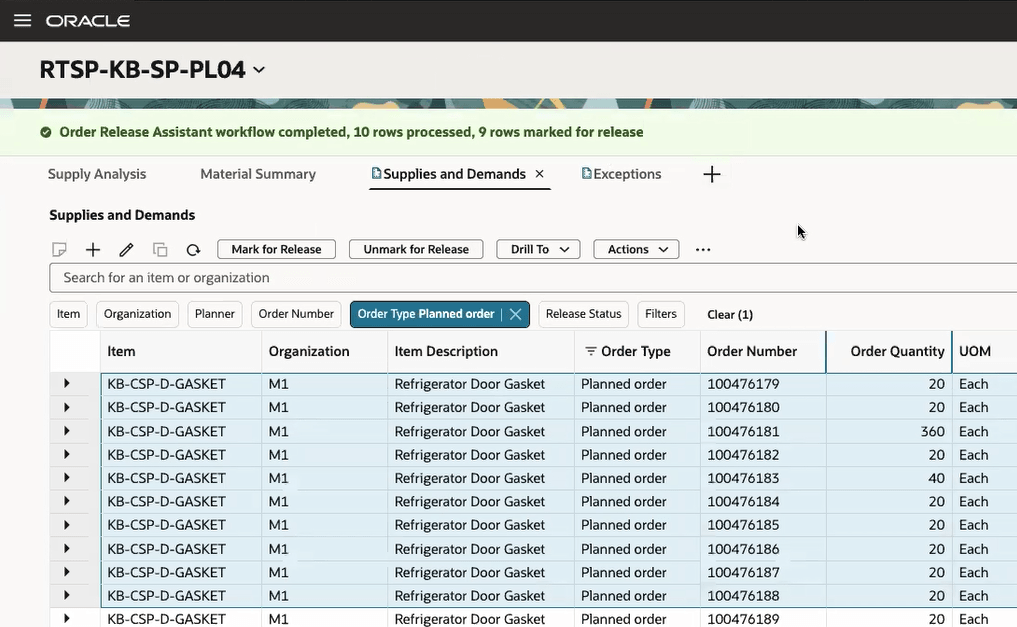
Message Displaying the Result of Workflow
- Refresh the page to view the updated release status.
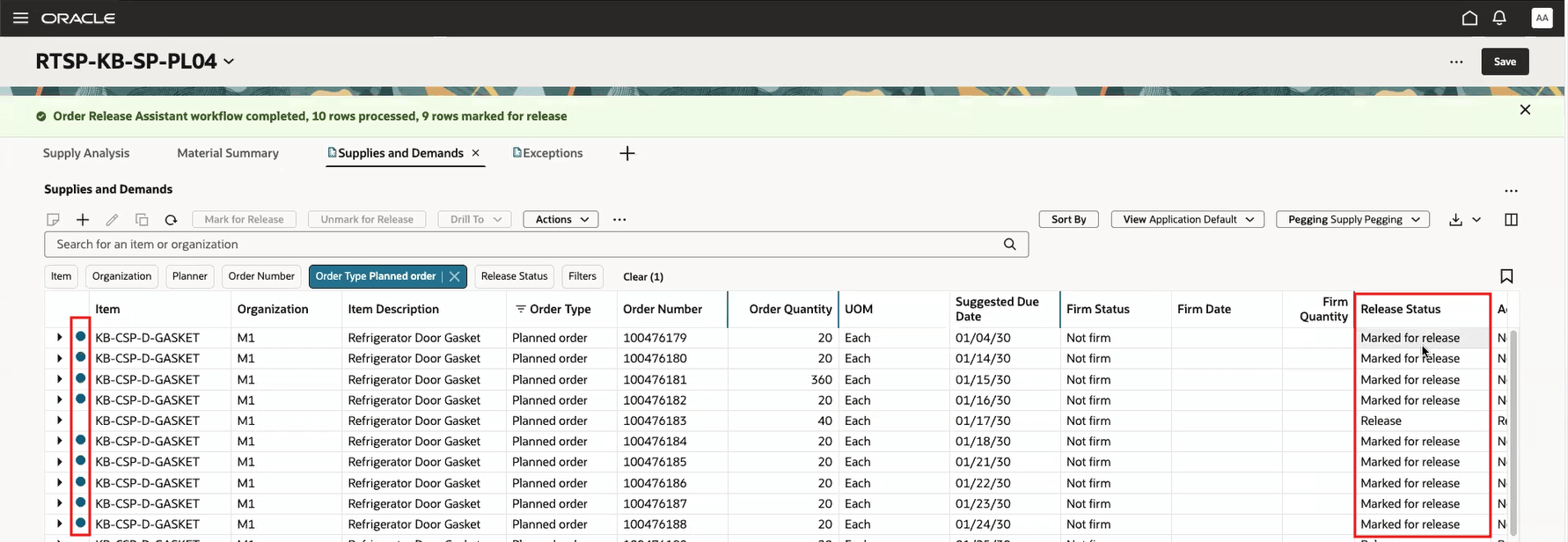
Updated Release Status
You can also monitor the status of the Order Release Assistant workflow while it is processing and after it has completed. Click the Actions icon and select View Status Details.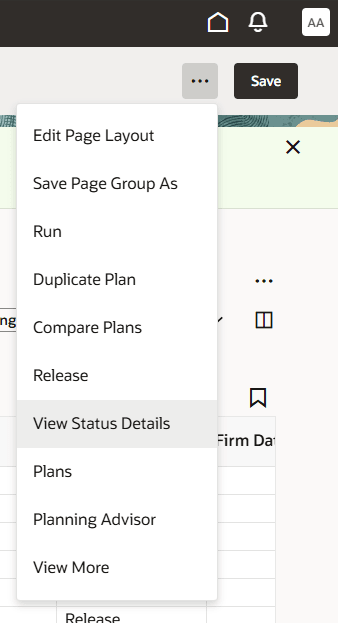
Status Details
The current status of the AI agent workflow is displayed.
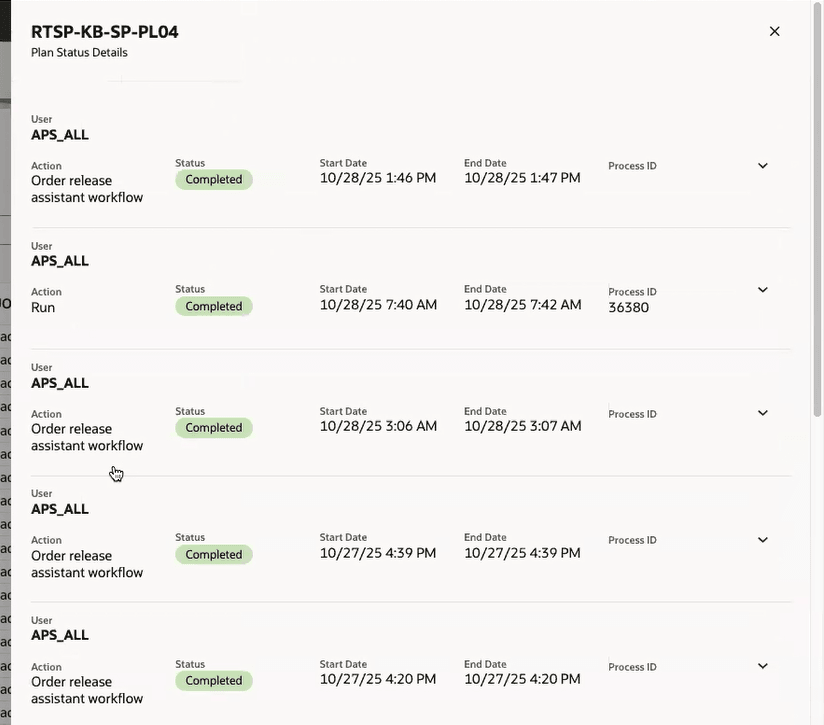
Current Status
Steps to enable and configure
To enable permission groups for roles:
- In the Setup and Maintenance work area, search for the Manage Administrator Profile Values task using the search link in the Tasks panel tab.
- Search for the Enable Security Console External Application Integration (ORA_ASE_SAS_INTEGRATION_ENABLED) profile option and set the Site profile level to Yes.
Here's the demo of these capabilities:
Tips and considerations
When running the Order Release Assistant, limit the number of orders to 200 or fewer at one time. If you are processing larger numbers of orders, you can run them in multiple batches of 200 orders, one group of orders at a time.
Key resources
Access requirements
To interact with AI agents in product pages, users must be assigned a configured job role that contains this duty role:
- Fai Genai Agent Runtime Duty (ORA_DR_FAI_GENERATIVE_AI_AGENT_RUNTIME_DUTY)
To allow users to interact with agents, you must also enable permission groups in the Security Console on those users' configured job roles that contain the Fai Genai Agent Runtime Duty role. You can enable permission groups when you manage the basic information of your configured job roles.
Threshold document upload and delete:
To upload a new or delete an existing threshold document the following privilege is required:
- Manage Planning Objects (MSC_MANAGE_PLANNING_OBJECTS_PRIV)
Using the Orders Release Assistant:
Users who are assigned a configured job role that contains these privileges can access this feature:
- Monitor Plan Inputs Work Area (MSC_MONITOR_PLAN_INPUTS_WORK_AREA_PRIV)
These privileges were available prior to this update.
A new duty role is also required:
- Supply Chain Planning Order Release Workflow Duty (ORA_DR_MSC_ORDER_RELEASE_WORKFLOW_DUTY)