Honor the Validity Dates of Process Manufacturing Outputs Specified on a Formula
In a process manufacturing environment, there might be changes, including improvements to the product outputs over time. For example, you might be making a new variety of cheese where you expect a limited output the first few months while you fine tune the manufacturing process but then expect a much-improved output in subsequent months. This update of Oracle Supply Planning honors the specifications of time varying outputs of the primary and secondary products as defined in the work definition.
You can plan supplies based on a formula, which is a new structure item type. Specifically, this formula contains ingredients (inputs) and products (outputs). The root item of a formula is considered the primary output; consequently, it will be added automatically as a product in the formula.
Feature Applicability
- Applies to: Item structures with associated work definitions
- Available in: Process manufacturing
- Planning types: Constrained Supply Planning and Constrained Demand and Supply Planning.
Note: This feature is not available in flow manufacturing.
Formula Attributes
The following table displays values for the output types and component types and whether they are mandatory, new, or nullable.

Values For the Output Types and Component Types
Note: Once an item is used in an item structure (either as a parent or component), the structure item type can’t be modified. Until that point, it can be changed.
Same Output with Different Effectivities and Find Numbers
The same output can be added to the same or different operations if the effectivity dates aren’t overlapping. This applies to all product types. The following image shows an example of how effectivity dates affect manufacturing setup.
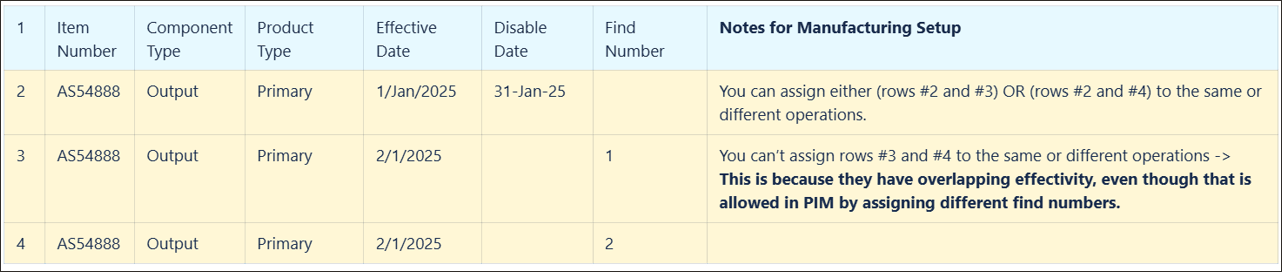
Same Output with Different Effectivities and Find Numbers
New Columns
There are some new fields and columns in different planning visualizations. The following image provides an overview of each. Details are in the following sections.
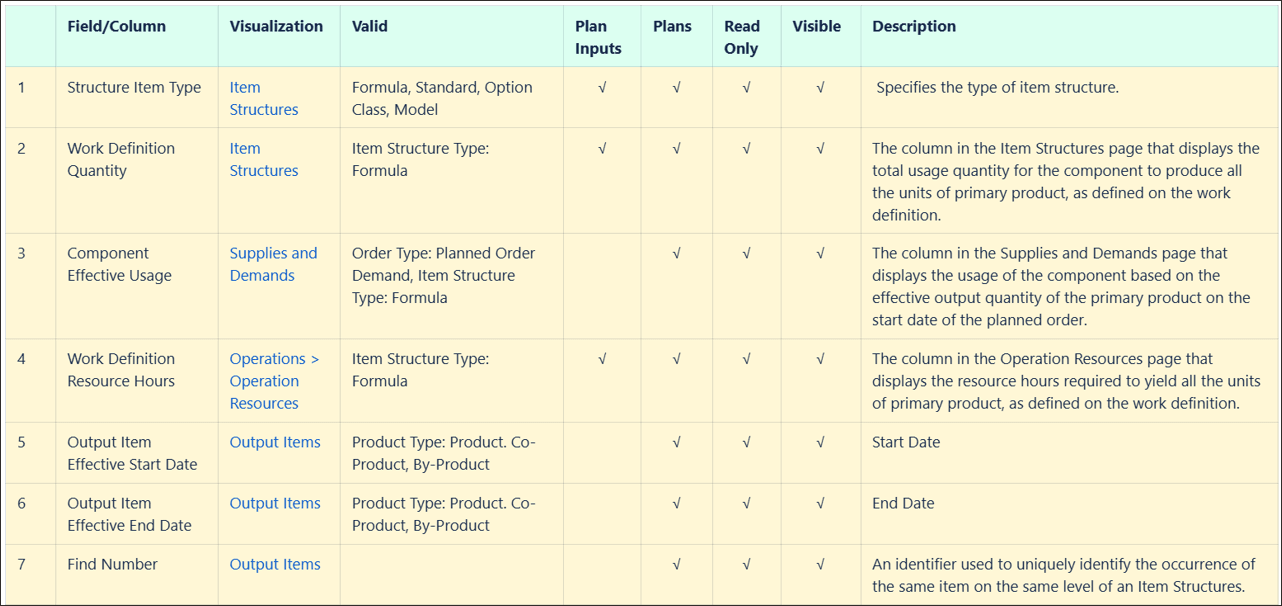
Visualizations with New Columns
Output Items Visualization
The following new columns appear in the Output Items visualization:
- Output Item Effective Start Date and Output Item Effective End Date
- Indicates start and end date of the range when each output is valid
- Valid for product types: product, co-product, and by-product
- Available only in Plans
- Read only
- Visible by default
- Find Number
- Uniquely identifies occurrences of the same item on the same level of an Item Structure
- Available only in Plans
- Read only
- Visible by default
In the following example, Item KB-PEANUT-BUTTER-F5 appears twice in operation 20 because the effectivity dates don’t overlap, despite having the same find number.
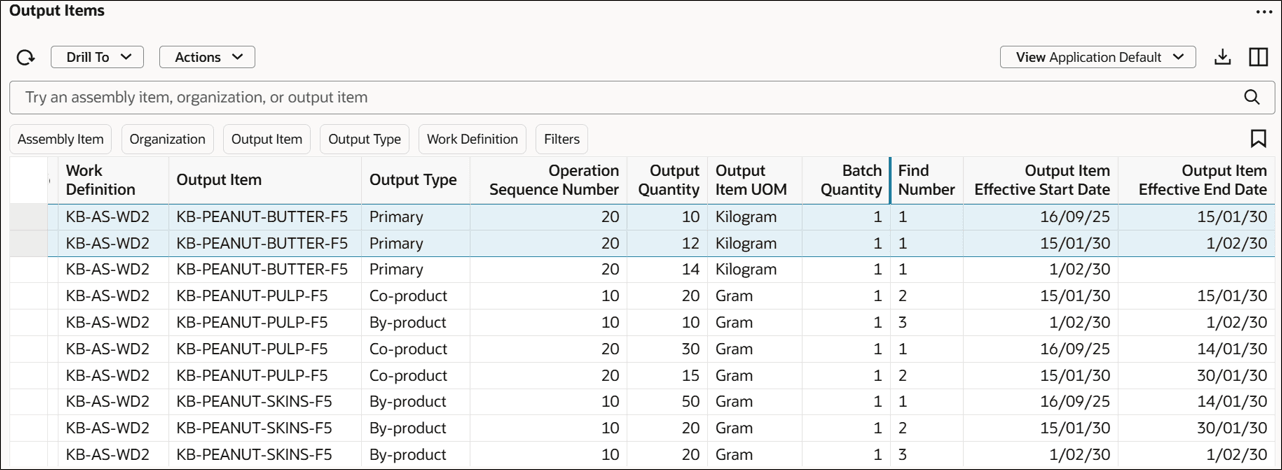
Output Items with the Same Item in the Same Operation
Operation Resources Visualization
The Operation Resources visualization includes the following new column:
- Work Definition Resource Hours:
- Displays the resource hours required to yield all the units of the primary product, as defined on the work definition.
- Valid for item structure type of Formula only
- Available in Plans and Plan Outputs
- Read only
- Visible by default
The following image shows an example the Work Definition Resource Hours column in an Operation Resources visualization.

Work Definition Resource Hours Column
The following new columns appear in the Item Structures visualization:
- Structure Item Type
- Specifies the type of item structure
- Valid for item structure types of Formula, Standard, Option Class, and Model
- Available in Plans and Plan Inputs
- Read only
- Visible by default
- Work Definition Quantity
- Displays the total usage quantity for a component to produce all the units of the primary product, as defined on the work definition
- Valid only for item structure type of Formula
- Available in Plans and Plan Inputs
- Read only
- Visible by default
The following image shows the Structure Item Type and Work Definition Quantity columns on an Item Structures visualization.
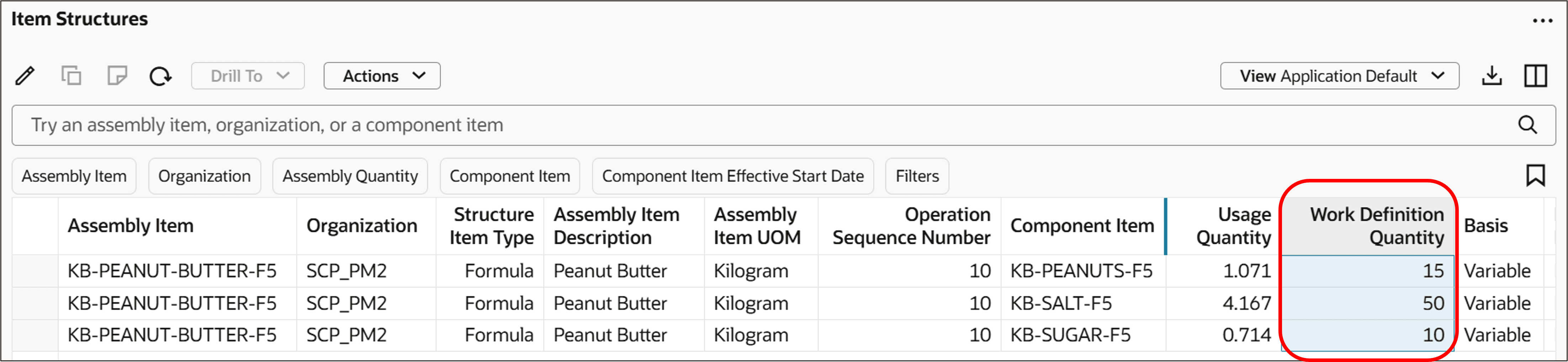
Work Definition Quantity and Structure Item Type Columns
Supplies and Demands Visualization
The Supplies and Demands visualization includes the following new column:
- Component Effective Usage:
- Displays the usage of the component based on the effective output quantity of the primary product on the start date of the planned order
- Valid only for order type of Planned Order Demand and item structure type of Formula
- Available in Plans only
- Read only
- Visible by default
The following image shows the Component Effective Usage column in a Supplies and Demands visualization.
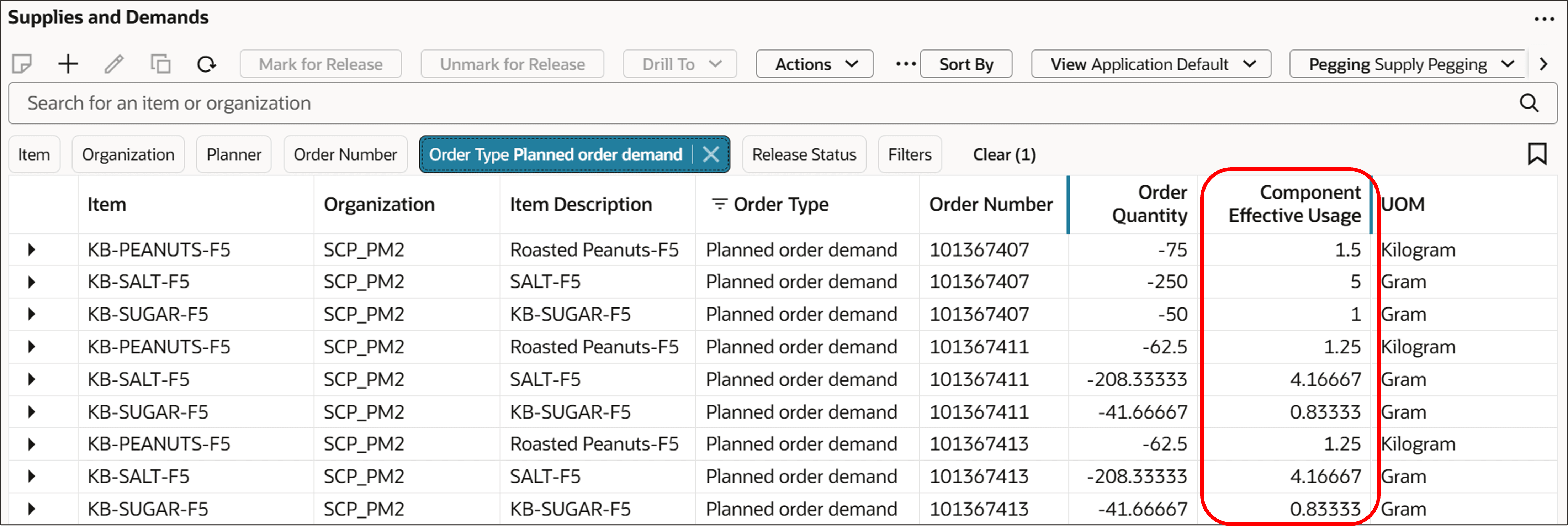
Component Effective Usage Column
Planning Process
Product and Co-Product with Different Effectivity
Example 1
In this example:
- Product A has a demand of 100 on Day 1.
- Product A effectivity is from Day 1 to Day 5 (disable date is Day 6).
- Co-Product B has a demand of 100 on Day 3.
- Co-Product B effectivity is from Day 3 to Day 5 (disable date is Day 6).
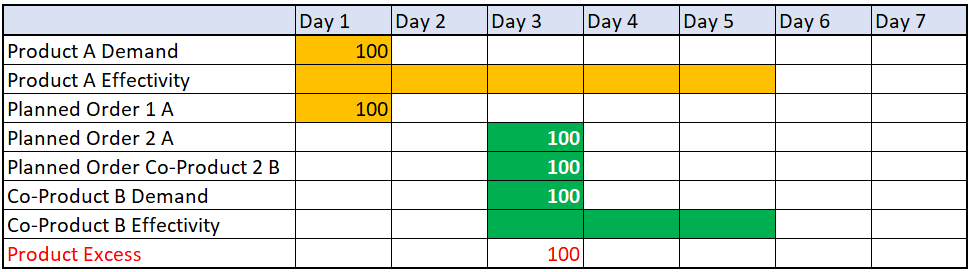
Planning Output for a Product and Co-Product with Different Effectivities
There are 2 planned orders created for Product A as follows:
- The first planned order on Day 1 (Planned Order 1A) is generated to satisfy the demand of Product A on Day
- The demand for the Co-Product B is on Day 3.
- The Product A Planned Order 1A on Day 1 doesn’t generate any Planned Order Co-Product 1B because the Co-Product B is not effective on Day 1.
- So, another planned order for the Product A is generated on Day 3 to satisfy the demand of the Co-Product B on Day 3.
As a result, there are 100 excess units for Product A on Day 3.
Example 2
In this example, a product, a co-product, and a by-product have different date effectivities and output quantities as shown in the following image:
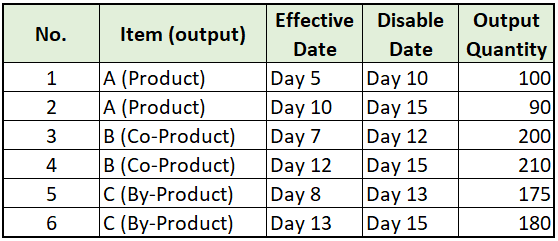
Multiple Items with Multiple Effectivity Dates
When plotted on a chart across days, the preceding items have the following effectivity days. This shows spans where the effective days overlap.
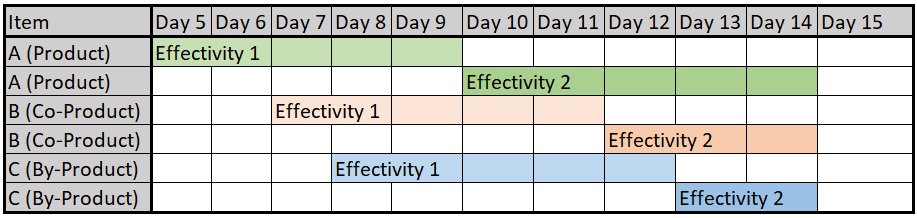
Chart Showing Spans of Different Effectivities for Multiple Items
The planning process generates supply based on the products, co-products, and by-products effectivities and their corresponding output quantities.
Product Planned Quantity
Example 2-1
A product planned order of quantity 300 on Day 8 has a Product Planned Order Quantity / Product Output Quantity ratio of 300/100 = 3.
Co-Product and By-Product Planned Order Quantity
Continuing with the preceding product example, the equations for the co-product and by-product planned orders are:
- Co-Product Planned Order Quantity = (Product Planned Order Quantity / Product Output Quantity) x Co-Product Output Quantity = 3 x 200 = 600.
- By-Product Planned Order Quantity = (Product Planned Order Quantity / Product Output Quantity) x By-Product Output Quantity = 3 x 175 = 525.
The planned order demand is also determined with respect to the product planned order quantity, product output quantity, and input quantity similar to the co-product and by-product planned order quantities.
Example 2-2
A product planned order of quantity 300 on Day 11 has a Product Planned Order Quantity / Product Output Quantity ratio of 300/90 = 3.33.
Co-Product and By-Product Planned Order Quantity
Continuing with the preceding product example, the equations for the co-product and by-product planned orders are:
- Co-Product Planned Order Quantity = (Product Planned Order Quantity / Product Output Quantity) x Co-Product Output Quantity = 3.33 x 200 = 667.
- By-Product Planned Order Quantity = (Product Planned Order Quantity / Product Output Quantity) x By-Product Output Quantity = 3.33 x 175 = 583.
Comparison
In the second scenario, the planned order of 300 on Day 11 was generated based on the second effectivity range. In this range the output quantity is 90 instead of 100. So, the ratio of the planned order quantity over the output quantity is 3.33 versus 3. As a result, the quantity of the co-product planned order and the by-product planned order are increased accordingly (Co-Product Planned Order Quantity 667 versus 600 and By-Product Planned Order Quantity 583 versus 525).
Component Usage Calculation
The planning process dynamically calculates component effective usage based on the primary product effectivity (output).
Example 3
In this example:
- A is the product.
- D is the ingredient.
- R is the Resource.
The component effective usage based on the output quantity and effective date range is calculated as follows:
Product A Effective Date Range: Day 1 – Day 5
- Product A Output Quantity: 150
- Ingredient D Work Definition Quantity: 200
- Component Effective Usage: 200/150 = 1.33
- Work Definition Resource Hours = 6 (Resource hours required to yield all the units of primary product, 150)
- Resource R Usage = 6/150 = 0.04
- Planned order quantity: 50
- Resource Requirements = 0.04 x 50 = 2
Product A Effective Date Range: Day 6 – Day 15
- Product A Output Quantity: 170
- Ingredient D Work Definition Quantity: 200
- Component Effective Usage: 200/170 = 1.18
- Work Definition Resource Hours = 6
- Resource R Usage = 6/170 = 0.035
- Planned order quantity: 50
- Resource Requirements = 0.035 x 50 = 1.76
Steps to enable and configure
You don't need to do anything to enable this feature.
Tips and considerations
- Overlapping Effectivity in Item Structure Input-Type Records
- Item structure input-type records with overlapping effectivity aren’t collected.
- For example, if a collected component of an operation (effective from Day 1 to Day 10) overlaps with another instance of the same component in a different operation (effective from Day 5 to Day 15), then the second instance won’t be collected.
- The collection process is designed to prevent such overlaps. However, if a user attempts to upload overlapping records using file-based data import (FBDI), the upload will be rejected.
- Product Information Management (PIM) and Planning Process
- PIM allows effectivity at a date and time level. A component or output can have multiple effectivities on the same day, but PIM ensures that the effectivity don’t overlap with respect to date and time.
- However, the planning process operates at a day level, with the start time set to 00:00 and the end time set to 23:59.
- This discrepancy can lead to issues when effectivity dates in PIM don’t overlap based on time but do overlap based on date.
- Collection should consider the following three scenarios when there are multiple instances of the same item with effectivity dates:
- The last instance doesn’t have an end date.
- In this case collection only collects the last instance.
- The last instance has an end date on the same day as the start date.
- In this case collection ignores all instances of the item.
- The last instance has an end date on a different day than the start date.
- In this case collection only collects the last instance.
- The last instance doesn’t have an end date.
- Other Key Considerations
- The planning process doesn’t support gaps in the effectivity of products, co-products, or by-products.
- Component effectivity dates must fall within the work definition effectivity dates.
- Updating resource usage isn’t supported in simulation sets.
- Work orders can be rescheduled regardless of product effectivity, consistent with the existing planning process regarding component effectivity.
- Planned order suggested due date falls within the effectivity date range determined by Effectivity Date and Disable Date.
Access requirements
Users who are assigned a configured job role that contains these privileges can access this feature:
- View Plan Options (MSC_VIEW_PLAN_OPTIONS_PRIV)
- Edit Plan Options (MSC_EDIT_PLAN_OPTIONS_PRIV)
These privileges were available prior to this update.