View Budget Details with Funds Check Results
The funds check result details have been updated to include a Budget view that displays control budget details, such as total budget, total consumed from the budget, budget balance, and other relevant information.
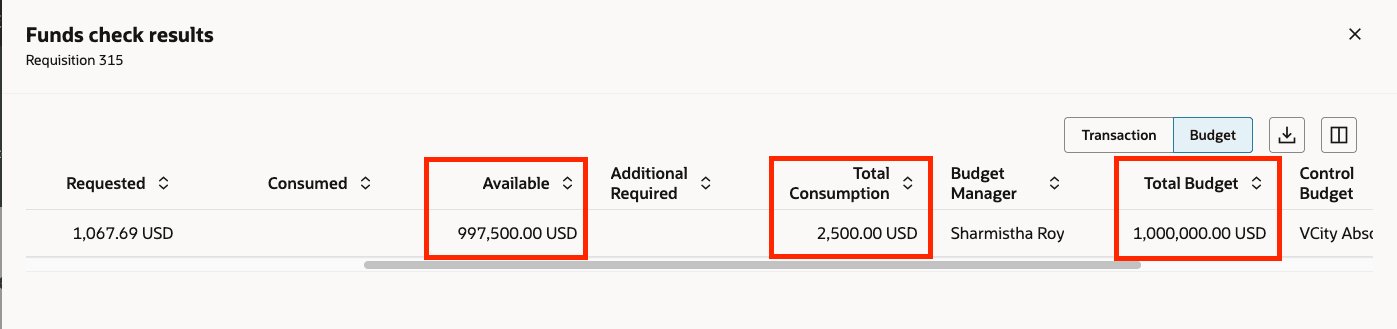
Funds Check Results Details - Budget View
This feature allows you to see how much of your budget is available for future purchases, which aids in planning and prioritizing procurement requests. It also helps you proactively avoid overspending and ensures that expenditures remain within approved limits.
Steps to enable and configure
You don't need to do anything to enable this feature.
Key resources
- To know how to provide the required privileges to your requesters to use your own configured role instead of the Requisition Self Service User role, refer to the Privileges Required for a Predefined Role for a Requisition Self Service User topic.
- For more information on how to enable a guided journey for Redwood pages, refer to the Enable a Guided Journey for Redwood Pages topic.
- For information about using Oracle Visual Builder Studio to extend your Redwood application pages, see Oracle Fusion Cloud HCM and SCM: Extending Redwood Applications for HCM and SCM Using Visual Builder Studio.
Access requirements
Users who are assigned a configured job role that contains these privileges can access this feature:
- Check Funds (XCC_CHECK_FUNDS_PRIV).
- View Funds Available Balance (XCC_VIEW_FUNDS_AVAILABLE_PRIV).
- Review Budget Impact (XCC_REVIEW_BUDGET_IMPACT_PRIV).
These privileges were available prior to this update.