Review Charge Account Descriptions on Requisition Distributions
In this release, you can now view segment descriptions for charge account details in the Redwood Self Service Procurement application. You can view the details when you hover over the charge account value on a page.
These details will be available on these pages:
- Shopping Cart > Summary Section (Both Table View and List View).
- Shopping Cart Lines (Both Table View and List View).
- Requisition Details > More Information.
- Requisition Line Details.
You now view segment descriptions for charge accounts.
.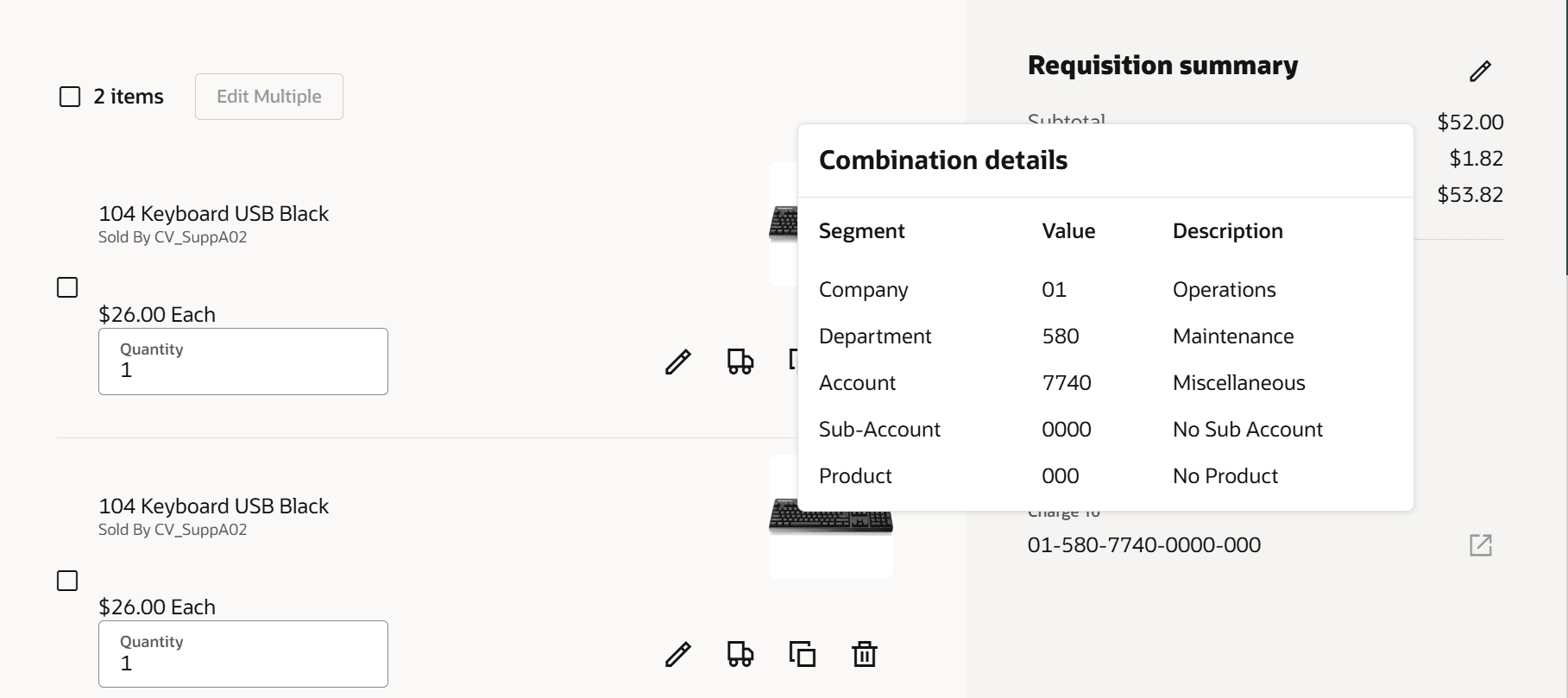
Charge Account Segment Descriptions
Steps to enable and configure
You don't need to do anything to enable this feature.
Tips and considerations
- This feature isn't enabled on editable fields.
- When accessing the charge account on a page for the first time, there may be a small delay in displaying the account value. You can wait or refresh the details to view the charge account information.
Key resources
- To know how to provide the required privileges to your requesters to use your own configured role instead of the Requisition Self Service User role, refer to the Privileges Required for a Predefined Role for a Requisition Self Service User topic.
- For more information on how to enable a guided journey for Redwood pages, refer to the Enable a Guided Journey for Redwood Pages topic.
- For information about using Oracle Visual Builder Studio to extend your Redwood application pages, see Oracle Fusion Cloud HCM and SCM: Extending Redwood Applications for HCM and SCM Using Visual Builder Studio.