Select Inventory Organizations Participating in Recall Management
With this release, you can now control which inventory organizations participate in Product Recall Management. Instead of applying recall processes across all organizations, you can designate all or only selected inventory organizations, enabling phased rollouts and more targeted containment actions.
From the Recall Parameters page, simply choose the participating organizations using a streamlined selection list, giving you greater flexibility in managing recalls.
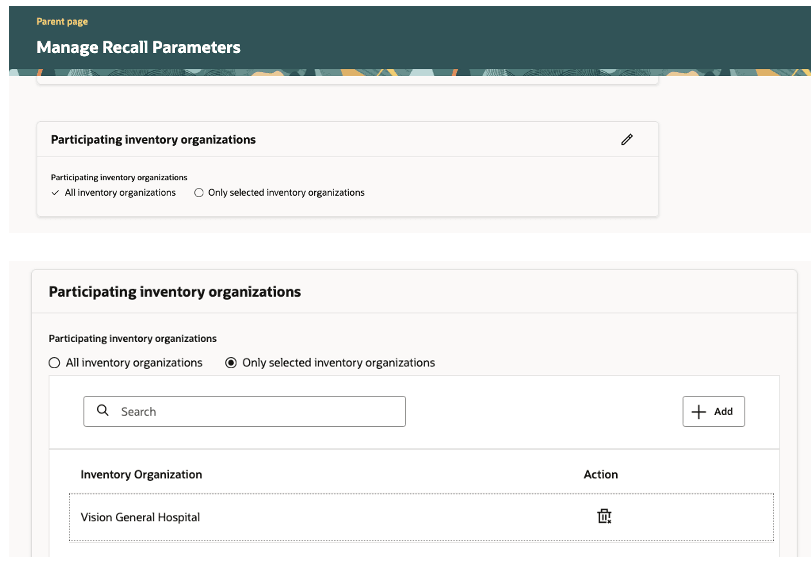
Define participating organizations in Recall Parameters
Once configured, all recall validations, track and trace activities, task generation, and containment notifications are limited to the designated inventory organizations. Only transactions, stock checks, and subinventory associations within participating organizations are evaluated throughout the recall lifecycle.
When you’re ready to extend Recall Management to additional organizations, you can select All Inventory Organizations. This overrides any previously selected organizations and brings the entire enterprise into scope for recall management operations.
- Enables phased deployment of Recall Management by allowing you to roll out functionality to selected inventory organizations at your own pace.
- Reduces operational disruption by limiting recall activities to only the organizations included in scope.
- Improves user efficiency through clear organization selection and context-driven task creation, resulting in more targeted and effective recall actions.
Steps to enable and configure
To enable this feature, do the following:
- In the Set up and Maintenance work area, use the Manage Product Recall Parameters task:
- Offering: Manufacturing and Supply Chain Materials Management
- Functional Area: Product Recall Management
- Choose Only selected inventory organizations under Participating inventory organizations section and add the required inventory organizations.
Key resources
- Oracle Supply Chain Management guide and Using Product Recall Management guide, available on the Oracle Help Center.
- Implementing Product Recall Management section under the Implementing Manufacturing and Supply Chain Materials Management guide, available on the Oracle Help Center.
Access requirements
Users who are assigned with configured job role that contains the following privileges can access this feature:
- Manage Product Recall Parameters (ENQ_MANAGE_PRODUCT_RECALL_PARAMETERS)