Use Additional CFOP Codes for Buyer-Issued Bookkeeping
You can now use additional CFOP codes 1604 / 2604 – Release of credit related to the purchase of goods for fixed assets when capturing fiscal documents in buyer-issued bookkeeping flows.
This enhancement supports processes involving the return of goods for repair or maintenance, as well as the treatment of agribusiness products, applicable to large companies, small rural producers, farmers, and individuals.
The new CFOP codes are available for the following fiscal flows:
- Bookkeeping Issued by Buyer
- Bookkeeping Issued by Buyer – Complementary
For return operations related to repair, businesses must enter a buyer-issued fiscal document using CFOP 1916 / 2916 for bookkeeping purposes.
In scenarios involving credit related to the purchase of goods for fixed assets, a fiscal document must be entered using CFOP 1604 / 2604. These codes are used for ICMS and CIAP credit calculation adjustment scenarios.
This update also supports buyer-issued bookkeeping fiscal documents with the new outbound CFOP codes.
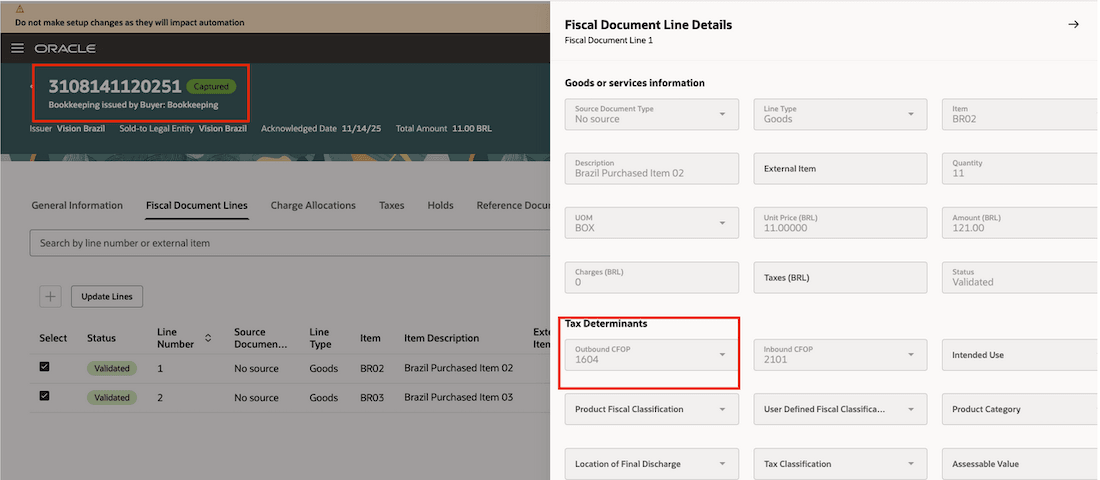
Bookkeeping issued by buyer fiscal document with new outbound CFOP code.
Accurate classification and compliance in fiscal processing for businesses that handle returns for repairs.
Steps to enable and configure
You don't need to do anything to enable this feature.
Tips and considerations
The new CFOP codes are enabled by default. If they are not applicable to your business, you must manually disable them.
Key resources
Oracle Fusion Cloud SCM: Using Fiscal Document Capture guide, available on the Oracle Help Center
Access requirements
You have a couple of options for giving people access to this feature, depending on whether you're assigning them predefined job roles or your own configured job roles.
- Users who are assigned any of these predefined job roles can automatically access this feature:
- Set Up Fiscal Flows (CMF_FISCAL_FLOWS)
- Capture Fiscal Document (CMF_ENTER_FISCAL_DOCUMENT)
- Process Electronic Fiscal Documents (CMF_PROCESS_E_FISCAL_DOCUMENTS)