Redwood: Set Default Behavior for Configurator Rules
You can configure the default behavior of a configurator rule to either show or hide a warning when a selection made by the configurator is changed at runtime.
Realize these benefits:
- Control when warnings appear: Decide which rule-driven changes deserve attention during configuration.
- Skip unnecessary prompts: Suppress warnings for routine, expected adjustments.
- Highlight important changes: Show warnings only when a review is needed.
- Keep configuration moving smoothly: Provide sales and customer service teams with a cleaner, more focused experience.
A new Defaulting Behavior section is available when creating a rule. This section has two options:
- Constrain selections (the default setting): Select this option if you want to create constraint rules that display warnings at runtime when a user changes a selection driven by the rule.
- Suggest selections: Select this option if you want to create default rules that don’t display warnings at runtime when a user changes a selection driven by the rule.
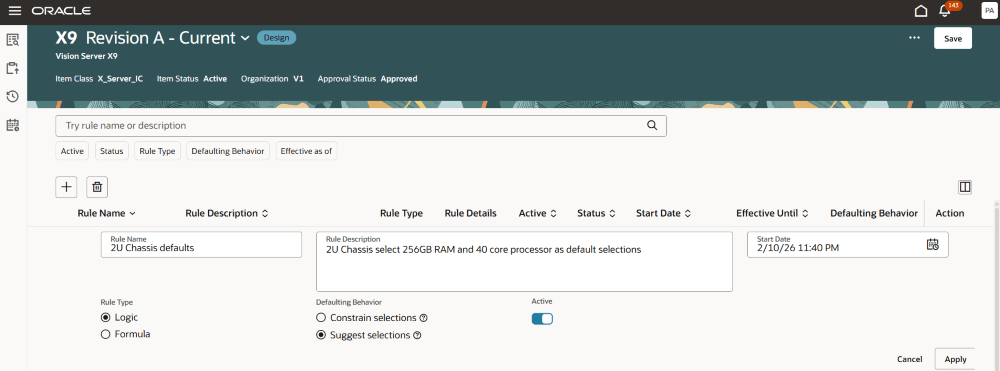
Defaulting Behavior Section
Here’s an example of creating a default logic rule. When this model is configured at runtime, selecting 2URackmount Chassis will automatically select Intel Xeon Gold 40-Core Processor and 256GB DDR5 ECC RAM as shown in the following screenshot.
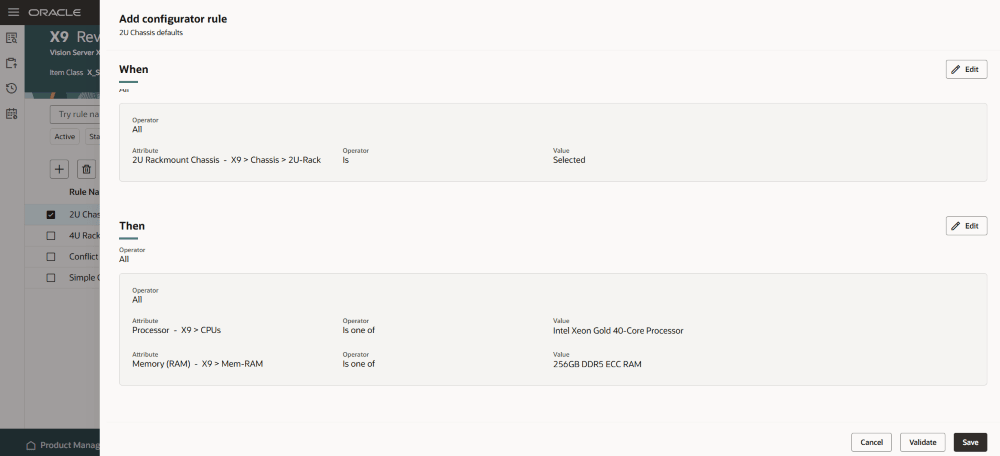
Example of Creating a Default Logic Rule
If you choose a different processor or RAM—such as 512GB RAM or the 64-Core processor—no warning will appear because the rule is set to Suggest selections rather than Constrain selections.
Steps to enable and configure
To use the Redwood: Set Default Behavior for Configurator Rules feature, opt in to the Redwood: Author Configurator Rules in Product Management feature. If you've already opted in to this feature, no further action is required.
Tips and considerations
Default rules provide guidance when multiple options exist, helping you find an appropriate solution. They apply during runtime configuration whenever a rule participant is selected or deselected. Removing selections made by a rule does not impact previous user choices or trigger warnings.
There is a slight difference in behavior between the Redwood suggest selection rules and the classic default rules. For example, with the classic rules, selecting 2U Rackmount Chassis will automatically select Intel Xeon Gold 40-Core Processor and 256GB DDR5 ECC RAM. If you later remove 2U Rackmount Chassis and select it again, the associated options are automatically added again.
With the Redwood rules, however, if you explicitly deselect Intel Xeon Gold 40-Core Processor or 256GB DDR5 ECC RAM after they were suggested, they won’t be automatically selected again if you remove 2U Rackmount Chassis and add it back. This allows greater control over option selection.
Another example highlighting the difference in the default rule behavior is when an additional suggest or default selection rule exists alongside the primary rule described earlier. This second rule definition states that when 256GB DDR5 ECC RAM is excluded, then 1TB NVMe PCIe Gen4 SSDs is selected.
In the classic default rules, if you select 2U Rackmount Chassis, both Intel Xeon Gold 40-Core Processor and 256GB DDR5 ECC RAM are automatically chosen. If you then deselect 256GB DDR5 ECC RAM, the second default rule is triggered which will automatically select 1TB NVMe PCIe Gen4 SSDs. However, in Redwood, deselecting 256GB DDR5 ECC RAM won’t trigger the automatic selection of 1TB NVMe PCIe Gen4 SSDs.
Key resources
Refer to the Oracle Fusion Cloud SCM: Modeling Configurations for SCM guide, available on the Oracle Help Center.
Access requirements
Users who are assigned a configured job role that contains these privileges can access this feature:
- END USER
- Initiate Order (FOM_CREATE_ORDER_PRIV)
- View Orders (FOM_VIEW_ORDERS_PRIV)
- Revise Order (FOM_REVISE_ORDER_PRIV)
- ORCHESTRATION PROCESS:
- Manage Orchestration Process Definition (DOO_MANAGE_ORCHESTRATION_PROCESS_DEFINITION_PRIV)
- Manage Orchestration Task Types (DOO_MANAGE_ORCHESTRATION_TASK_DEFINITION_TASK_TYPE_PRIV)
- Manage Orchestration Process Assignment Rule (DOO_MANAGE_ORCHESTRATION_PROCESS_ASSIGNMENT_RULE_PRIV)
- Manage Status Conditions (DOO_MANAGE_STATUS_DEFINITION_STATUS_CONDITION_PRIV)
- Deploy Orchestration Process (DOO_DEPLOY_ORCHESTRATION_PROCESS_PRIV)
- Manage Orchestration Infrastructure Process Definition (DOO_MANAGE_ORCHESTRATION_INFRASTRUCTURE_PRIV)
- Manage Orchestration Infrastructure Status Conditions (DOO_MANAGE_ORCHESTRATION_INFRASTRUCTURE_STATUS_DEFINITION_STATUS_CONDITION_PRIV)
- Manage Orchestration Infrastructure Task Types (DOO_MANAGE_ORCHESTRATION_INFRASTRUCTURE_TASK_DEFINITION_TASK_TYPE_PRIV)
- CONNECTORS:
- Manage Order Orchestration External Interface Routing Rule (DOO_MANAGE_ORCHESTRATION_ORDER_EXTERNAL_INTERFACE_ROUTING_RULE_PRIV)
- Manage Orchestration Infrastructure External Interface Routing Rule (DOO_MANAGE_ORCHESTRATION_INFRASTRUCTURE_EXTERNAL_INTERFACE_ROUTING_RULE_PRIV)
- Administer Orchestration Infrastructure Web Service Sourcing Rule (DOO_ADMINISTER_ORCHESTRATION_INFRASTRUCTURE_WEB_SERVICE_SOURCING_RULE_PRIV)
- Administer Web Service Sourcing Rule (DOO_ADMINISTER_WEB_SERVICE_SOURCING_RULE_PRIV)
- PRICING:
- Manage Draft Pricing Promotions (QP_MANAGE_DRAFT_PRICING_PROMOTIONS)
- Manage Pricing Promotions (QP_MANAGE_PRICING_PROMOTIONS)
- View Pricing Promotions (QP_VIEW_PRICING_PROMOTIONS)
- Activate Pricing Promotions (QP_APPROVE_PRICING_PROMOTIONS)
- Manage Pricing Rules (QP_MANAGE_PRICING_RULES)
- Approve Discount Lists (QP_APPROVE_DISCOUNT_LISTS)
- Manage Discount Lists (QP_MANAGE_DISCOUNT_LISTS)
- Manage In-Progress Discount Lists (QP_MANAGE_IN_PROGRESS_DISCOUNT_LISTS)
- View Discount Lists (QP_VIEW_DISCOUNT_LISTS)
- View Price Lists (QP_VIEW_PRICE_LISTS_PRIV)
- Manage Price Lists (QP_MANAGE_PRICE_LISTS_PRIV)
- Manage In-Progress Price Lists (QP_MANAGE_IN_PROGRESS_PRICE_LISTS_PRIV)
- Approve Price Lists (QP_APPROVE_PRICE_LISTS_PRIV)
- Import Price Lists (QP_PRICE_LIST_IMPORT_PRIV)
- Import Approved Price Lists (QP_PRICE_LIST_APPROVED_IMPORT_PRIV)
- View Returns Price Lists (QP_VIEW_RETURNS_PRICE_LISTS_PRIV)
- Manage Returns Price Lists (QP_MANAGE_RETURNS_PRICE_LISTS_PRIV)
- Approve Returns Price Lists (QP_APPROVE_RETURNS_PRICE_LISTS_PRIV)
- Manage In-Progress Returns Price Lists (QP_MANAGE_IN_PROGRESS_RETURNS_PRICE_LIST_PRIV)
These privileges were available prior to this update.