Redwood: View Order Line's Orchestration Process
Use Order Management's redesigned Redwood pages to view orchestration process details for each order line and to track the progress of fulfillment tasks.
Before this update, you could view these details only on Order Management's classic pages. Now you can view them on Redwood pages too:
- View details of each orchestration process that's assigned to the order line.
- View the status of each task that's complete, in progress or not started.
- View fulfillment tasks and status details that Order Management will run for the orchestration process that it has assigned to the order line.
- View the set of order lines that Order Management assigned to the same orchestration process and that it will fulfill together as a group.
Try it:
- Go to Home > Order Management > Order Management (New) > Sales Order.
- Search for and open a sales order that you submitted.
- Add the Orchestration Process Name attribute and the Orchestration Process Number attribute to the view.
- Click the link in the Orchestration Process Number attribute:
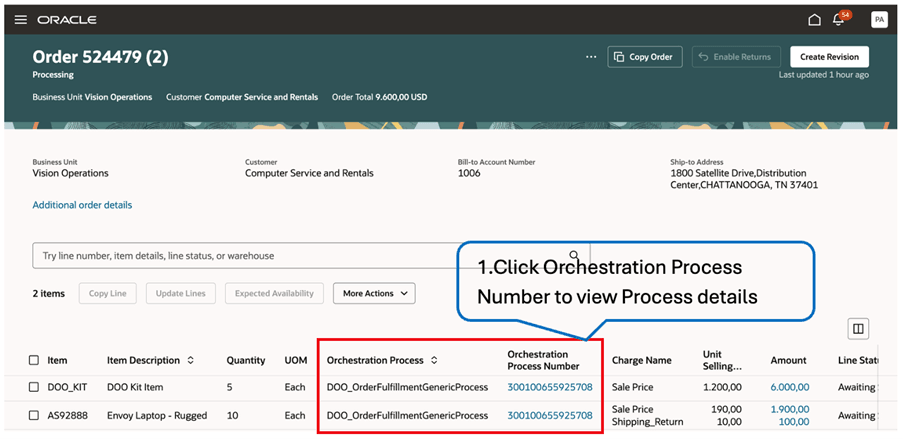
- Examine the detail:
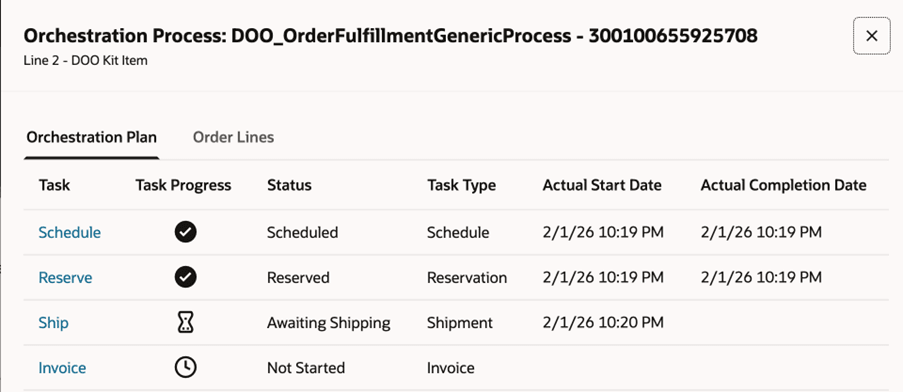
You can view these attributes for each orchestration plan:
- Task
- Progress
- Status
- Task Type
- Actual Start Date
- Actual Completion Date
Click the task name to view the task's history. For example, click Reserve to get details about the reserve task.
Steps to enable and configure
If you want to use the Redwood: View Order Line's Orchestration Process feature, then you must opt in to its parent Redwood: Create and Manage Sales Orders feature. If you already opted in to the parent, then you don't need to opt in again.
Tips and considerations
- You can view the orchestration process number and its details only for a sales order that you submitted. You can't view them for a draft order.
- You can view the Order Lines tab in the Orchestration Process Details dialog only when Order Management has assigned more than one line to the same orchestration process number.
- If your sales order includes a configured item or kit, then the Orchestration Process Details dialog displays detail only for the root item. You can use the Configuration Summary page to view detail for included components and option items.
- The Redwood pages don't display some of the same detail that the classic page displays, such as tasks in error, or some actions, such as Recover Task or Cancel Current Task. You can use the sales order's banner message to view error details. You can use the Recover Errors scheduled process to rerun tasks in the orchestration process.
- You can also use the Redwood search pages to view the sales order's orchestration process name and number.
Key resources
Overview of Orchestration Processes
Access requirements
Users who are assigned a configured job role that contains these privileges can access this feature:
End user:
- Initiate Order (FOM_CREATE_ORDER_PRIV)
- View Orders (FOM_VIEW_ORDERS_PRIV)
- Revise Order (FOM_REVISE_ORDER_PRIV)
Orchestration process:
- Manage Orchestration Process Definition (DOO_MANAGE_ORCHESTRATION_PROCESS_DEFINITION_PRIV)
- Manage Orchestration Task Types (DOO_MANAGE_ORCHESTRATION_TASK_DEFINITION_TASK_TYPE_PRIV)
- Manage Orchestration Process Assignment Rule (DOO_MANAGE_ORCHESTRATION_PROCESS_ASSIGNMENT_RULE_PRIV)
- Manage Status Conditions (DOO_MANAGE_STATUS_DEFINITION_STATUS_CONDITION_PRIV)
- Deploy Orchestration Process (DOO_DEPLOY_ORCHESTRATION_PROCESS_PRIV)
- Manage Orchestration Infrastructure Process Definition (DOO_MANAGE_ORCHESTRATION_INFRASTRUCTURE_PRIV)
Manage Orchestration Infrastructure Status Conditions (DOO_MANAGE_ORCHESTRATION_INFRASTRUCTURE_STATUS_DEFINITION_STATUS_CONDITION_PRIV)
- Manage Orchestration Infrastructure Task Types (DOO_MANAGE_ORCHESTRATION_INFRASTRUCTURE_TASK_DEFINITION_TASK_TYPE_PRIV)
Connectors:
- Manage Order Orchestration External Interface Routing Rule (DOO_MANAGE_ORCHESTRATION_ORDER_EXTERNAL_INTERFACE_ROUTING_RULE_PRIV)
- Manage Orchestration Infrastructure External Interface Routing Rule (DOO_MANAGE_ORCHESTRATION_INFRASTRUCTURE_EXTERNAL_INTERFACE_ROUTING_RULE_PRIV)
- Administer Orchestration Infrastructure Web Service Sourcing Rule (DOO_ADMINISTER_ORCHESTRATION_INFRASTRUCTURE_WEB_SERVICE_SOURCING_RULE_PRIV)
- Administer Web Service Sourcing Rule (DOO_ADMINISTER_WEB_SERVICE_SOURCING_RULE_PRIV)
These privileges were available before this update.