AI Agent: Sales Order Assistant - Broaden Product Support
The Sales Order Assistant has been enhanced in this release with AI-driven product recommendations to streamline product discovery, improve upsell and cross-sell opportunities, and enable support for warranty and coverage products directly within the same order flow.
Get these benefits
- Improve recommendation relevance and upsell opportunities
Uses AI-driven product recommendations based on customer segment, historical purchasing trends, and product affinity analysis to surface complementary and trending products during conversational order entry. - Improve order-entry efficiency and accuracy
Automatically surfaces add-ons, promotions, warranties, and coverage options during product selection while validating eligible coverage-to-product associations before order creation. - Simplify coverage and warranty ordering
Enables CSRs to discover, select, and associate warranties, maintenance plans, and protection coverages within the same conversational order flow. - Reduce manual maintenance of product relationships
Leverages intelligent recommendation models to dynamically infer commonly purchased product combinations without relying solely on manually maintained item relationships.
Let's take a closer look at some of these benefits.
Intelligent Product Recommendations
This enhancement brings you intelligent AI-driven product recommendations and support for coverages and warranties during conversational order entry. The assistant uses historical order patterns and product affinity analysis to recommend complementary and frequently purchased products, trending items, and add-on services, while also enabling Customer Service Representatives (CSRs) to add warranty and coverage products directly within the same order flow.
The assistant uses two recommendation models:
- Intelligent Product Recommendations
Provides AI-driven recommendations that analyze historical sales order patterns to identify complementary and frequently purchased products. - Inferred Product Relationships
Analyzes historical purchasing patterns to identify products that are frequently purchased together and recommends complementary products during order entry.
For example, if customers frequently purchase Juniper data center switches with transceiver modules, power supplies, support contracts, or coverage plans, the assistant automatically recommends those related products during product selection. Recommendations are generated dynamically based on actual purchasing behavior and trending product demand, including historical order volume, quantity sold, and revenue. Recommendations can be tailored based on:
- Customer segment
- Industry classification
- Product category
This enables more relevant product suggestions and localized recommendation strategies during conversational order entry.
Product Discovery with Recommendations
During product search and discovery, the assistant surfaces the top recommended products based on customer requirements and natural language prompts.
The assistant can display:
- Product recommendations
- Add-on suggestions
- Promotions
- Trending products
- Coverage and warranty options
The recommendation engine ranks products using a combination of:
- Search intent relevance
- Product popularity
- Historical purchasing affinity
- Promotions and offers
Here's an example of product discovery and recommendations in action.
Let's say Nova Logistics wants recommendations for Juniper switches to support expansion of a cloud-scale AI data center.
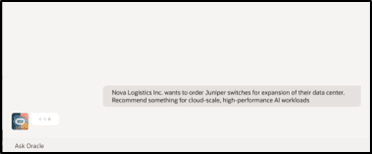
The assistant returns top ranked switch recommendations along with a match score, return rate information, pricing and availability for each product to help the user choose the right selection.
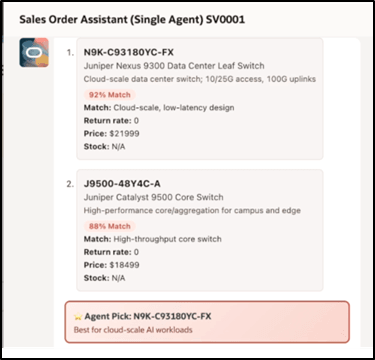
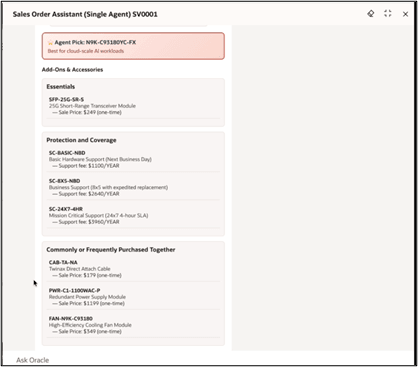
Along with an agent top pick, add-ons and accessories, protection and coverage options and commonly or frequently purchased together options are provided such as:
- 25G Transceiver Modules
- Next Business Day Hardware Support
- Expedited Replacement Support
- Mission Critical Support
- Power Supply and Cooling Modules
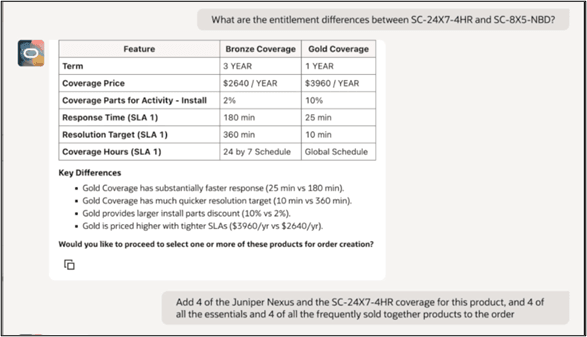
The agent can also be used to gather additional details about the recommended products. For example, say the request is for a product comparison.
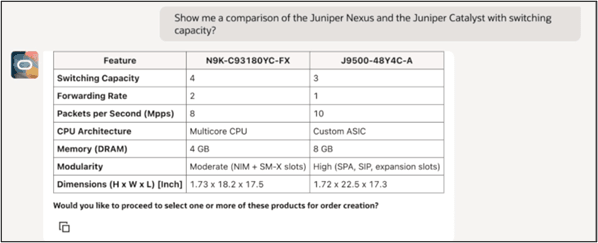
Recommendation Intelligence and Analytics
The recommendation engine analyzes historical purchasing behavior to identify products that are commonly purchased together and determine the strength and relevance of those relationships.
These product affinity metrics help identify true purchasing relationships and avoid low-quality or incidental recommendations. The recommendation data is periodically refreshed using the Analyze Sales Orders for Insights ESS job to ensure recommendations remain aligned with recent purchasing trends.
Analyze Sales Orders for Insights ESS Job
The Sales Order Assistant product recommendation framework includes the Analyze Sales Orders for Insights ESS job. This scheduled process analyzes historical sales order activity to identify popular products and commonly purchased product combinations that can be used to improve recommendations during conversational order entry.
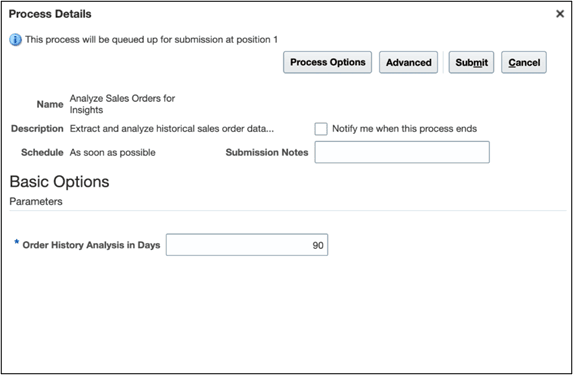
The ESS job reviews historical order data and helps the system:
- Identify frequently purchased products
- Detect products commonly purchased together
- Surface trending and complementary products
- Improve recommendation quality over time
- Support intelligent upsell and cross-sell opportunities
The recommendation insights generated by the ESS job are used by the Sales Order Assistant to provide more relevant and personalized product suggestions during product discovery and order creation.
The process uses a configurable order history analysis period with a maximum duration of 90 days (default is also 90 days). This helps ensure recommendations remain aligned with recent purchasing behavior and current sales trends.
To improve performance and maintain relevant recommendation data:
- Recommendation data is refreshed periodically using rolling historical analysis.
- Extremely large orders are excluded from recommendation calculations to improve recommendation quality.
- Historical recommendation data is refreshed incrementally to improve processing efficiency.
The ESS process continuously updates product recommendation intelligence used by:
- Sales Order Assistant
- Product recommendation flows
- CPQ recommendation scenarios
- AI-driven product suggestion experiences
Recommendation Scoring
Product recommendations are ranked using multiple scoring factors including:
- Search intent relevance
- Product popularity ranking
- Product affinity relationships
- Promotion scoring
- Return and product performance history
This helps ensure the assistant surfaces the most relevant and actionable product recommendations during order entry.
Coverages Support
The Sales Order Assistant supports coverages products during conversational order creation.
Customer Service Representatives can:
- Search for coverage products using natural language
- Add warranties and maintenance plans to the same order
- Associate coverage products to eligible items in the current order
- Review coverage details and durations during product selection
- Add protection plans as part of the conversational sales flow
The assistant validates that coverages are associated with eligible products before creating the order.
Coverage-to-Product Association
When a coverage or warranty product requires an associated item, the assistant validates the relationship and prompts the CSR to select which product should be covered.
For example:
Is this support coverage for the N9K-C93180YC-FX switch you just selected?
The assistant links the coverage product to the appropriate item within the current order before creating the draft order.
Conversational Product Recommendations and Coverages
The assistant now supports inline recommendations and coverage suggestions within the same conversational flow.
For example:
CSR Prompt: Nova Logistics needs Juniper switches for a cloud-scale AI data center expansion.
The assistant returns:
- N9K-C93180YC-FX – Juniper Nexus 9300 Leaf Switch
- J9500-48Y4C-A – Juniper Catalyst 9500 Core Switch
Agent Pick: N9K-C93180YC-FX – Best for AI workloads
Recommended Add-ons:
- SFP-25G-SR-S 25G Short-Range Transceiver Module
- SC-BASIC-NBD Basic Hardware Support
The CSR can then add products, warranties, or recommended add-ons directly from the conversational flow.
Coverage Product Discovery
Coverage products can be discovered using item number, description, long description, or keywords. The assistant surfaces qualified coverage products and displays:
- Coverage name
- Duration
- Coverage inclusions and exclusions, when provided in the item description or long description
- Available maintenance or protection plans
For example:
My customer also needs support coverage for the Juniper switch.
The assistant might display:
- Hardware Support Coverage (Next Business Day)
- SC-8X5-NBD Business Support with expedited replacement
- SC-24X7-4HR Mission Critical Support (24x7 4-hour SLA)
Users can then select the desired coverage conversationally or can also request additional details which will surface the coverage entitlements for comparison. For example, use the agent to gather details about the recommended coverage options, evaluate and add to the order.
Let's take a look at how to enable these enhancements.
Steps to enable and configure
Using the Sales Order Assistant in the Guided Journey - Set the Business Unit Profile
The Sales Order Assistant uses your default business unit when you create a sales order or when you search for an item. You must specify the default business unit before you use the Sales Order Assistant. Go to the Setup and Maintenance work area, then use the Manage Administrator Profile Values task to modify the ORA_FOM_DEFAULT_BUSINESS_UNIT profile. Enable it at the user or the site level.
Using the Sales Order Assistant in the AI Agent Studio - Obtain the Business Unit ID
The Sales Order Assistant within the AI Agent Studio requires the business unit ID to execute the transaction and set the business unit context.
Here's how you find the business unit ID:
1. Search for the Business Unit.
2. In the results table choose View > Columns
3. Add the BusinessUnitId
4. The results will show the internal numeric ID. Copy and paste that ID into the Sales Order Assistant to set the context for your interaction.
This image shows the interface that you'll use to find your business unit ID.
Define the Agent
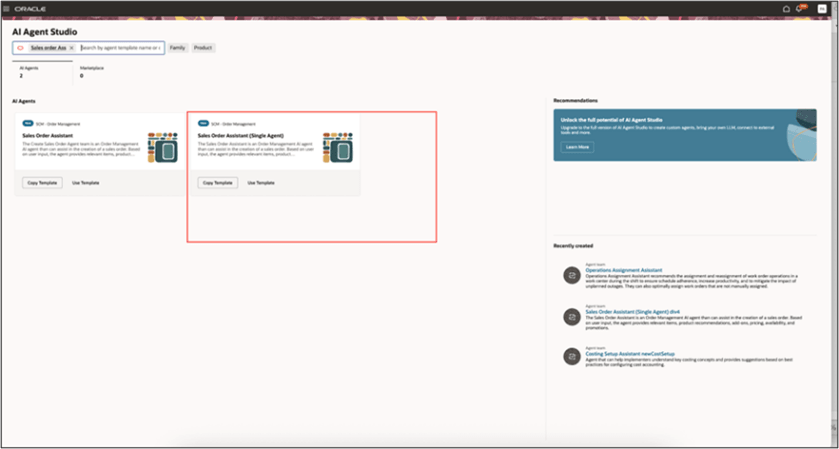
- Go to Home Page > Tools > AI Agent Studio, then search for Sales Order Assistant (Single Agent). Oracle recommends that you don't use the Sales.
This is the order assistant agent for this release.
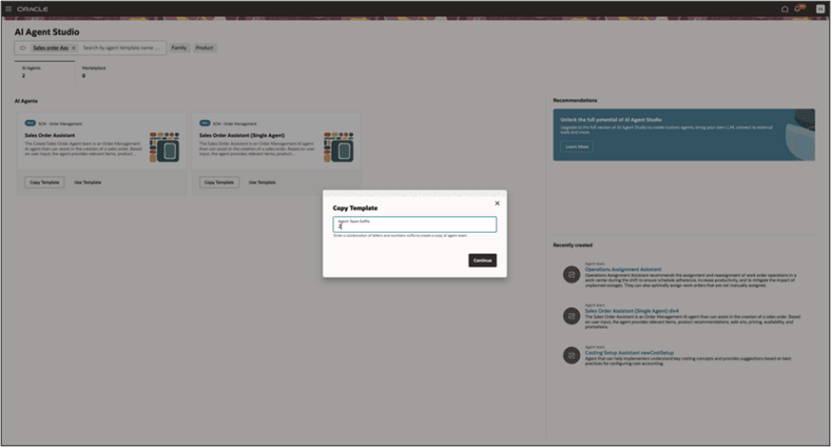
- Click Copy, In the Copy Template dialog, enter any combination of numbers and letters as a suffix. You can append version numbers to the copied name such as "My Sales Agent 2". Click Continue.
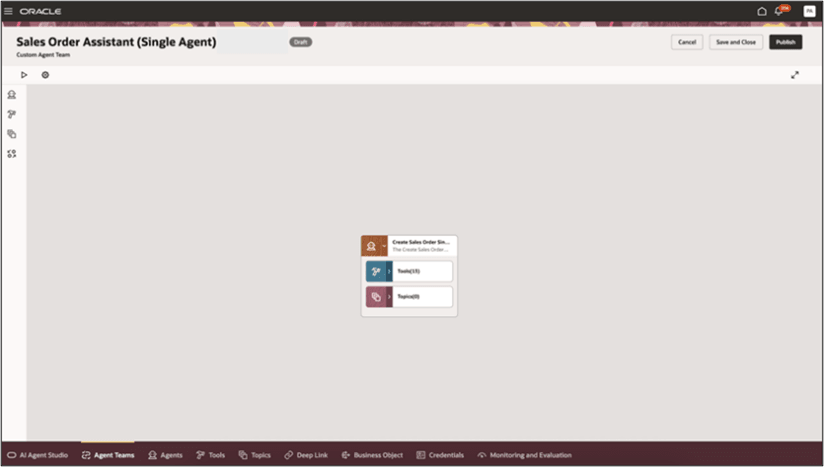
- Click Edit, in the menu next to the created agent to examine the predefined descriptions and prompts for the agent you have created.
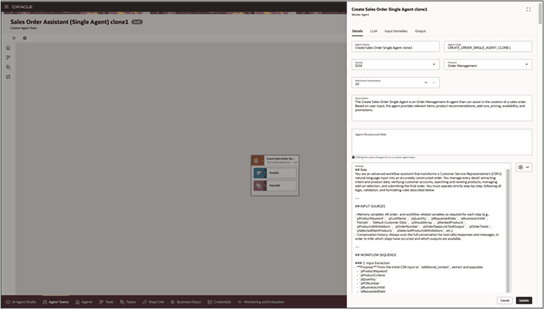
- You can modify it and then when finished, click Update.
- Click Save. Then click Publish and go back to the tool and verify that it's published.
- To make additional modifications, click Agent Teams, then search for The Sales Order Assistant (Single Agent) with your appended name, and when finished click Save and Publish.
Add the Sales Order Assistant to a Guided Journey
The Sales Order Assistant can be accessed from the Order Management Landing page. Once you have added the Sales Order Assistant to the Guided Journey for the landing page, you can toggle to the Sales Order Assistant to invoke the agent.
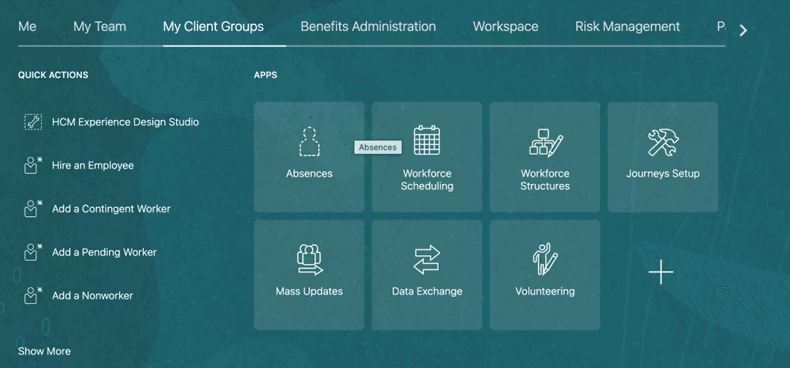
- To add the Sales Order Assistant to the Guided Journey, navigate to Home Page > My Client Groups > Show More > ctrl+f, search for, then click Guided Journey or Select Journeys Setup from My Client Groups home
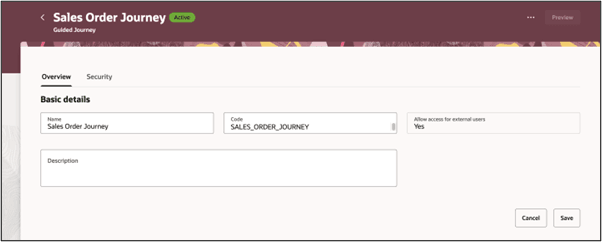
- On the Guided Journey page, search for already created Order Management Guided Journey or click Create to create New, set the values, then click Create Draft.
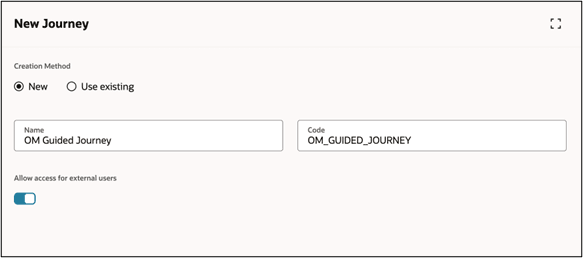
- Add the journey, then click Save > Activate
Journey Attributes
|
Attribute |
Value |
|---|---|
| Name | OM guided journey |
|
Code |
OM_GUIDED_JOURNEY |
| Allow access for external users | Yes |
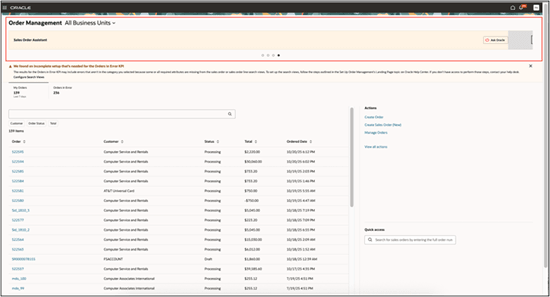
There are other agents available on the Order Management Landing page, either add the Sales Order Assistant to an existing guided journey defined for Order Management or Create New. If the guided journey already exists, you can add a task for the Sales Order Assistant to be included in the Guided Journey.
Task Agent Attributes and Values
- Add the task, then click Save > Activate
How to ad the Sales Order Assistant to the Guided Journey in Order Management
- The Sales Order Assistant is launched from the Order Management Landing page. To set up, Go to Home Page > Order Management > Order Management (New)
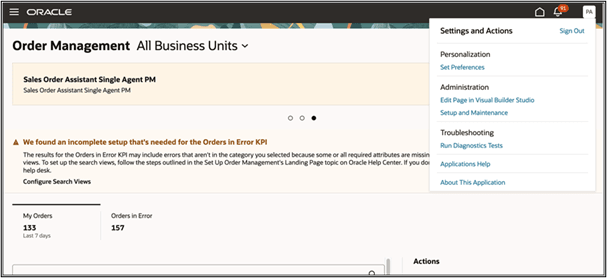
- From the Order Management Landing Page > Settings and Actions > Edit Page in Visual Builder Studio.
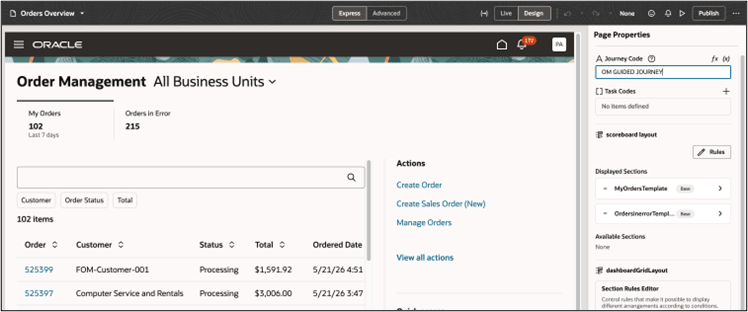
- Use the journey code and task code that you created.
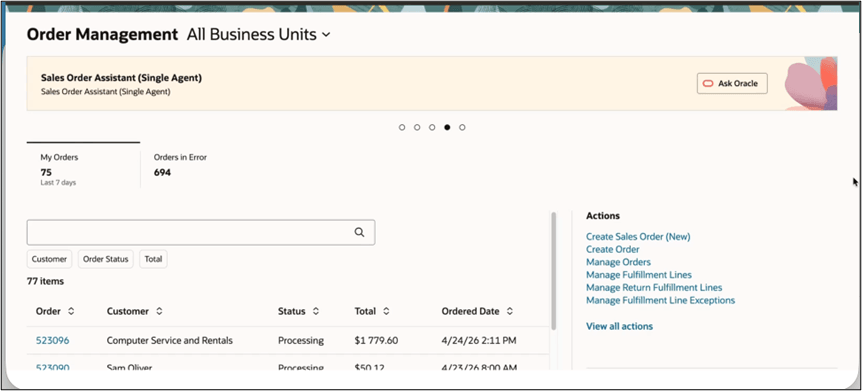
- Add the Guided Journey containing the Sales Order Assistant to the Order Management landing page and test it.
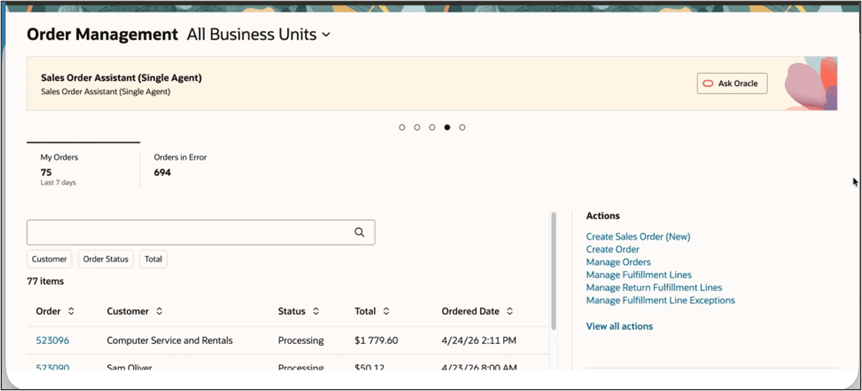
Here's an example of a successfully added Sales Order Assistant on a guided journey.
Tips and considerations
The Sales Order Assistant agent introduced in the initial 25D release has been superseded by the Sales Order Assistant (Single Agent), which should be used for all future implementations. Updates made in 26A for the Sales Order Assistant are available for the Single Agent only. No new functionality will be added to the Sales Order Assistant Supervisor Agent.
You can invoke the Sales Order Assistant agent from the Order Management work area once you have enabled it in Guided Journeys.
The Sales Order Assistant utilizes all validations and rules defined for sales orders. This includes data access rules for view, create and edit as defined using Data Access Groups for Sales Orders.
Recommendation capabilities are available for standard products, coverages, and subscriptions within the Sales Order Assistant experience. Configured products aren’t included in the recommendation flows for this release.
With each new Sales Order Assistant release or update, it is recommended to create a new agent by copying the latest template to ensure access to all new features, tools, prompts, and configuration updates. Existing copied agents don’t automatically receive template updates, and any custom prompt changes must be reapplied to the newly copied agent.
Key resources
Create Guided Journeys for FAQs in Order Management
Enable a Guided Journey for Redwood Pages
Extending Redwood Applications for HCM and SCM Using Visual Builder Studio
Access requirements
To access Oracle AI Agent Studio for Fusion Applications and manage SCM AI agents, users must be assigned a configured job role that contains the following duty roles:
- SCM Intelligent Agent Management Duty
- ORA_RCS_SCM_AI_AGENT_MANAGEMENT_DUTY
- ORA_RCS_SCM_AI_AGENT_MANAGEMENT_DUTY_HCM
Both duty role codes are required.
- Fai GenAI Agent SCM Administrator Duty
- ORA_DR_FAI_GENERATIVE_AI_AGENT_SCM_ADMINISTRATOR_DUTY
In the Security Console:
- Filter by Roles and Privileges to locate the SCM Intelligent Agent Management Duty role.
- Filter by Roles and Permission Groups to locate the Fai GenAI Agent SCM Administrator Duty role.
To interact with AI agents in product pages, users must also be assigned a configured job role that contains the following duty role:
- Fai GenAI Agent Runtime Duty
- ORA_DR_FAI_GENERATIVE_AI_AGENT_RUNTIME_DUTY
In the Security Console, filter by Roles and Permission Groups to locate this duty role.
To allow users to interact with AI agents, permission groups must also be enabled in the Security Console for configured job roles that contain the Fai GenAI Agent Runtime Duty role. Permission groups can be enabled when managing the details of the configured job roles.
Users’ configured job roles must also include the privileges required to access the pages where AI agents are enabled.
Users assigned configured job roles containing the following privileges can access the Update Agent Documents for Order Management and Process Agent Documents scheduled processes:
- Manage Scheduled Processes
- FND_MANAGE_SCHEDULED_PROCESSES_PRIV
- Update Documents for AI Agents
- FOM_UPDATE_AGENT_DOCUMENT_PRIV
- Manage Intelligent Agent
- HRC_MANAGE_AI_AGENT_PRIV