Redwood: Use Transactional Attributes to Meet Specific Customer Requirements
Use transactional attributes to capture user requirements that are specific for each sales order, such as engraving text. These attributes flow to downstream applications to make sure you accurately fulfil them according to your user’s specifications. For example, to manufacturing.
Realize these benefits:
- Enables Flexibility: Allows entry of user-defined values during product configuration, supporting tailored solutions for diverse user needs.
- Reduces Manual Effort: Automatically associates transactional item attributes with each order, streamlining processes and minimizing the need for manual updates.
- Enhances Customer Satisfaction: Empowers users to provide special instructions or modify products, ensuring their specific requirements are met.
Transactional item attributes are now displayed in Redwood configurator runtime for both models and standard items. You can easily set values for these attributes directly on the UI at the model-level.
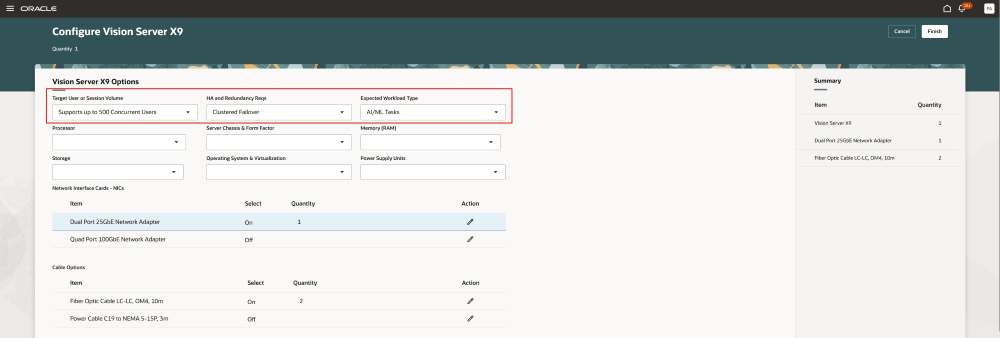
Transactional Item Attributes
You can access the transactional item attributes for standard items via a drawer. When you select a standard item—using checkboxes, options, or a List of Values (LOV)—the Configure Attributes icon appears. Clicking this icon opens the drawer, where you can set or modify the transactional item attribute values. Click Done to save your changes.
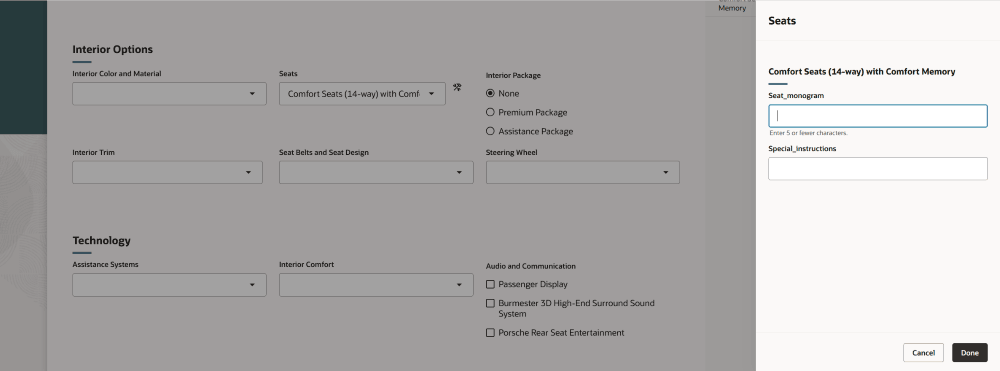
Transactional Item Attributes for Option Items in Drawer
Steps to enable and configure
To use the Redwood: Use Transactional Attributes to Meet Specific Customer Requirements feature, opt in to the Redwood: Manage Configured Items on Sales Orders feature. If you've already opted in to this feature, no further action is required.
Tips and considerations
Transactional item attributes defined using format-only or independent value sets of type number or character are supported. Value sets with decimal precision (greater than zero), and those of type date, date and time, or table, aren’t supported currently.