Define Dynamic Variables for Approver and Reviewer Participants
You can now take advantage of the following enhancements in access control lists for workflows
-
Variable Support: You can now define workflow conditions that grant Approvers and Reviewers View or Manage access.
-
Secure the OTBI Reports created from the Workflow Subject Area: The workflow-related data in Oracle Transactional Business Intelligence (OTBI) reports can now be secured using access control lists.
Variable Support:
Workflows are now accessible to Approvers and Reviewers.
You can now select Approver or Reviewer in the condition builder with $USER supported as a selectable value.
When you set a condition with Approver = $USER and associate it with a permission set and a team, the application grants access to the user if the user is
-
In Approvers list (in Workflow instance), either individually or part of a role, and,
-
In team members list (added as an individual, part of a role, or part of a filtered list).
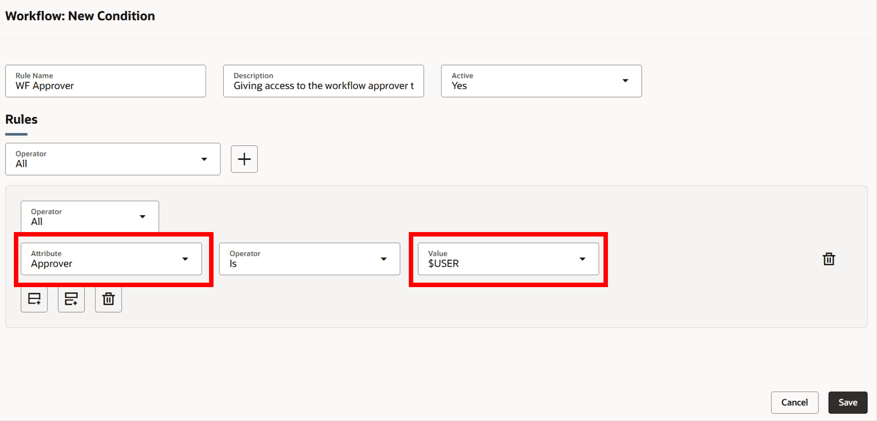
$User Condition for Workflows Applied to the Approver Attribute
After a permission set with the $USER condition is granted to a team, all team members who are Approvers and/or Reviewers on workflow objects are granted the View or Manage permissions, based on the configuration.
Note that these permission sets apply to all workflow objects across all statuses and is applicable regardless of how Approvers and/or Reviewers are added to the workflow object.
This behavior also applies to the workflow objects created in the future.
Secure workflow related OTBI Reports:
You can now access workflow-related data in OTBI reports based on the View or Manage permissions applicable to you. The following workflow subject areas are now secured using access control lists:
-
Product Management - Change Order Approvals Real Time
-
Product Management - Change Order Real Time
The following image is a sample OTBI report giving the details of all the workflows:
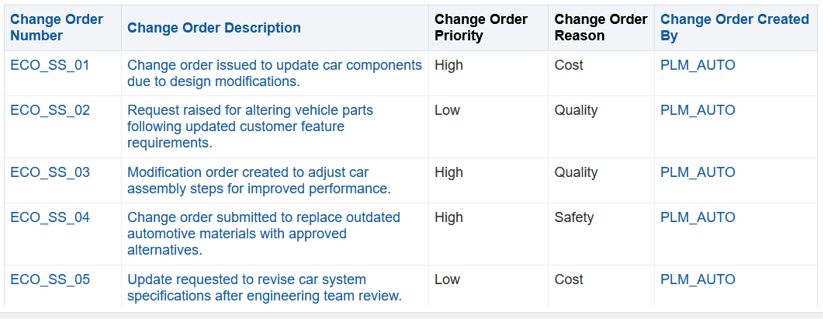
OTBI Report before Workflow Access Control List is Enabled
The following image shows an example of the same report, displaying only workflows with a High priority:
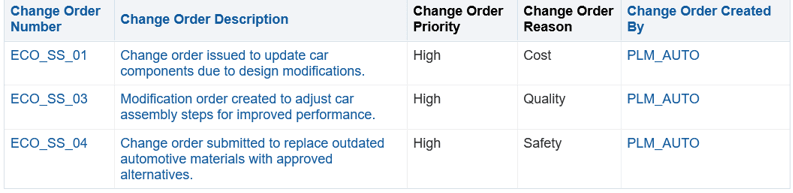
OTBI Report after Workflow Access Control list is Enabled
This enhancement benefits your business in the following ways:
-
Empowers your business with variable support, providing greater flexibility when granting access to Approver or Reviewer participants based on dynamic user context.
-
Reduces the number of rules that need to be created and maintained, making governance configuration smarter and more efficient.
-
Expands security coverage to include OTBI Workflow details that provides more comprehensive governance across your data.
Steps to enable and configure
To use criteria-based access control for workflows, you must enable the profile option Enable Access Control List for Workflows. By default, the profile option is set to No.
On enabling the profile option, the workflow continues to honor the existing security settings till you create a permission and permission set.
Note: After you enable the profile option and define the required workflow permissions, all workflows in the application will become private, regardless of their current public or private settings. You must manually assign user permissions to enable access to the workflows.
Tips and considerations
-
An Approver or Reviewer has access to all workflow statuses unless you include the Status attribute in the conditions to restrict access to a specific status.
-
When a workflow approval is reassigned, only the new approver is granted access.
-
When a workflow approval is delegated, both the original approver and the delegate are granted access.
Key resources
Oracle Fusion Cloud SCM Implementing Product Management guide, available on the Oracle Help Center.
Access requirements
Users who are assigned a configured job role that contains these privileges can access this feature:
To configure conditions for workflows using a filtered list:
-
Use REST Service - Identity Integration (ASE_REST_SERVICE_ACCESS_IDENTITY_INTEGRATION_PRIV)
-
Use Atom Feed - Employees Workspace (PER_ATOM_WORKSPACE_ACCESS_EMPLOYEES_PRIV)
-
Manage HCM Lists (HRC_MANAGE_HCM_LISTS_PRIV)
-
Human Capital Management Application Administrator (ORA_HRC_HUMAN_CAPITAL_MANAGEMENT_APPLICATION_ADMINISTRATOR_JOB)
To configure teams, permission sets, and conditions:
-
Manage Landing Page Layout(EGP_MANAGE_LANDING_PAGE_LAYOUT_PRIV)
-
Access HCM Common Components (HRC_ACCESS_HCM_COMMON_COMPONENT)
-
Manage Search Consumer Applications Rest(EGP_MANAGE_SEARCH_CONS_REST_PRIV)
-
Monitor Product Development (ACA_MONITOR_PRODUCT_DEVELOPMENT_PRIV)
-
Configure Access Control Teams, Permission Sets, and Conditions (EGP_ACCESS_CONTROL_TEAMS_PRIV)
-
Use REST Service - Identity Integration (ASE_REST_SERVICE_ACCESS_IDENTITY_INTEGRATION_PRIV)
-
Use Atom Feed - Employees Workspace (PER_ATOM_WORKSPACE_ACCESS_EMPLOYEES_PRIV)
-
Manage HCM Lists (HRC_MANAGE_HCM_LISTS_PRIV)
-
Manage HCM Rules (HRC_MANAGE_HCM_RULES_PRIV)
-
Run Scheduled Processes (HEY_RUN_SCHEDULED_PROCESSES_PRIV)
-
Manage Scheduled Processes(FND_MANAGE_SCHEDULED_PROCESSES_PRIV)
-
Access Product Management Landing Page (EGP_ACCESS_LANDING_PAGE_PRIV)
-
Manage Scheduled Job Definition(FND_MANAGE_SCHEDULED_JOB_DEFINITION_PRIV)
-
Access Users (EGP_ACCESS_USERS_PRIV)
-
View product management search(EGP_VIEW_PRODUCT_MGT_SEARCH_PRIV)
To view or edit workflows on the workflow pages, or to access notifications, you should have the following privileges:
For change orders:
-
View Change Order (ACA_VIEW_CHANGE_ORDERS_PRIV) or
-
Manage Change Orders (ACA_MANAGE_CHANGE_ORDERS_PRIV)
For change requests:
-
View Change Request (ACA_VIEW_CHANGE_REQUESTS_PRIV) or
-
Manage Change Requests (ACA_MANAGE_CHANGE_REQUESTS_PRIV)
For problem reports:
-
View Problem Report (ACA_VIEW_PROBLEM_REPORTS_PRIV) or
-
Manage Problem Report (ACA_MANAGE_PROBLEM_REPORT_PRIV)
For corrective and preventive actions:
-
View Corrective Action (ACA_VIEW_CORRECTIVE_ACTIONS_PRIV) or
-
Manage Corrective Action (ACA_MANAGE_CORRECTIVE_ACTION_PRIV)
To create workflows from the search pages or when using links in Actions in the Product Management home page:
-
Create Change Order (EGO_CREATE_CHANGE_ORDER_PRIV)
To create a change order from the item, either through a Needs Approval rule or by using the Assign to action:
-
Create Change Order (EGO_CREATE_CHANGE_ORDER_PRIV)
-
Manage Change Orders (ACA_MANAGE_CHANGE_ORDERS_PRIV)
To approve or reject workflows:
-
Approve Item Change Order (EGO_APPROVE_ITEM_CHANGE_ORDER_PRIV)
To move change order lines to a new change order:
-
Create Change Order (EGO_CREATE_CHANGE_ORDER_PRIV)
-
Manage Change Orders (ACA_MANAGE_CHANGE_ORDERS_PRIV)
To move change order lines to an existing change order:
-
Manage Change Orders (ACA_MANAGE_CHANGE_ORDERS_PRIV)
To reschedule change lines, resolve revision conflict and Fill up-down actions on the affected objects :
-
Manage Change Orders (ACA_MANAGE_CHANGE_ORDERS_PRIV)
To publish changes order:
-
View Change Order (ACA_VIEW_CHANGE_ORDERS_PRIV) or
-
Manage Change Orders (ACA_MANAGE_CHANGE_ORDERS_PRIV)
-
Publish Change Order (ACA_PUBLISH_CHANGE_ORDER_PRIV)
To change status, delete, terminate, restart or cancel a workflow:
-
Manage Change Orders (ACA_MANAGE_CHANGE_ORDERS_PRIV)
-
Manage Change Requests (ACA_MANAGE_CHANGE_REQUESTS_PRIV)
-
Manage Problem Report (ACA_MANAGE_PROBLEM_REPORT_PRIV)
-
Manage Corrective Action (ACA_MANAGE_CORRECTIVE_ACTION_PRIV)
To select or be selected as an Assigned To user or Assignee Role on a workflow:
-
Manage Assignee (EGO_MANAGE_ASSIGNED_TO_PRIV)
To view the history tab on the workflow:
-
View Change History (EGO_VIEW_CHANGE_HISTORY_PRIV)
To run the change order details report:
-
Generate Item Change Order Report (EGO_GENERATE_ITEM_CHANGE_ORDER_REPORT_PRIV)
-
Get BIP Report Definitions (EGI_GET_BIP_REPORT_DEFINITIONS_REST)
To send a workflow object:
-
Use REST Service - Users and Roles Lists of Values (PER_REST_SERVICE_ACCESS_USERS_AND_ROLES_LOVS_PRIV)
-
Manage HR Name Format (PER_MANAGE_HR_NAME_FORMAT_PRIV) (optional)
To select users managing participants or changing workflow status:
-
Use REST Service - Users and Roles Lists of Values (PER_REST_SERVICE_ACCESS_USERS_AND_ROLES_LOVS_PRIV)
-
Manage HR Name Format (PER_MANAGE_HR_NAME_FORMAT_PRIV) (optional)
To search for items on Redwood pages:
-
Product Search (ORA_EGI_PRODUCT_SEARCH_DUTY)
These privileges were available prior to this update.
Additionally, you will require the new privilege Access Users (EGP_ACCESS_USERS_PRIV), to select users in:
-
Requested By or Assigned To attributes in the Attributes tab.
-
Task assignee in Workflow and Tasks > Create task or Edit task drawers.
-
Manage Participants or Change Status drawer.
-
Send Object drawer.
To run workflow OTBI reports, you need the following:
-
Product Catalog Transaction Analysis Duty (FBI_PRODUCT_CATALOG_TRANSACTION_ANALYSIS_DUTY)
-
Product Transaction Analysis Duty (FBI_PRODUCT_TRANSACTION_ANALYSIS_DUTY)
-
BI Consumer Role (BIConsumer)