Check In-Check Out and Upload Files Asynchronously
With these improvements, users can check in, check out, cancel check out and upload files asynchronously. If a user checks out an attachment, the application prevents other users from cancelling the check out, ensuring that only the user who has checked out the file can cancel the checkout. All the attachment updates are now captured in the Workflow History Tab. You can view revisions of an attachment and also set any version as active.
Navigate to the new More Actions button from the Attachments tab - Item Revision Attachments to view the following options:
- Check In
- Check Out
- Cancel Check Out
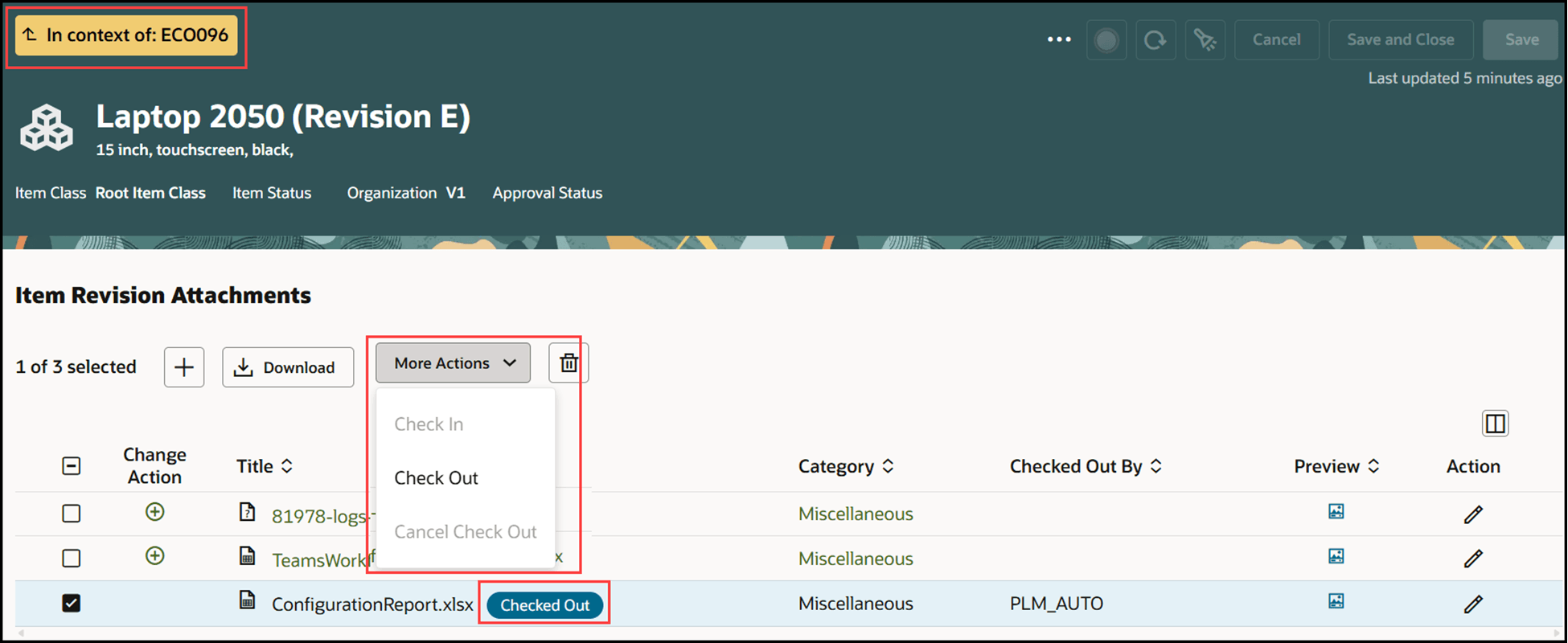
Check Out an Attachment
The Action column on the Workflow History tab indicates actions such as add, remove, modify, check in, check out, and cancel checkout performed on the item attachments.
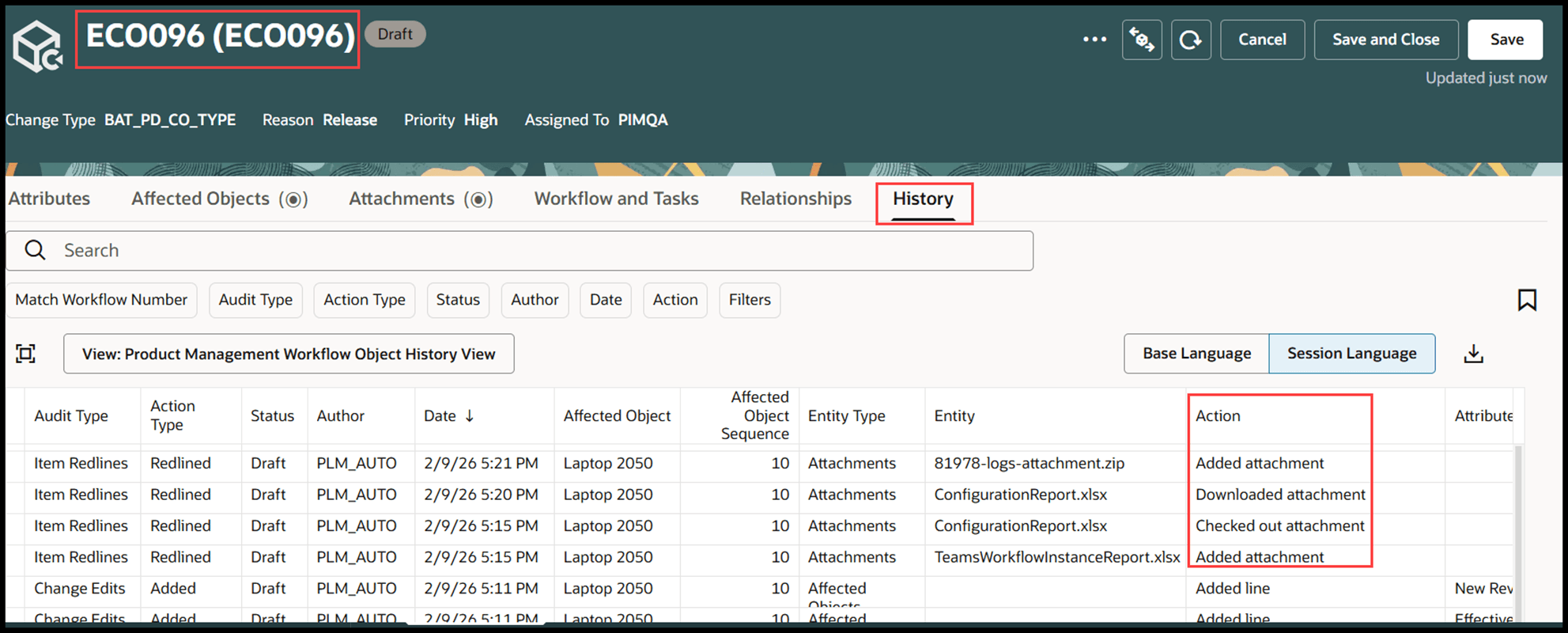
Attachment Audit Entries in Workflow History Tab
You can view the attachment revisions and also set a revision as active.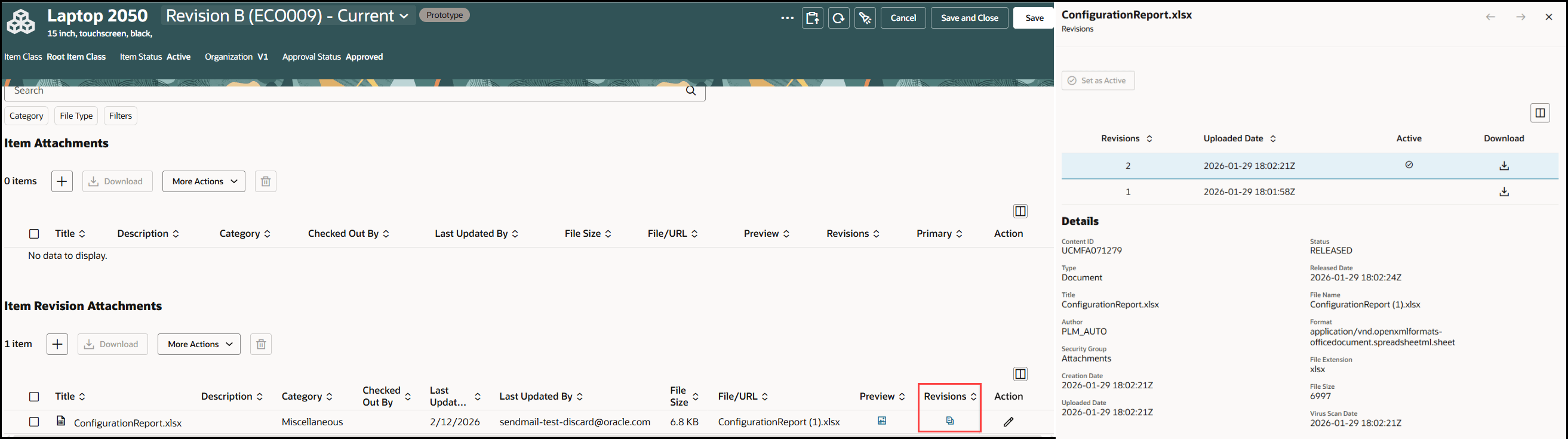
Attachment Revisions
This feature benefits your business by providing the following:
- Data integrity and security - By controlling updates when a file is checked out, you prevent conflicting changes and maintain accurate version history, safeguarding information.
- Efficiency - Asynchronous large-file uploads allow team members to continue working without unnecessary downtime, optimizing productivity during upload of attachments.
- Comprehensive attachment audit history - who accessed, modified, or may have shared any document (for example: design drawings, specifications, certifications) which support regulatory compliance practices.
These features together help streamline collaboration, improve data governance, and boost operational efficiency across the organization.
Steps to enable and configure
You don't need to do anything to enable this feature.
Tips and considerations
- You can leverage business rules to show or hide certain columns in attachments table conditionally.
- Asynchronous operation is supported while uploading the large files, but not during check in and check out.
Key resources
Oracle Fusion Cloud SCM Using Product Development Guide, available on the Oracle Help Center.
Access requirements
Users who are assigned a configured job role that contains these privileges can access this feature:
For item:
- Manage Item (EGP_MANAGE_ITEM_PRIV)
For change orders:
- Manage Change Orders (ACA_MANAGE_CHANGE_ORDERS_PRIV)
For change requests:
- Manage Change Requests (ACA_MANAGE_CHANGE_REQUESTS_PRIV)
For problem reports:
- Manage Problem Report (ACA_MANAGE_PROBLEM_REPORT_PRIV)
For corrective and preventive actions:
- Manage Corrective Action (ACA_MANAGE_CORRECTIVE_ACTION_PRIV)
For manufacturers:
- Manage Manufacturers (EGP_MANAGE_MANUFACTURER_PRIV)