Redwood: Create and Edit Purchase Orders with Supply Chain Financial Orchestration
Create and edit purchase orders with supply chain financial orchestration using a Redwood page. The sold-to legal entity on the purchase order is now automatically derived from an eligible financial orchestration flow.
As a buyer, you can now select the legal entities associated with an active financial orchestration flow when you create a new purchase order or process requisition lines into a new purchase order.
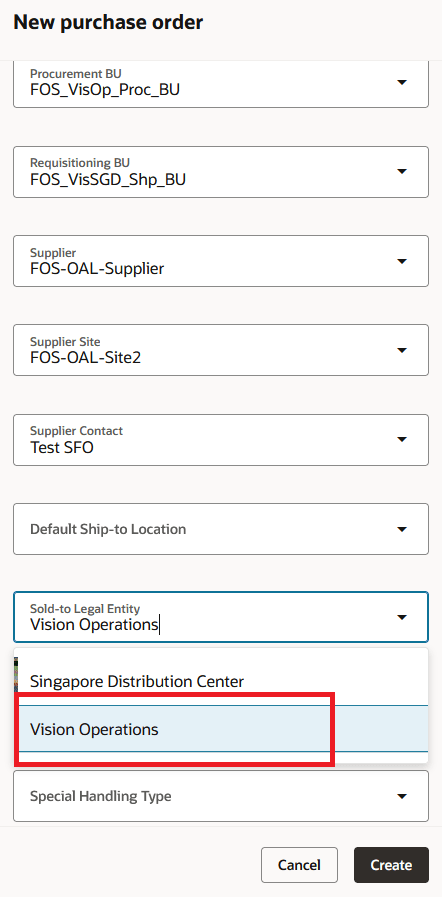
Choose Legal Entity in the New purchase order Drawer
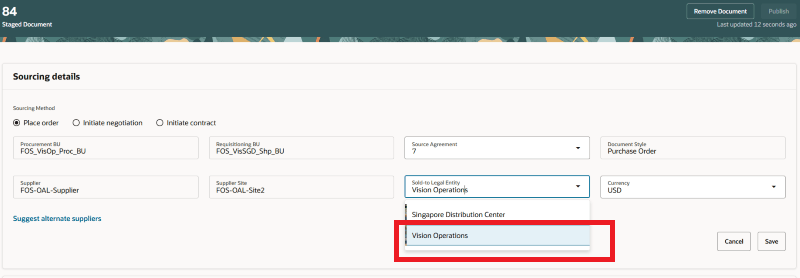
Select Legal Entity When Processing Requisition Line into Purchase Order
To display the Financial Orchestration Flow and Purchasing Trade Organization fields in the Schedules tab while editing a purchase order, use the column management option.
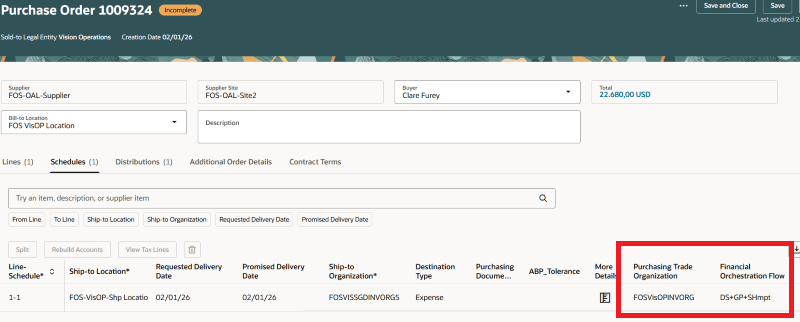
Purchasing Trade Organization and Financial Orchestration Flow Attributes on the Purchase Order Schedule
To display the Destination Charge Account and Destination Variance Account fields in the Distributions tab while editing a purchase order, use the column management option.
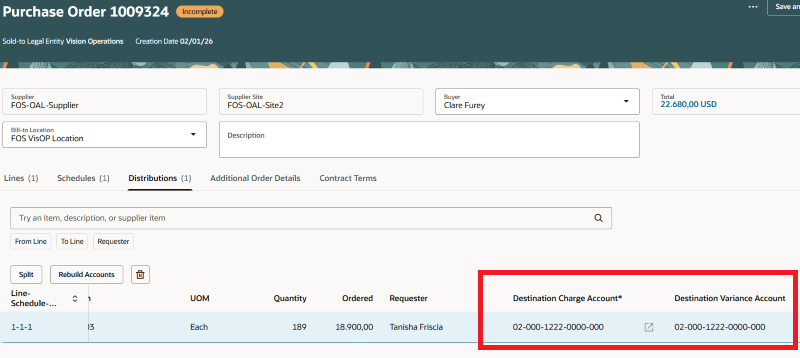
Destination Charge Account and Destination Variance Account Attributes on the Purchase Order Distribution
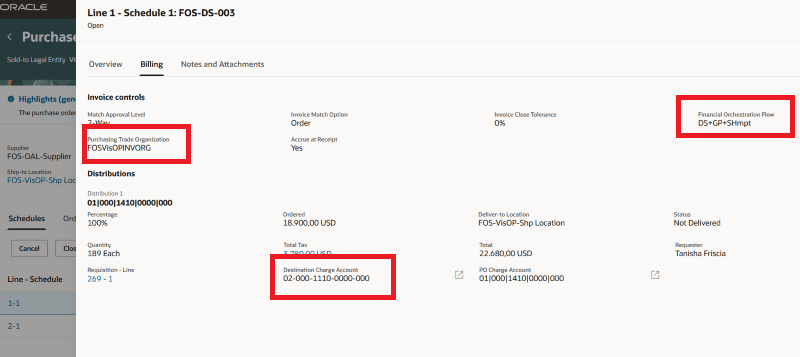
Financial Orchestration Attributes on View Purchase Order
Steps to enable and configure
- To use this feature, you must enable the Supply Chain Financial Orchestration feature in the Procurement offering.
- If you haven't enabled Redwood for Purchasing, see the Getting Started with Redwood in Purchasing topic on the SCM Resource Center in Customer Connect.
Tips and considerations
- The Destination Charge Account and Destination Variance Account attributes are displayed only if the purchase order schedule has a Financial Orchestration Flow.
- You can edit the Destination Charge Account attribute in these conditions:
- The PO schedule has a financial orchestration flow with the destination type set to Expense, but no project has been entered yet.
- The PO schedule has a financial orchestration flow with the destination type set to Expense. A project has been entered and the PJC_ALLOW_ACCOUNT_OVERRIDE profile option allows account to be updated.
- The PO schedule hasn't been accounted.
- Buyers with Override Purchase Order Sold To Legal Entity (PO_OVERRIDE_PO_SOLD_TO_LEGAL_ENTITY_PRIV) privilege can choose the legal entities associated with an active financial orchestration flow when creating a new purchase order or processing requisition lines into a new purchase order.
- Support for extensibility capabilities is available for the Financial Orchestration attributes.
Key resources
For information about using Oracle Visual Builder Studio to extend your Redwood application pages, see Oracle Fusion Cloud HCM and SCM: Extending Redwood Applications for HCM and SCM Using Visual Builder Studio.
Access requirements
No specific privileges are needed to create or update purchase orders with Supply Chain Financial Orchestration.